




ERP Implementation Life Cycle: 8 Practical Phases (2026 Guide)

 Updated on Sep 03, 2026
ERP implementation life cycle 2026 refers to the sequence of phases a company moves through to deploy an ERP system, from the first discovery conversation to post-go-live stabilization. There’s no single standard for how many phases it should have. Some vendors describe five stages, others eleven. This guide uses eight practical phases, a structure that maps cleanly to how ERP-adjacent integration and data work actually gets scoped and staffed.
Most ERP kickoffs start with a clean plan. Few stay that way. Data turns out messier than expected, a quick customization eats three weeks, and finance pushes back on a workflow nobody flagged during discovery. None of that means the project is doomed. It usually means the team never had a shared map of the ERP implementation life cycle before work began.
The 8 Phases of an ERP Implementation Process
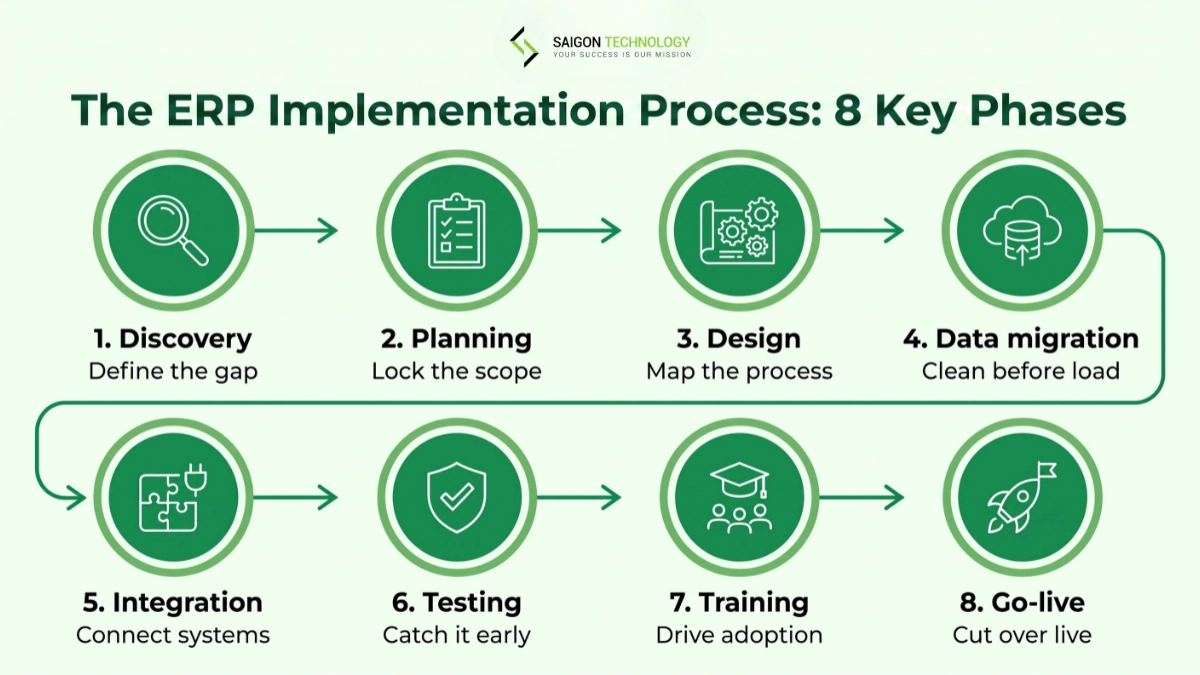
Here’s the short version: a full ERP system implementation usually moves through discovery, planning, design, data migration, integration, testing, training, and go-live, roughly in that order, though phases often overlap in practice.
Phase 1: Discovery and Requirements Analysis
What happens. Your team defines the business case, documents how things work today, and finds the gap between that and where you want to be.
Key activities:
- Stakeholder interviews across finance, operations, sales, and IT
- Gap analysis comparing current processes to target-state workflows
- Requirements definition, separating must-haves from nice-to-haves
Deliverables. A documented business case, a requirements matrix, and a gap analysis report.
Typical duration. 2 to 6 weeks, depending on how many departments and systems are in scope.
Common pitfall. Running discovery as a few informal chats instead of a structured process. Thin requirements tend to come back later as change orders, at a point where they cost far more to fix.
Phase 2: Planning and Implementation Plan
What happens. Discovery findings turn into a formal implementation plan: scope, budget, timeline, and who’s actually doing the work.
Key activities:
- Building the project management plan, including milestones and a contingency reserve
- Assembling the project team and confirming executive sponsorship
- Resource planning across internal staff, your implementation partner, and any outside consultants
Deliverables. An approved implementation plan, project charter, and risk register.
Typical duration. 2 to 4 weeks.
Common pitfall. Assuming internal staff can absorb the project on top of their day jobs. If your team can only give it 10% of their time, say so in the plan instead of assuming availability that won’t show up.
Phase 3: Design and Configuration
What happens. Your target business processes get mapped into the ERP system’s structure. The team decides what to configure natively and what to customize.
Key activities:
- Process mapping against ERP modules (finance, inventory, procurement, HR)
- Deciding what stays as native configuration and what gets customized
- Building a prototype or sandbox environment for stakeholder review
Deliverables. A configuration design document and a validated prototype environment.
Typical duration. 3 to 8 weeks.
Common pitfall. Defaulting to customization instead of adapting a process to fit the platform’s native features. Every custom build adds cost, stretches the timeline, and makes future upgrades harder. Push back on a “we’ve always done it this way” request before building around it.
Phase 4: Data Migration
What happens. Legacy data gets extracted, cleaned, mapped, and loaded into the new ERP system. This step overlaps heavily with data migration work engineering teams handle on legacy modernization projects.
Key activities:
- Cleaning up legacy data before migration, not after
- Building the data mapping logic between old and new field structures
- Extracting, transforming, and loading core data sets: item master files, customer master files, bills of materials, and transactional data
- Validating the migrated data, including at least one parallel run to compare outputs
Deliverables. A clean, validated data set loaded into the target environment, with a documented data mapping specification.
Typical duration. 4 to 10 weeks, often running alongside design.
Common pitfall. Treating data migration as purely technical work. Data quality problems tend to surface late, during testing, the most expensive point to find them.
Phase 5: Integration and Customization
What happens. The ERP gets connected to the other systems your business runs on: CRM, e-commerce, warehouse management, or BI tools. This is where software integration work usually sits, and it’s often the most engineering-heavy phase of the whole rollout.
Key activities:
- API integration with existing business applications
- Building any custom modules approved in the design phase
- Weighing the value of each connection point against the complexity it adds
Deliverables. Working integrations validated in a staging environment.
Typical duration. 3 to 6 weeks, depending on how many systems are involved.
Common pitfall. Trying to integrate everything at once. Prioritize by business impact, not technical convenience, to keep this phase from sprawling.
Phase 6: Testing and Validation
What happens. Everything that’s been configured, migrated, and integrated gets tested before it touches production.
Key activities:
- Unit and integration testing across configurations and connected systems
- User acceptance testing (UAT) with real business scenarios and the people who’ll actually use the system
- Performance, stress, and security testing informed by standard frameworks like OWASP’s Web Security Testing Guide
Deliverables. A signed-off testing plan with documented test cases, defect logs, and UAT sign-off from business stakeholders.
Typical duration. 3 to 8 weeks.
Common pitfall. Compressing testing to hit a go-live date. Cutting UAT short is a fast way to push problems into production, where end users find them instead of your QA team.
Phase 7: Training and Change Management
What happens. End users learn the new system. The organization actively manages the shift away from old habits and workarounds.
Key activities:
- Role-based end-user training tailored to each department’s real workflows
- Building internal trainers and subject matter experts who can support colleagues after go-live
- Clear, repeated communication from leadership about why the change is happening
Deliverables. Trained end users, training materials, and a change management communication plan.
Typical duration. Usually runs alongside testing, around 3 to 6 weeks of focused effort.
Common pitfall. Treating training as one event near go-live instead of an ongoing effort. Research on ERP adoption, including Panorama Consulting’s annual ERP Report, has repeatedly linked weak change management to poor adoption after launch. Visible sponsorship from leadership tends to matter more than the training format itself.
Phase 8: Go-Live and Deployment
What happens. The organization cuts over from the legacy system to the new ERP in production.
Key activities:
- Choosing a rollout strategy: big-bang, phased, or hybrid
- Final transactional data conversion and baseline data validation
- Go-live support with a team on call, plus close system monitoring in the first days after launch
Deliverables. A live production ERP system with a hyper-care support plan in place.
Typical duration. The go-live event itself usually takes 1 to 3 days. Hyper-care support commonly runs another 2 to 4 weeks after.
Common pitfall. A big-bang cutover without a tested rollback plan. For complex, high-transaction-volume operations, running parallel systems for a short window can meaningfully cut risk, even though it adds short-term overhead.
ERP Implementation vs ERP Software Development
It helps to be precise about terms. ERP implementation and ERP software development are related, but not the same. Implementation means deploying and configuring an existing platform, like NetSuite, SAP, Oracle, or Microsoft Dynamics. The other side of the work means building custom modules or fully custom systems around or in place of an off-the-shelf platform.
Most projects use both: an implementation partner runs the core rollout, and an engineering team handles the custom work layered on top.
Post-Implementation: Support, Optimization, and Continuous Improvement
The ERP implementation life cycle doesn’t really end at go-live. The weeks right after launch, often called hyper-care, involve fixing glitches, gathering user feedback, and watching for surprises like licensing costs that weren’t in the original estimate.
After hyper-care, support shifts to system audits, security updates, and scalability planning as the business grows. Many teams hand this phase to an ongoing software maintenance and support partner rather than keeping the full project team on staff. Track KPIs tied to your original business case, not just system uptime, so you can tell whether the ERP is delivering what it was built for.
ERP Implementation Methodology: Waterfall, Agile, or Hybrid
Short answer: many cloud ERP projects today lean toward a hybrid approach, but the right ERP implementation methodology depends on how stable your requirements are and how regulated your industry is.
Methodology comparison
| Methodology | Best for | Typical duration | Risk profile | Cost pattern |
| Waterfall | Regulated industries with fixed, well-understood requirements | Longer, sequential phases | Lower mid-project risk, higher risk if requirements shift late | Predictable, front-loaded |
| Agile / Iterative | Organizations expecting requirements to evolve, cloud-native ERP | Shorter cycles, continuous delivery | More flexible, needs strong project governance to avoid scope drift | Spread across sprints, harder to fix a total upfront |
| Hybrid (Waterfall + Agile) | Many mid-market and enterprise ERP projects | Balanced: phase gates with iterative build inside each phase | Moderate, blends predictability with flexibility | Moderate, with contingency built in |
| Rapid / Accelerated | Small to mid-sized businesses on pre-configured industry templates | Compressed, weeks rather than months | Higher risk if business processes don’t fit the template well | Lower upfront, less room for customization |
In our experience with ERP-adjacent integration and data work, a hybrid model tends to work best. Phase gates keep governance tight, and Agile sprints keep the build flexible as testing surfaces new information.
AI and ERP Implementation: What It Actually Helps With
AI doesn’t replace the judgment calls in an ERP implementation process. It speeds up a few of the slower ones.
During discovery, AI-assisted tools can process existing documentation faster than manual interviews alone, helping surface gaps earlier. Data migration benefits too: AI-driven checks can flag anomalies in legacy data before they reach production, cutting rework that often shows up during UAT. Testing gets a boost as well, since AI-generated test cases can extend coverage into edge cases manual planning sometimes misses. None of this replaces the need for a human to decide what to configure, customize, or sequence, it just narrows what a project team has to catch by hand.
For a broader look at how AI fits into engineering workflows beyond ERP, see our guide to AI-Augmented Software Development: A Practical Guide for Engineering Leaders (2026).
Who’s on an ERP Implementation Team?
A clear team structure is an overlooked factor in a smooth ERP implementation life cycle.
ERP implementation team roles
| Role | Responsibility | Typical involvement |
| Executive Sponsor | Provides backing from leadership, resolves cross-department conflicts, protects budget | Part-time, high influence |
| Project Manager | Owns the project management plan, timeline, and risk register | Full-time |
| Business Analyst | Leads requirements definition and process mapping | Full-time during discovery and design |
| ERP Consultant / Implementation Partner | Brings platform expertise and configuration guidance | Full-time or as-needed |
| Technical Lead | Owns integrations, custom development, and technical architecture | Full-time |
| Data Migration Lead | Owns data cleanup, mapping, and validation | Full-time during migration |
| Change Manager | Drives communication, training, and user adoption | Full-time from design through go-live |
| Subject Matter Experts | Validate configuration against real department workflows | Part-time, department-specific |
| QA Lead | Owns the testing plan and UAT coordination | Full-time during testing |
How Long Does an ERP Rollout Take?
Most ERP system implementation timelines depend on company size and scope, not on the ERP brand you pick.
ERP rollout timelines by company profile
| Company profile | Simple / template ERP | Standard ERP implementation | Complex / multi-entity ERP |
| Small business | 3–6 months | 4–9 months | 9–12+ months |
| Mid-market | 3–6 months | 6–12 months | 12–18 months |
| Large enterprise | 6–9 months | 12–18 months | 18–24+ months |
| Multinational | 9–12 months | 12–24 months | 18–36+ months |
These ranges are directional, not fixed. Cloud and SaaS deployments generally move faster than on-premises ERP implementation, since there’s less infrastructure setup involved, though the underlying ERP implementation phases stay largely the same.
How Much Does ERP Implementation Cost?
There’s no fixed number here. Cost depends on data complexity, integration scope, and how much customization you take on. The table below gives a directional sense of where budget typically goes.
Where ERP implementation budget typically goes
| Cost area | Main cost drivers | Estimated share of total ERP cost |
| Discovery & Planning | Requirements analysis, process mapping, workshops, project planning | 5–10% |
| Design & Configuration | ERP modules, workflow configuration, business rules, prototypes | 15–20% |
| Data Migration | Data extraction, cleansing, mapping, transformation, validation | 10–15% |
| Integration & Customization | APIs, third-party integrations, custom modules and extensions | 15–25% |
| Testing & Quality Assurance | Test planning, test execution, UAT, automation, performance testing | 10–15% |
| Training & Change Management | Training materials, workshops, user support, change management | 5–10% |
| Software Licensing & Infrastructure | User licenses, ERP modules, environments, hosting or infrastructure | 10–20% |
| Go-Live & Initial Support | Cutover, deployment, hyper-care, troubleshooting | 5–10% |
| Ongoing Support & Enhancements | Maintenance, upgrades, security updates, feature enhancements | Ongoing; typically budgeted separately |
Note: these percentages are indicative planning ranges based on general project patterns, not fixed industry benchmarks. They shouldn’t be added together to produce a single total. Actual allocation varies by project scope, industry, and platform.
Implementation partner rates are one of the biggest swing factors in total cost. Saigon Technology’s engagement rates run $22 to $46 per hour, with transparent pricing across five flexible engagement models. A common budget surprise is licensing: per-user and per-module pricing tiers can shift as your user count grows, so confirm those terms in the contract before you sign, not after.
Common Risks in ERP Implementation and How to Reduce Them
ERP implementation risks and mitigations
| Risk | How to reduce it |
| Weak change management | Adoption suffers when communication and training feel like an afterthought. Sponsorship and early employee involvement matter more than the training format itself. |
| Poor data quality | Legacy data problems surface late and get expensive fast. A dedicated cleanup phase with multiple validation passes catches this earlier. |
| Scope creep through customization | Every custom request adds cost and time. Tie change requests back to the original business case. |
| Underestimating internal staffing needs | Teams often can’t give a project the time it needs on top of regular work. Build realistic availability into the plan upfront. |
| Licensing cost surprises | Confirm full licensing terms, including future user growth, before you sign. |
| Rushed testing | Compressing UAT to protect a go-live date usually just moves problems into production, where they’re harder to fix. |
Choosing an ERP Implementation Partner
Look for a partner whose experience matches your platform, industry, and scope, not just a general ERP experience claim on their site. A few things worth checking:
- Technical capability across the specific ERP platform and integration patterns you need
- Industry experience, especially in logistics, manufacturing, or a regulated sector
- Methodology fit and engagement model flexibility, from staff augmentation to a dedicated team
- Security and compliance posture relevant to your industry, backed by verifiable references
Many organizations bring in an implementation partner for the overall rollout and a separate engineering partner for the technical build: integrations, custom modules, and data migration pipelines. That’s the piece Saigon Technology plays in ERP programs. We’re not typically the systems integrator running the end-to-end implementation. We bring senior engineering capacity to the integration and data migration work inside it, backed by 14+ years, 850+ projects, Microsoft Gold Partner status, and ISO 27001-certified security practices.
FAQs
Which ERP implementation phase most often causes delays?
Data migration and testing are where timelines slip most often. Legacy data problems surface late, usually during UAT, and fixing them at that point is far more expensive than catching them during a dedicated cleanup phase. Compressing testing to protect a go-live date tends to move the problem into production rather than remove it.
What are the main causes of ERP implementation failure?
There is no single cause of ERP implementation failure. Common risks include weak change management, poor data quality, unclear requirements, scope creep, inadequate testing, and insufficient internal resources.
How many phases are in the ERP implementation life cycle?
There is no universal number of ERP implementation phases. This guide uses 8 practical phases, while other frameworks may use fewer or more. The core activities typically include planning, design, data migration, testing, training, and deployment.
How long does an ERP implementation typically take?
An ERP implementation can take anywhere from a few months to 36 months or longer. Small, well-scoped projects may take 3 to 6 months, while complex multi-entity or multinational implementations can take 18 to 36+ months, depending on scope, integrations, data complexity, and rollout strategy.
Is Agile suitable for ERP implementation?
Yes, Agile can be suitable for ERP implementation, particularly when requirements may evolve. A hybrid approach can combine Agile’s iterative delivery with structured project governance, while Waterfall may be appropriate when requirements are stable and regulatory controls are strict.
What role does AI play in ERP implementation today?
AI can accelerate ERP implementation activities such as requirements analysis, data validation, test-case generation, and documentation. It can reduce repetitive work and help identify issues earlier, but human oversight remains essential for configuration, data, security, and deployment decisions.
Conclusion
An ERP rollout succeeds or struggles based on how well the process is run, not just which platform you pick. Discovery sets the foundation. Data migration and testing are usually where timelines slip. Change management tends to decide whether the system gets used once it’s live. Treat each of the ERP implementation phases as its own mini-project with clear ownership, and resist the urge to compress testing or training just to hit a date.
If you’re mid-rollout and need engineering support for integration work, custom modules, or data migration pipelines, that’s where our team typically plugs in. See how we approach the broader ERP software development side of this work in our ERP software development guide, or reach out to talk through your specific scope.


Related articles

Top 10 Best Software Testing Tools for Your Enterprise in 2026
 Thanh (Bruce) Pham - CEO of Saigon Technology
  13 Jun 2024
Custom Software vs Off-the-Shelf Solutions: A Side-by-Side Evaluation Framework
26 Mar 2026 
ERP Software Development: A 2026 Guide for Decision-Makers
19 May 2026 
Staff Augmentation vs Outsourcing: A CTO’s Decision Framework
09 Jun 2026 
AI-Augmented Software Development: A Practical Guide for Engineering Leaders (2026)
08 Jul 2026 
Outcome-Based Pricing: How It Works and What It Takes to Bill It
07 Aug 2026 
AI Readiness Assessment: Scoring Whether You Can Actually Build
20 Aug 2026