




ERP Software Development: A 2026 Guide for Decision-Makers

 Updated on Sep 23, 2026
If your finance team still reconciles month-end across five spreadsheets, if your warehouse can’t tell sales what’s in stock, or if compliance audits eat a full quarter of your operations time, you are not alone, and the fix usually starts with ERP software development.
The global ERP market is on track to top $65 billion by 2029 at a 4.26% CAGR (Statista), and most of that growth is moving toward custom and platform-based builds rather than rigid out-of-the-box products. The reason is simple: every company’s workflow is a little different, and the cost of forcing your business into a generic system is usually higher than the cost of building one that fits. By one industry benchmark, roughly two-thirds of ERP implementations miss their original budget or timeline (Panorama Consulting) – usually for the same handful of reasons we cover below.
This guide explains how ERP software development actually works in 2026 – the process, the tech stack, what it costs, the pitfalls that derail projects, and how to choose an ERP software development company you can trust with an 18-month engagement.
By Thanh Pham, CEO of Saigon Technology. Our team has delivered hundreds of enterprise projects, including ERP and ERP-adjacent platforms for healthcare, fintech, and logistics clients across the US, EU, and APAC. ISO 9001 and ISO 27001 certified.
What is ERP software development?
ERP software development is the practice of designing, building, and deploying enterprise resource planning systems that match a specific company’s workflows, data model, and compliance requirements – rather than forcing the company to fit a generic product.
A modern ERP is a centralized database that unifies what used to live in separate tools: financial management, customer relationship management, supply chain management, human resources management, manufacturing, inventory, and business intelligence. When those modules share one source of truth, leadership stops arguing about which number is right and starts deciding what to do about it.
It helps to be clear about what ERP is not:
- It is not a CRM. CRM is one module inside an ERP.
- It is not accounting software. Accounting is one module inside an ERP.
- It is not a data warehouse. ERPs run the business; warehouses analyze the business.
Three buyer profiles typically invest in custom or customized ERP software development:
- Mid-market companies (200-2,000 employees) outgrowing QuickBooks, Xero, or Zoho.
- Regulated enterprises in healthcare, finance, or pharma – where compliance shapes the data model.
- Operationally unique businesses where the workflow itself is the competitive advantage and no off-the-shelf product fits.
A fair trade-off to acknowledge up front: custom takes longer than buying. But long-term recurring software license fees for an enterprise SaaS ERP can outpace a one-time build inside three to five years.
Types of ERP systems (and which one fits your business)
ERP systems fall into four practical categories: on-premise, cloud-based, hybrid, and industry-specific, and each carries different cost, control, and compliance trade-offs.
Deployment models
- On-premise ERP solutions run on your own servers. You own the hardware, the data, and the maintenance burden. Best when data residency or air-gapped security is a hard requirement.
- Cloud-based ERP systems run on AWS, Azure, or GCP. Lower upfront capex, faster updates, easier to scale. Best for distributed teams and predictable opex.
- Hybrid ERP models keep sensitive workloads on-premise (e.g., patient records, payments) while pushing analytics, reporting, and self-service tools to the cloud. Best for regulated industries that need both.
Generic vs industry-specific
Some ERPs are built for everyone (SAP S/4HANA, Microsoft Dynamics 365, Oracle NetSuite, Odoo – the four that consistently appear as Leaders in Gartner’s Magic Quadrant for Cloud ERP). Others are built around sector-specific processes, for example, ERPs that ship with FDA compliance for pharma or HL7 routing for healthcare. If your industry has hard regulatory requirements, an industry-specific base is usually faster to adopt.
Architecture: monolithic vs modular
- Monolithic ERP ships as one codebase. Simpler at a small scale, harder to evolve at a large scale.
- Modular architecture/microservices ERP breaks the system into independent services. This modular system design is what most modern builds use because it makes integration, scaling, and module replacement cheaper to evolve.
Build models – the real-world choice
|
Approach |
Cost |
Time to launch |
Flexibility |
Best for |
|
Custom ERP systems (built from scratch) |
High |
12-24 months |
Total |
Unique workflows, multi-entity orgs |
|
Ready-made ERP systems (configure only) |
Low-medium |
3-6 months |
Limited |
Standard businesses, tight launch |
|
Platform-based (extend Odoo, Dynamics, NetSuite, SAP with custom modules) |
Medium |
6-12 months |
High |
The pragmatic middle ground for ~80% of mid-market |
In our own engagements, platform-based wins about 60% of the time. We extend an Odoo or a Dynamics 365 rather than building everything from zero – clients get vendor security and updates for the foundation, and we focus engineering hours where their workflow is genuinely different.
Core ERP modules and the 2026 must-haves
A modern ERP typically includes finance, HR, supply chain, manufacturing, CRM, inventory, procurement, and business intelligence modules, and in 2026, embedded AI, mobile-first access, and open APIs are no longer optional.
The standard module set
- Financial management – general ledger, AP/AR, payroll, tax, multi-currency consolidation
- Customer relationship management – pipeline, contacts, campaigns, service tickets
- Supply chain management and extended supply chain management – purchasing, logistics, multi-tier supplier visibility
- Inventory management – real-time stock, reorder points, multi-warehouse
- Procurement – requisitions, purchase orders, supplier scoring
- Human resources management – onboarding, performance, time, and attendance
- Manufacturing and production planning – MRP, capacity, shop-floor control
- Product lifecycle management – BOMs, engineering change orders
- Supplier relationship management – contract terms, performance, risk scoring
- Project management – budgets, tasks, time, billing
- Sales and marketing integrations – connectors to HubSpot, Salesforce, marketplaces
- Reporting and analytics – dashboards, scheduled reports, ad-hoc queries
2026 must-haves that competitors often miss
The competitive line in 2026 isn’t whether you have these modules – it’s whether you have these capabilities baked into them:
- Embedded AI/ML for demand forecasting, anomaly detection, and auto-categorization
- Customizable analytics and reporting tools with real-time analytics dashboards (not stale month-old extracts)
- Low-code workflow builders so business teams can change rules without queueing IT tickets
- Open APIs and webhooks (REST + GraphQL) plus solid integration capabilities for your ecosystem
- Mobile functionality as a core experience, not a stripped-down companion app, with offline sync for field crews
- Integrated ecommerce module for retail, wholesale, and B2B portals
- Built-in observability and audit trails so compliance isn’t a separate spreadsheet
The ERP software development process, step by step
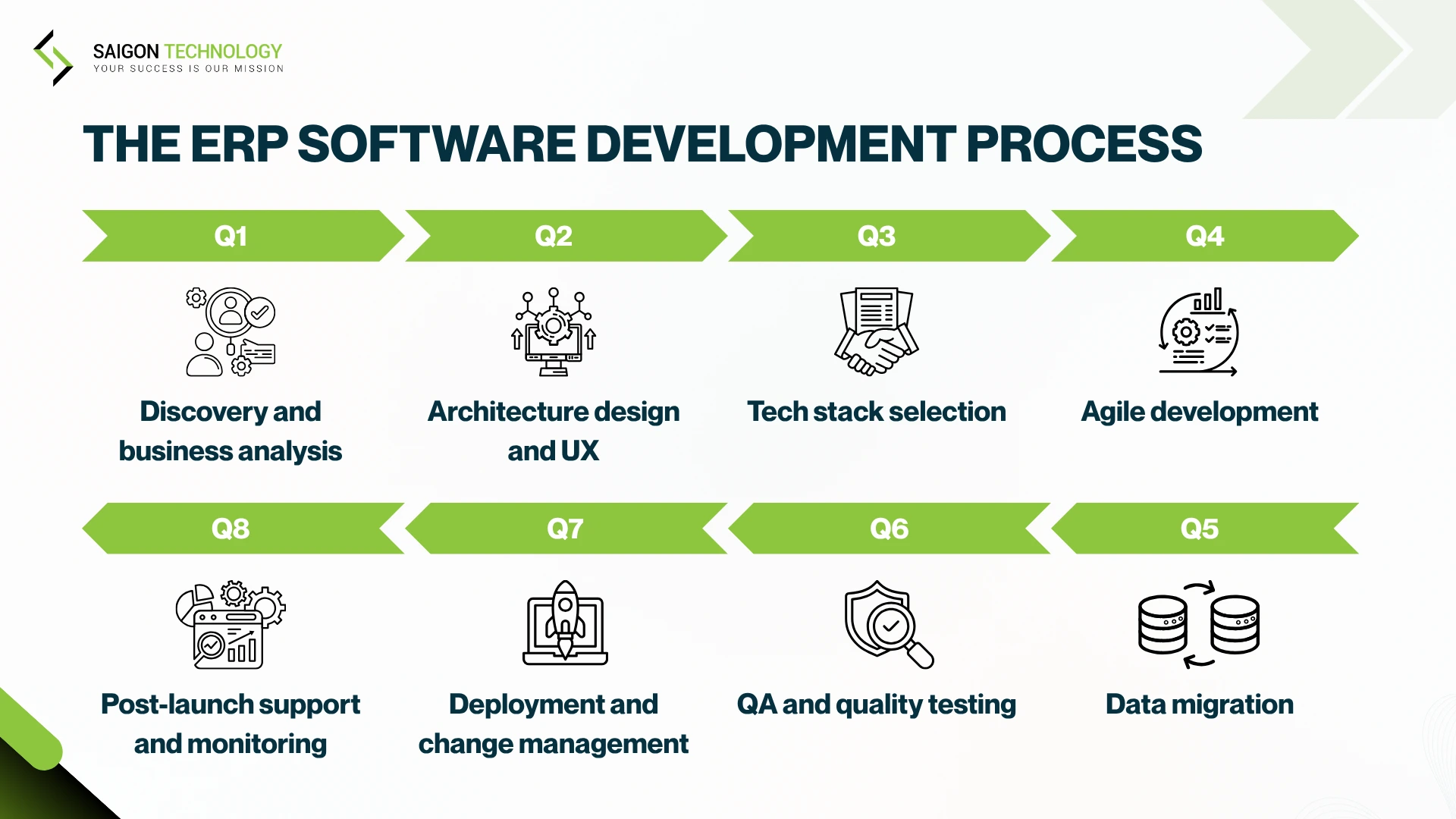
A typical custom ERP build moves through eight phases – discovery, design, tech selection, agile build, data migration, QA, deployment, and post-launch support, over a realistic timeline of six to eighteen months.
1. Discovery and business analysis
Stakeholder workshops, process mapping, and a clear ROI hypothesis. The deliverable is a requirements specification document that names every must-have, every nice-to-have, and the integration points where ERP touches existing tools. Spending four weeks here often saves six months later.
2. Architecture design and UX
Data model, architecture design, role-based interfaces, wireframing, and clickable prototyping. UX is high-leverage in ERP – users live in this software eight hours a day, and a clunky user interface is what makes “we have an ERP” feel like a punishment.
3. Tech stack selection
We cover the modern stack in detail in the next section. The short version: typed backend, modern frontend, cloud-native, API-first.
4. Agile development
Two-week sprints, demo-driven feedback, CI/CD from day one. Programming languages and frameworks are chosen once and held steady, switching mid-build is a budget-killer.
5. Data migration
This is where most projects underestimate complexity. A real data migration plan includes:
- Data mapping from legacy fields to ERP fields
- ETL/ELT pipelines that extract, transform, and load in repeatable runs
- Data validation rules (no two customers with the same tax ID, every PO has a valid supplier)
- Data synchronization for parallel-run periods
- A guardrail for data integrity and data consistency across the cutover
Assume your legacy data is dirtier than anyone admits, and build validation into every migration run.
6. QA and quality testing
Real quality testing is more than functional checks. It’s a stack:
- Functional testing – features behave per spec
- Integration testing – modules and third-party systems talk correctly
- Performance testing – system holds at peak load
- Security testing, including penetration tests and web application firewall validation
- Usability testing with real end-users
- Compatibility testing across browsers, devices, OS versions
- Compliance testing against HIPAA, PCI-DSS, GDPR, or SOC 2 as relevant
- Regression testing every sprint to catch breakage early
7. Deployment and change management
Use phased deployment – never big-bang. A pilot deployment to one department, then a wider wave, then full rollout. Pair the rollout with a change management strategy (more on this below).
8. Post-launch support and performance monitoring
The first 90 days reveal real workflow gaps. Post-launch support plus continuous performance monitoring lets you tune before small frictions become structural problems.
From the field: On a recent healthcare project for a US client, we spent four weeks on discovery before writing code. That decision is what let us cut development time by 40% and run a system handling 6M+ medical records in production. Skipping discovery to “save time” is the most expensive shortcut in this category.
A modern tech stack for ERP development in 2026
A modern ERP software development tech stack centers on typed backend languages (.NET, Java, Python), a React or Angular frontend, PostgreSQL or MSSQL databases, REST and GraphQL APIs, Kafka or RabbitMQ event streaming, and a cloud-native foundation on AWS, Azure, or GCP.
1. Backend
.NET Core / ASP.NET, Java/Spring Boot, Node.js, Python (FastAPI or Django). Typed languages win for ERP because data integrity matters more than rapid prototyping. Heavy event-driven workloads often add Apache Kafka or RabbitMQ for message buses.
2. Frontend
React (with Next.js), Angular, or Vue. React dominates new builds; Angular still leads inside Microsoft-stack enterprises.
3. Mobile
React Native or Flutter for ERP companion apps with offline-first sync.
4. Database
PostgreSQL (default modern choice), MSSQL for Microsoft-stack shops, MongoDB for document-heavy modules, Oracle when migrating from existing Oracle environments.
5. Integration layer
- Standardized APIs (REST + GraphQL) for synchronous calls
- gRPC for high-throughput service-to-service communication
- Middleware and iPaaS (e.g., MuleSoft, Boomi) for complex enterprise landscapes
- ETL/ELT for batch data movement
- Data exchange protocols like EDI for B2B partners
- Event streaming via Kafka or RabbitMQ for data synchronization across modules
6. Cloud and DevOps
AWS, Azure, or GCP, with Kubernetes for orchestration, Terraform for infrastructure-as-code, and GitHub Actions or Azure DevOps for CI/CD.
7. Security
OAuth 2.1, JWT, SSO via SAML/OpenID, AES-256 encryption, RBAC, MFA, HashiCorp Vault for secrets. All of these are now baseline expectations in regulated industries.
8. AI/ML layer
TensorFlow, PyTorch, vector databases for semantic search, OCR pipelines for document ingestion – increasingly embedded inside ERP modules rather than running as separate tools.
What ERP software development actually costs
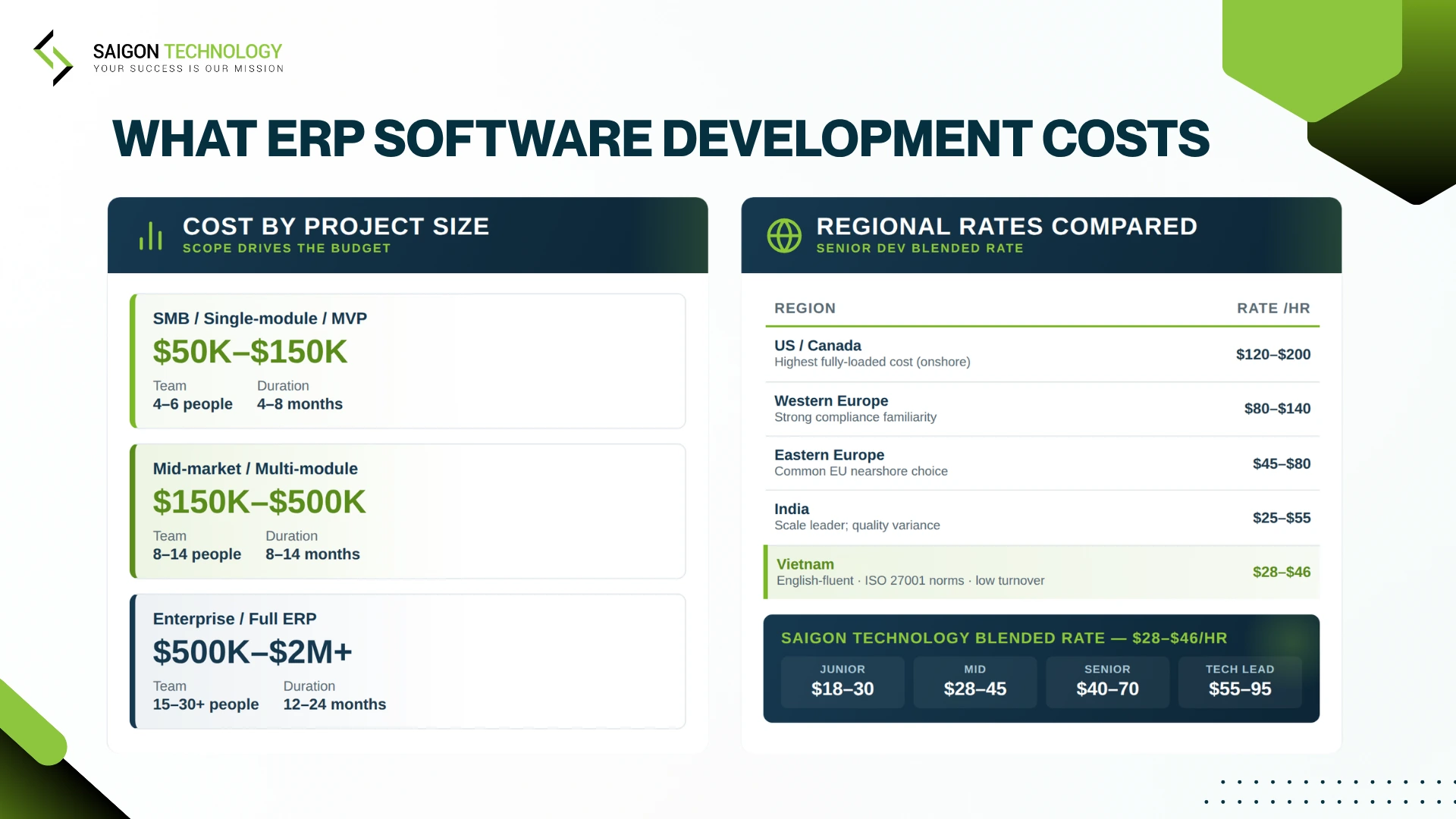
Custom ERP software development typically costs between $50,000 and $2 million-plus, depending on scope, with mid-market projects landing in the $150,000-$500,000 range. The bigger driver is which features you scope, not where the team is located.
Cost ranges by project size
|
Project size |
Typical range |
Team |
Duration |
|
SMB / single-module / MVP |
$50K-$150K |
4-6 people |
4-8 months |
|
Mid-market / multi-module |
$150K-$500K |
8-14 people |
8-14 months |
|
Enterprise / full ERP |
$500K-$2M+ |
15-30+ people |
12-24 months |
What drives the cost
- Customization capabilities required – every workflow unique to your business adds development hours
- Number of integrations – connectors to CRMs, banking systems, marketplaces, IoT
- Tech stack decisions (modern stacks cost less long-term)
- Geographic location of developers
- Customization depth – configuring an Odoo is cheap; deep custom modules are not
- Maintenance, training, and ongoing support
Total cost of ownership (TCO)
The upfront ERP software development costs are only the beginning. Total cost of ownership (TCO) also includes:
- Recurring software license fees if platform-based
- Annual maintenance is typically 15-20% of the build cost
- Training and corporate learning programs (often 10-15% of build cost – frequently underestimated)
- Integration changes when your tools evolve
- Compliance audits (HIPAA, PCI-DSS, SOC 2) on an annual cycle
Regional rates compared
|
Region |
Senior dev blended rate |
Notes |
|
US / Canada (onshore) |
$120-$200/hr |
Highest fully-loaded cost |
|
Western Europe |
$80-$140/hr |
Strong compliance familiarity |
|
Eastern Europe |
$45-$80/hr |
Common EU nearshore choice |
|
India |
$25-$55/hr |
Scale leader; quality variance |
|
Vietnam |
$22-$46/hr |
English-fluent, ISO 27001 norms, low turnover |
Saigon Technology rates land at $22-$46/hour blended – junior $22-$26, mid $26-$36, senior $36-$46, tech lead from $40. The cost arithmetic that matters is not “rate” but “rate × hours × quality of output × rework rate.” Cheap quotes with high rework rates beat no one.
From the field: On a US fintech build last year, the integrations line item alone came in at 35% of total cost, connectors to the client’s core banking provider, KYC/AML vendor, identity provider, and two reporting platforms. That’s where most first-time ERP buyers underestimate, and why we now insist on naming every integration target before signing a fixed-price scope.
Initial investment vs long-term cost savings
Custom builds have a high initial investment, but long-term cost savings add up: no perpetual license fees, no vendor lock-in, no annual price increases you didn’t sign up for. The break-even point for most mid-market ERP custom builds, compared to SaaS, lands between year three and year five.
Custom vs off-the-shelf vs platform-based ERP
Choose off-the-shelf ERP when your workflows are conventional and speed matters; choose custom or platform-based ERP when your workflows are a competitive advantage or compliance shapes your data flows.
Side-by-side
|
Factor |
Custom ERP systems |
Ready-made ERP systems |
Platform-based |
|
Customization |
Total |
Limited |
High |
|
Cost |
High upfront, lower long-term |
Low upfront, recurring fees |
Medium both |
|
Time to launch |
12-24 months |
3-6 months |
6-12 months |
|
Vendor-provided support |
None (you choose your team) |
Included |
Vendor + integrator |
|
Scalability |
Defined by your design |
Defined by vendor |
Hybrid |
|
Best for |
Unique workflows, regulated industries |
Standard businesses |
The pragmatic middle |
When each path wins
- Custom wins when your operations are the moat, and when staying flexible matters more than launch speed.
- Off-the-shelf wins when you need a working system this quarter, and your processes can adapt to the vendor’s.
- Platform-based wins when you want vendor security and updates for the boring 70% of your ERP, plus custom modules for the 30% that’s genuinely different.
A hard truth most build-only agencies won’t say: off-the-shelf is the right answer more often than they admit. If a $40k/year NetSuite subscription solves 90% of your needs, building a $500k custom system is rarely the right call.
What you actually get from ERP software development
Companies that invest in well-scoped ERP software development typically see lower operating costs, faster reporting cycles, better cross-department data quality, stronger compliance posture, and a foundation for embedding AI into operational decisions.
The benefits worth quantifying:
- Operational efficiency improvements – admin overhead commonly drops 20-30% after consolidation (Panorama Consulting)
- Real-time analytics replacing month-old reports – leadership decides on current data, not stale data
- Single source of truth – finance, sales, ops, and support all see the same numbers
- Compliance features built-in – audit trails, role-based access, encryption become a feature, not a project
- Better customer experience – sales have a full account context without switching tools
- Extended supply chain management with multi-tier supplier visibility
- Scalability for multi-entity, multi-region, multi-currency growth
- AI-ready data foundation – clean, structured data is the prerequisite for embedded AI
- Long-term cost savings from eliminating spreadsheet workarounds and disconnected point tools
Five ERP development pitfalls and how to avoid them
Most ERP projects miss their budget or timeline for the same five reasons: scope creep, weak change management, vendor-by-price selection, underestimated data migration, and skipping post-launch optimization.
1. Scope creep
Every stakeholder has a feature they think is critical. Without a must-have / nice-to-have line drawn in week one and defended every sprint, that list grows past what the budget can carry. The fix: a hard backlog discipline plus a quarterly re-prioritization meeting where new requests have to displace something else.
2. Under-investing in change management
You can ship a perfect system and still have it fail because no one wants to use it. Change resistance is the single biggest killer of ERP value realization. A real change management strategy includes:
- Comprehensive training programs – not just one launch-day session
- User manuals and quick-reference cards for daily tasks
- eLearning modules for self-paced onboarding
- Workshops for power users and department leads
- Corporate training sessions tied to job functions, not generic feature tours
- A feedback mechanism that surfaces friction in week one, not month six
- Active management & staff buy-in – leadership using the system visibly
- End-user support in the first 90 days when questions peak
- Ongoing support as workflows mature
Budget at least 10-15% of build cost for training and rollout. The teams that skip this lose 6-12 months, no matter how good the engineering is.
3. Choosing a vendor on price alone
The cheapest quote almost always means rework. If a bid comes in 40% below the rest, ask what the others know that this one doesn’t.
4. Ignoring data migration complexity
Legacy data is messier than anyone admits. Plan parallel-run periods, validate every migration batch, and accept that your first ETL run will surface problems your business didn’t know it had.
5. Skipping post-launch optimization
The first 90 days post-launch are where workflows reveal themselves. Teams that move on to the next project lose the chance to tune the system while users still remember the old way.
From the field: We spent six years scaling an offshore development center for a Netherlands IT-services client through our Build-Operate-Transfer model, from 2 engineers to 50. The single biggest predictor of which workstreams succeeded was whether the client’s internal champion budgeted time for change management. The ones that didn’t lose 6-12 months, no matter how good the engineering was.
What ERP software development services actually include
ERP software development services span strategic consulting, custom build, platform customization, data migration, third-party integration, deployment, training, and ongoing support, and most engagements blend several of these.
The five-service taxonomy
- Consulting and strategy – readiness assessment, ROI modeling, vendor and platform selection
- Custom build – full ground-up development of bespoke ERP
- Platform customization – extending Odoo, Microsoft Dynamics 365, NetSuite, or SAP with custom modules
- ERP integration and migration – connecting to third-party solutions, banking systems, identity providers, marketplaces, IoT
- Support and maintenance – including vendor-provided support, personalized support, end-user support, performance monitoring, and continuous implementation process refinement
Engagement models that match how you actually want to work
- Offshore Development Center (ODC) – a dedicated long-term team, your own software center in Vietnam
- Dedicated Team – exclusive but smaller team, behaves as an extension of your in-house team
- Staff Augmentation – individual specialists fill skill gaps in your existing team
- Fixed-Price – defined scope, defined cost, best when requirements are stable
- Build-Operate-Transfer (BOT) – we build and run your team, then transfer ownership to you (we’ve completed BOT engagements transferring 40+ developers to clients)
If you’re scoping an engagement, our custom ERP software development services cover all five service types and all five engagement models.
How to choose an ERP software development company
Choose an erp software development company on the basis of industry experience, customization depth, security and compliance certifications, transparent pricing, and proof of long-term partnerships, not on hourly rate alone.
The 9-point vendor checklist
- Industry experience – have they built ERP or ERP-adjacent platforms for your vertical? Ask for case studies and direct references.
- Technical expertise and development team selection – who exactly will be on your team? What is their seniority mix?
- Customization capabilities – do they extend platforms, or only configure?
- Verifiable references and client reviews – Clutch, G2, GoodFirms, named logos.
- Project management skills – Agile maturity, sprint cadence, demo discipline, documentation quality.
- Communication rhythm and cultural fit – overlap hours, language fluency, working style.
- Cost transparency – line-itemed quotes, no surprise change orders.
- Data security standards and certifications – ISO 27001, SOC 2, and any sector-specific compliance (HIPAA, PCI-DSS).
- Scalability of the engagement and ongoing support model – what happens at month 18 when you need a new module?
Red flags
- Refusal to share previous client references
- No security certification on a project handling regulated data
- A quote 40%+ below market – usually means rework
- “We can do anything” – they cannot
What we bring to that checklist
Saigon Technology has been on the buyer’s side of this checklist since 2012. We hold ISO 9001 and ISO 27001 certifications from BSI UK, a Clutch 4.8 rating across 9+ verified reviews, and appeared on Fortune’s 100 Best Companies to Work For in Southeast Asia 2025 – a low-turnover signal that matters when ERP projects run 12-18 months. Our 400+ engineers ship across the same modern tech stack we recommended above, and our healthcare and fintech practices carry deep compliance familiarity (HIPAA, HL7, FHIR, PCI-DSS, KYC/AML).
For the full evaluation framework, see our vendor-selection checklist – or hire offshore ERP developers directly.
Industry-specific ERP software development
ERP requirements differ sharply by industry – manufacturing needs MES integration and production scheduling, healthcare needs HIPAA and HL7/FHIR, fintech needs PCI-DSS and KYC/AML, logistics needs fleet and route optimization, retail needs omnichannel inventory, and construction needs job-based costing.
Manufacturing
MES integration, production scheduling, capacity planning, IoT-enabled predictive maintenance, BOM management, and shop-floor data capture are the manufacturing and production planning features that separate real manufacturing ERP from a generic build.
Healthcare
HIPAA, HL7 v2, FHIR, DICOM, and WCAG 2.1. Patient-data segregation, e-prescription workflows, and compliance features that hold up to audit. We’ve delivered AxiaGram (US, 6M+ medical records managed in production, $70K/month ongoing engagement) and HealthCare Connect (telehealth, 50,000+ patient interactions per month). See our healthcare software development practice.
Fintech
PCI-DSS, KYC/AML, GDPR, Open Banking standards, multi-currency ledgers, and real-time audit trails are table-stakes. We’ve built a US wealth management platform (portfolio, trading, fund ops) and a US personal-loans platform (20 senior engineers, full loan lifecycle, 3+ years). See our fintech software development practice.
Logistics and supply chain
Fleet management, route optimization, real-time GPS tracking, EDI integration, extended supply chain management, and warehouse automation.
Retail and e-commerce
Omnichannel inventory synchronization, POS integration, marketplace connectors, integrated ecommerce module, customer loyalty data, and seasonal demand planning.
Construction and real estate
Project-based job costing, equipment scheduling, subcontractor management, progress billing, and CAD/BIM integration where relevant.
How AI is changing ERP software development in 2026
In 2026, AI is moving from a bolt-on feature to an embedded layer inside ERP, driving forecasting, anomaly detection, document automation, and conversational copilots that let business users query data without writing SQL.
The shifts worth tracking:
- AI-augmented forecasting – demand planning, cash flow, and workforce capacity built on machine learning rather than static formulas. Real-time analytics with predictive overlays.
- Embedded LLM copilots – natural-language interfaces where a controller can ask “show me overdue invoices over $10k from customers in California” and get a working report, not a service ticket.
- Anomaly detection – fraud signals in finance, inventory discrepancies, expense outliers – surfaced as alerts inside the workflow rather than discovered weeks later in business intelligence dashboards.
- Document automation – OCR plus NLP for invoice ingestion, purchase-order matching, and contract review. The work that used to take an AP clerk an hour now takes 30 seconds.
- Agentic workflows – the 2026 frontier. AI agents that complete multi-step ERP tasks (matching POs, requesting approvals, scheduling jobs) under human oversight.
For how to add these capabilities to an ERP you already run, including the four options and the guardrails agent write-backs need, see adding AI to the ERP you already run.
Our AI Research Labs have shipped production OCR pipelines, semantic search across enterprise document stores, and computer-vision models (including a fracture-detection model deployed in clinical settings). Pulling these capabilities into ERP modules is not theory for us – it’s current delivery work.
FAQs about ERP software development
1. What is ERP software development?
ERP software development is the practice of designing, building, and deploying enterprise resource planning software, either fully custom or by extending a platform such as Odoo, Microsoft Dynamics 365, NetSuite, or SAP, so that it matches a specific company’s workflows, data model, and compliance requirements rather than forcing the business into a generic template.
2. How long does ERP software development take?
Most ERP software development projects take six to eighteen months. Simple single-module MVPs land in the four-to-eight-month range; multi-module mid-market builds run eight to fourteen months; enterprise-wide deployments commonly take twelve to twenty-four months, with phased rollouts often extending past that. Discovery and data migration are the phases that most influence the timeline.
3. How much does custom ERP software development cost?
Custom ERP software development typically costs between $50,000 and $2 million-plus. SMB single-module builds run $50K-$150K, mid-market multi-module projects $150K-$500K, and full enterprise ERP $500K-$2M or more. Hourly rates vary by region: US-onshore averages $120-$200/hr, Eastern Europe $45-$80/hr, and Vietnam $22-$46/hr. Hidden costs (training, integrations, annual maintenance at 15-20% of build cost) usually outweigh hourly-rate differences.
4. What is the difference between custom ERP and platform-based ERP?
Custom ERP is built from scratch and tailored end-to-end; platform-based ERP extends an existing product like Odoo, Microsoft Dynamics 365, NetSuite, or SAP S/4HANA with custom modules. Custom gives full control but takes longer and costs more upfront. Platform-based delivers faster, uses vendor security and updates out of the box, and fits about 80% of mid-market scenarios, but locks you into the platform’s roadmap and licensing fees.
5. What tech stack is best for ERP development?
A modern ERP development tech stack combines a typed backend language (.NET, Java, or Python), a React or Angular frontend, PostgreSQL or MSSQL as the primary database, REST and GraphQL APIs for integration, Kafka or RabbitMQ for event streaming, and a cloud-native foundation on AWS, Azure, or GCP. Add Kubernetes for orchestration and embedded AI/ML libraries for forecasting and anomaly detection.
6. What are the phases of ERP implementation?
A typical ERP implementation strategy runs through eight phases: discovery and requirements, architecture and UX design, tech stack selection, agile development, data migration, QA and security testing, deployment with change management, and post-launch support. Discovery and data migration are the two phases most predictive of overall project success.
7. How do you choose an ERP software development company?
Choose an ERP software development company on industry experience, customization depth, security certifications (ISO 27001 and any sector-specific standards like HIPAA or PCI-DSS), verifiable client references, transparent pricing, integration expertise, post-launch support, and flexible engagement models. Be cautious of quotes that are 40% below market; they usually mean significant rework later.
8. Is custom ERP worth it for a small business?
For most small businesses, a fully custom ERP is not worth it, the upfront cost and time-to-launch outweigh the benefit. A better path is starting with an off-the-shelf or platform-based ERP like Odoo or NetSuite, then customizing the specific modules where your workflow is unique. Move toward fully custom only when the platform’s constraints actively block growth.
9. What are the biggest risks in ERP software development?
The biggest risks are scope creep, weak change management, choosing a vendor on price alone, underestimating data migration complexity, and skipping post-launch optimization. Each can blow a budget or timeline by 30–100%. Mitigate them by locking scope in week one, budgeting at least 10–15% for training, validating legacy data before migration, and committing to a 90-day post-launch tuning window.
8. Can ERP integrate with AI tools?
Yes, modern ERP systems integrate with AI tools at multiple layers. Embedded AI/ML powers forecasting and anomaly detection; LLM-based copilots let business users query ERP data in natural language; OCR and NLP automate document workflows for invoices and contracts; and agentic AI executes multi-step ERP tasks under human oversight. Clean, well-structured ERP data is the prerequisite that makes any of this work.
Building ERP software the right way
ERP success is 30% technology and 70% scoping plus change management. The companies that get the most from ERP software development are the ones that invest in discovery, budget honestly for training and post-launch optimization, and choose a development partner who has done this work in their industry before.
If you’re scoping a build or evaluating partners, we offer a free consultation to map your requirements against custom, platform-based, and engagement-model options, and an honest read on whether a build is the right call at all.
- Book a free ERP consultation →
- Explore our custom software development services
- Or hire offshore ERP developers directly
Thanh Pham is CEO of Saigon Technology, an ISO 9001 and ISO 27001 certified software development company headquartered in Ho Chi Minh City with offices in the US, Germany, Australia, and Singapore. He has led the company since 2012 across 800+ enterprise projects for clients in healthcare, fintech, logistics, and SaaS. LinkedIn →


Related articles
Why Are Custom Applications Critical in Your Digital Transformation Strategy?
 Thanh (Bruce) Pham - CEO of Saigon Technology
  13 Jun 2024
How much does SaaS application development cost in 2026?
12 Aug 2024 
Custom Application Development: What Decision-Makers Need to Know Before They Build
17 Dec 2024 
The Decision-Maker’s Guide to Outsourcing AI and Machine Learning Projects
18 Mar 2026 
Custom Software vs Off-the-Shelf Solutions: A Side-by-Side Evaluation Framework
26 Mar 2026 
AI in Fintech: A 2026 Builder’s Guide to Use Cases, Architecture and Regional Rules
04 May 2026