




Warehouse Management System Development: Architecture, Workflows & Build Decisions for Engineering Teams

 Updated on Jul 21, 2026
Off-the-shelf platforms break at the seams where every real warehouse operates: multi-zone picking, handoffs between handheld RF devices, ERP event consistency, and per-customer 3PL segregation.
This is a build-perspective guide to warehouse management system development for engineering teams. It covers core architecture, mobile barcode workflows, deployment trade-offs, and a realistic migration path. It isn’t a cost calculator and it isn’t a vendor comparison.
Key Takeaways
- Build a custom WMS only when off-the-shelf tools force workarounds in picking logic, integrations, or multi-tenant rules, not on cost grounds alone.
- The architecture that matters is event-driven and offline-resilient: scan events must survive 200 devices firing at once and Wi-Fi dead zones.
- Mobile barcode workflows are where accuracy is won: WMS deployments reach 99%+ fulfillment accuracy (ScienceSoft), well above manual paper picking.
- A first production version typically ships in 3–6 months; plan a phased, parallel-run cutover, not a cold switchover.
What “Warehouse Management System Development” Actually Covers
Warehouse management system development means engineering software that runs the physical lifecycle of inventory inside a facility:
- Receiving goods against purchase orders
- Guided putaway to optimal locations
- Real-time inventory tracking
- Picking and packing to outbound orders
- Shipping-label generation and carrier dispatch
- Returns handling for reverse logistics
A WMS is narrower than supply chain management software and deeper than the inventory module embedded inside your ERP. It owns floor-level daily operations that demand millisecond response times, offline resilience, and tight integration with barcoding and RFID hardware.
The build-vs-buy decision pivots on workflow density. If your dispatch, picking, and multi-tenant rules are standard, off-the-shelf usually wins, and that’s a fair call. If your operations carry complex picking logic, regulatory compliance, multi-warehouse coordination, or omnichannel fulfilment patterns, no SaaS vendor models, a custom WMS is the right call.
For the broader platform-engineering context this sits within, see Saigon Technology’s end-to-end logistics platform practice.
Core WMS Architecture: Modules, Data Model, Real-Time Events
A production-grade build rests on four architectural layers: a module map, a stable data model, an event-driven backbone, and a real-time visibility plane.
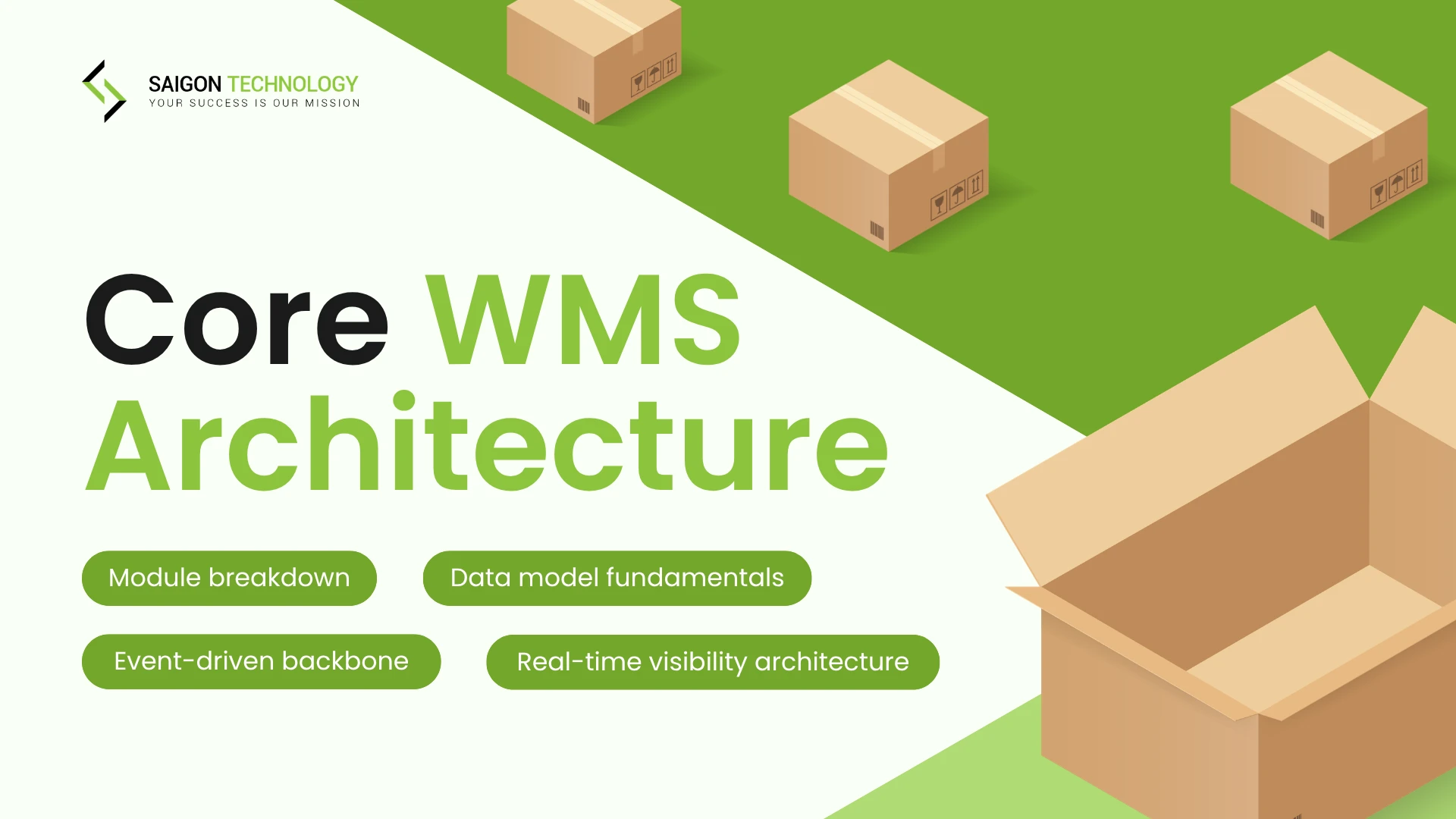
Module breakdown
- Receiving: PO validation, QA flagging, barcoded-label generation
- Putaway: directed rules based on size, weight, demand, and hazmat class
- Inventory management: real-time tracking, plus lot, serial, and expiration control
- Order fulfillment: single, batch, wave, zone, and cluster picking
- Packing and shipping: packaging recommendations and shipping-label generation
- Returns: restocking, refurbishment routing, and the RMA flow
- Labor planning: dynamic task assignment and shift forecasting
- Analytics: operational and predictive dashboards, KPI reporting
Data model fundamentals
The core entities stay stable across every WMS we’ve built:
- SKU: the sellable unit
- Lot / Serial: for regulated cargo and recall traceability
- Location: a zone → aisle → rack → bin hierarchy
- Task: the atomic work unit (scan, move, count)
- Wave / Shipment: the work grouping for batch optimization
Event-driven backbone
Scan events have to propagate reliably when 200 handheld devices fire at once. Kafka or RabbitMQ handles the load. Idempotency keys on every scan prevent a double-decrement when a device retries on a flaky connection. Operational data then flows out to dashboards, mobile apps, and e-commerce channels in under a second.
Real-time visibility architecture
A pick scan in Aisle 12 should reach the customer’s order page on Shopify before the picker takes the next step. That needs a write-once-read-many event log, materialized views for hot reads, and WebSocket push to subscribed clients. The payoff is the end-to-end visibility that downstream TMS platforms and ERP integrations depend on.
User Roles and Workflow Design
A custom WMS earns its keep by tailoring the interface to each role. The same data model serves very different jobs.
- Receiver/client: scan inbound, flag QA exceptions, print barcoded labels
- Order picker/packer: follow guided pick paths, scan to validate, escalate exceptions
- Supervisor: assign tasks, monitor exception dashboards, reroute labor live
- Manager: KPI dashboards, labor forecasting, slotting decisions
- 3PL warehouse manager: multi-customer segregation, billing-event capture
- Administrator: user configuration, permissions, and security audits
- B2B wholesale buyer (external): self-service inventory visibility and order placement
For role-specific UX, four principles consistently save support tickets and training time:
- Minimize taps. Pickers wear gloves and work in low light.
- Surface only contextual data. A picker doesn’t need a P&L view.
- Keep multi-factor authentication invisible at shift handoff, biometric, badge tap, or proximity.
- Reduce training time through consistent visual grammar across modules.
Interface customization isn’t optional in modern warehouse operations. Standard WMS screens force role compromises; tailored interfaces remove them and give every user a workflow shaped to the job they actually do.
Picking Strategies and Operational Workflows
The picking layer is where a WMS build delivers its biggest accuracy and labor-productivity wins. Most real warehouses run two or three of these strategies side by side, for example, zone picking on slow-movers, batch picking on small parcels, single-order on high-value SKUs.
|
Picking strategy
|
When it fits
|
|
Single-order
|
Low volume, high-value SKUs
|
|
Batch
|
Small parcels, many similar orders
|
|
Wave
|
Coordinated release across pickers and zones
|
|
Zone
|
Large facilities with specialized areas
|
|
Cluster
|
Multi-cart, parallel multi-order
|
Directed putaway logic
Guided putaway weighs item volume and weight, demand-pull slotting (fast-movers near pack stations), hazmat segregation, temperature zones for cold chain, and pickface-versus-reserve replenishment rules.
Cross-docking workflows
Receive-to-ship bypass for goods already allocated to an outbound order cuts both storage cost and turnaround time.
Cycle counting, FIFO and FEFO
- Replace annual physical counts with rolling cycle counts
- Enforce FIFO (first-in-first-out) or FEFO (first-expired-first-out) at pick time to cut expiry write-offs and waste
- AI-based exception handling flags variance patterns before they become shrinkage
- Computer-vision cycle counts close the loop with less manual labor
Lot, serial, and expiration tracking
This is mandatory for food, pharma, electronics, and any cargo subject to recall. The system stores chain-of-custody from receipt through delivery and reports against regulations like the U.S. Drug Supply Chain Security Act (DSCSA) and the EU Falsified Medicines Directive.
Mobile Barcode Scanning: The Workflow That Decides Accuracy
Mobile scanning is where inventory accuracy is made or lost. Strong workflows push fulfillment accuracy past 99% (ScienceSoft); weak ones leak shrinkage daily.
The four-scan chain
- Receiving scan: validate against the PO, flag short-ships and damage
- Putaway scan: confirm goods landed in the directed location
- Pick-path scan: validate each item picked against the order
- Pack-station scan: final order verification before the label prints
Hardware trade-offs
- Rugged Android (Zebra TC-series, Honeywell CT-series): best for cold chain, drop survival, and glove operation
- iOS: strong for customer-facing or kiosk roles, weaker in industrial environments
- Consumer phones: viable for small warehouses, but they struggle with battery life and drops
Offline mode and connectivity
Warehouse Wi-Fi has dead zones, so build for them. Devices queue scans locally when offline (edge buffering). Reconciliation uses last-write-wins with an operator override. And survey for dead zones around metal shelving before go-live, then fill them with mesh coverage.
Pair scanning with EDI automation upstream and the result is end-to-end visibility from supplier to customer, plus the real-time inventory accuracy that downstream ERP and TMS integrations depend on.
Deployment Models: Cloud, On-Prem, and Hybrid
The deployment model shapes uptime, latency, and how the floor behaves when the WAN drops.
|
Model
|
Best for
|
Trade-off
|
|
Cloud SaaS
|
Fastest to deploy, auto-scales for peak season, vendor handles patching; most e-commerce sellers and 3PLs
|
Verify uptime SLAs and data-egress costs before signing
|
|
On-premise
|
Hardened facilities (defense, pharma), offline-resilient floor operations, full data sovereignty
|
Higher capex; you own the hardware lifecycle
|
|
Hybrid
|
Cloud control plane (analytics, config, reporting) plus on-prem data plane (scan events, picking) for floor latency; multi-site with flaky links
|
More moving parts to operate and monitor
|
|
ERP-adjacent
|
Embedded in SAP or Oracle; tighter ERP integration
|
Bound to ERP release cycles; customization is harder and slower
|
API-first vs monolithic UI: headless WMS architectures decouple the data layer from the UI, letting you ship dedicated apps per role and expose ERP, TMS, e-commerce, and yard-management connectors without UI rework. For multi-channel operators and 3PLs, headless wins on scalability and pace of change.
Implementation Roadmap (Build → Pilot → Rollout)
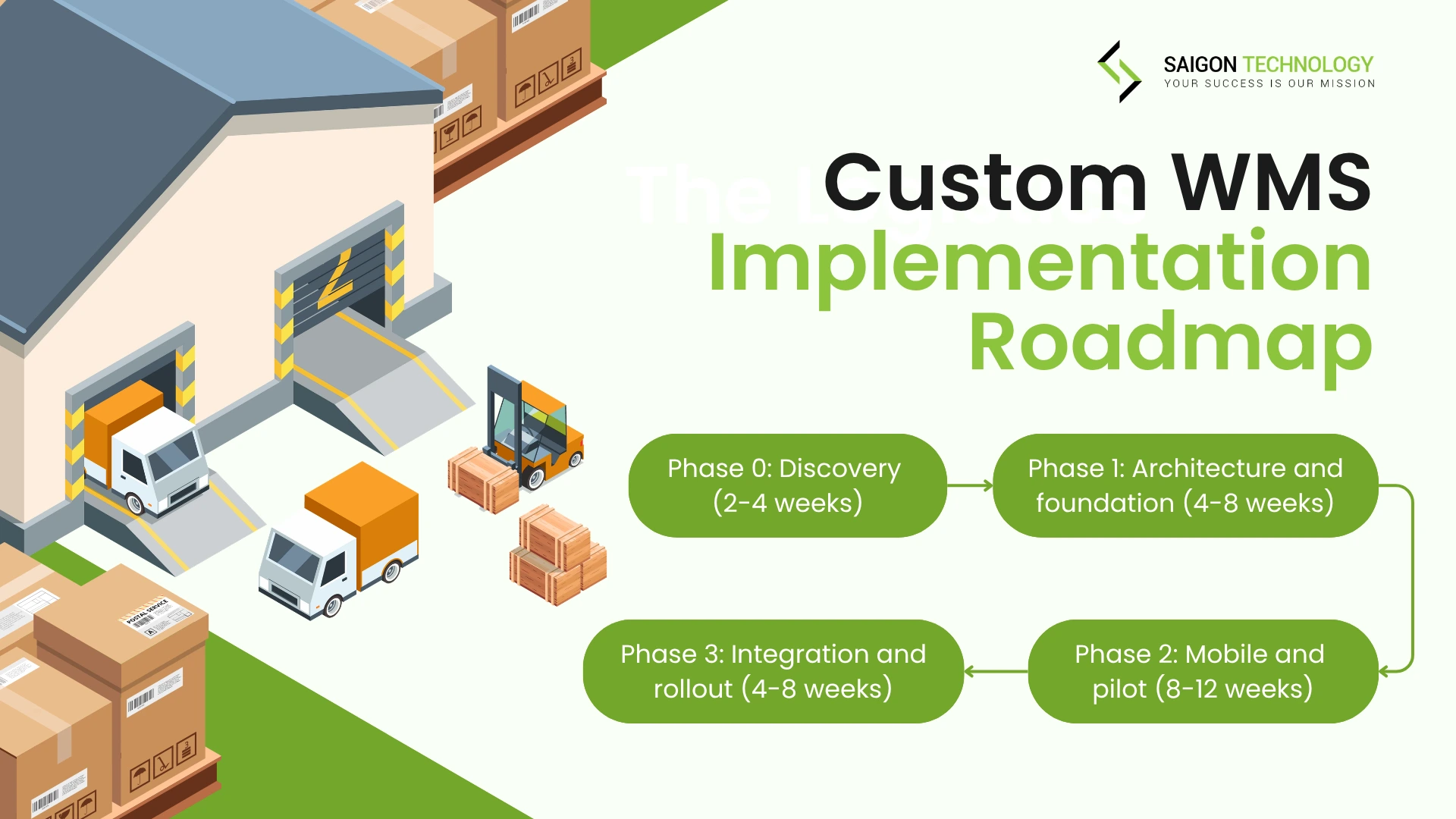
To build a warehouse management system, you move through five stages, typically over 5–9 months from discovery to multi-site rollout. The phases that work in practice:
- Discovery (2–4 weeks): warehouse mapping, SKU rationalization, integration audit, hardware inventory, and technical-requirements capture.
- Architecture and foundation (4–8 weeks): receiving, inventory, single-order picking, and basic reporting.
- Mobile and pilot (8–12 weeks): the mobile app, full scanning workflows, and a first-warehouse pilot in a single zone.
- Integration (3–6 weeks): carrier and ERP integrations plus advanced analytics.
- Rollout (2–4 weeks): templatize the pilot and expand to the remaining sites.
That sequence (discover, build the core, prove it on mobile in one zone, then integrate and expand) is the answer to “how do you develop a WMS without stopping fulfillment.”
Cutover strategy
- Big-bang: the entire facility switches overnight. Highest risk, fastest result. Use only when the legacy system is already failing.
- Phased-by-zone: one warehouse zone migrates at a time. Lower risk, longer dual-system run.
- Phased-by-warehouse: pilot one site, then templatize. Best for multi-site operators.
Data reconciliation post-go-live
Parallel-run the new system alongside the legacy for at least one full inventory cycle. A cold cutover saves a few weeks of dual cost but exposes hidden data-quality issues and disrupts daily operations. That’s usually a bad trade.
From the field: Saigon Technology’s Merit Logistics ODC engagement replaced a six-year-old multi-vendor ERP without disrupting the tools already in production. The same disciplined parallel-run pattern applies to WMS migration when you can’t stop fulfillment.
Industry-Specific WMS Configuration
A general template covers about 80% of needs. The last 20% comes from vertical-specific rules:
- E-commerce and multichannel: order-router rules, marketplace SKU mapping, and real-time inventory across channels to prevent overselling
- 3PL multi-tenant: strict customer segregation, billing-event capture per scan, per-client SLA tracking
- Food and beverage: FEFO enforcement, lot-recall workflows, and cold-chain temperature integration via IoT sensors
- Pharma: serialization (DSCSA in the U.S., EU FMD in Europe), full chain-of-custody, and audit logs retained per regulator
- Apparel: a size/color/variant matrix, omnichannel fulfilment, and high-volume returns processing
- Retail and B2B wholesale: bulk-break workflows, GS1/UCC-128 labeling standards, and B2B portal access
Emerging layers worth scoping: a generative-AI assistant for exception summarization, ML-driven slotting recommendations, digital-twin simulations of layout changes before physical re-slotting, and blockchain-backed chain-of-custody where regulators require it. For the transport leg that picks up where the warehouse ends, see our guide to building a transportation management system.
ROI Signals That Justify a Custom WMS Build
The ROI case is measurable, though the published numbers come mostly from WMS vendors rather than independent analysts, so treat them as implementation benchmarks, not guarantees. Vendor implementation data from ScienceSoft, a WMS development firm, reports:
- Fulfillment accuracy of 99%+, well above the accuracy typical of manual, paper-based picking
- Labor utilization up 10–35% through dynamic task assignment, a range Manhattan Associates corroborates for labor-management and task-interleaving software
- Inventory shrinkage down up to 50%+ with real-time tracking and cycle counts
- Space-utilization efficiency up 10–20% from analytics-based inventory placement
- Inventory carrying costs down 10–30% from optimized storage and less overstocking
- Fulfillment costs down 25–50% via optimized pick paths and lower error handling
ROI math, simplified
(Labor hours saved × hourly rate) + error-cost reduction − (build + run cost) = annual return
As an illustrative calculation: a 20-person warehouse recovering 4 hours per worker per week at $20/hour saves roughly $83,000 a year in labor alone. Add shrinkage savings, reclaimed space, and the error-cost reduction from a 99%+ accuracy rate, and the payback window for a mid-sized custom WMS build typically lands inside 18 months.
For cost ranges by software type, region, and functionality complexity, see Saigon Technology’s logistics software cost breakdown. If your fleet is part of the same operation, our fleet management software guide covers the adjacent build.
FAQs
1. What’s the difference between a WMS, an inventory management system, and an ERP module?
An inventory management system tracks quantities and value. A WMS controls the physical workflow that moves inventory through space: receiving, putaway, picking, packing, shipping. An ERP warehouse module sits inside a broader finance and procurement platform and is typically batch-oriented; a WMS is event-driven and built for real-time floor operations.
2. How do you build a warehouse management system?
Build it in five stages: (1) discovery – map the warehouse, rationalize SKUs, audit integrations; (2) core build – receiving, inventory, single-order picking; (3) mobile and pilot – the scanning app, tested in one zone; (4) integration – carrier, ERP, and analytics; (5) rollout – templatize the pilot across sites. Prove the core on mobile in a single zone before you integrate and expand, and parallel-run against the legacy system through cutover.
3. How long does WMS development take?
A first production version typically ships in 3–6 months, with full platform maturity (multi-site, full integrations, advanced analytics) in 9–14 months. The main drivers are integration count, mobile-app scope, compliance certifications, and team size.
4. Should we build a custom WMS or extend our ERP?
Extend the ERP when transaction volume is low (under 500 daily orders), workflows are standard, and you don’t need real-time floor scanning. Build a custom WMS when you need sub-second scan events, complex picking logic, multi-tenant 3PL rules, or hardware integrations the ERP doesn’t support.
5. What hardware do we need for a mobile-scan-driven WMS?
At minimum: rugged Android handheld scanners (Zebra, Honeywell), thermal label printers, mesh Wi-Fi with no dead zones, and edge devices for offline buffering. Optional: RFID portals, conveyors with PLC integration, automated sorters, voice-pick headsets, and goods-to-person robotics.
6. How do we keep WMS data consistent across cloud and warehouse floor during connectivity loss?
Build offline-first: devices queue scan events locally, sync on reconnect, and apply server-side conflict resolution. Idempotency keys prevent double-application. For high-stakes operations, deploy hybrid: a local data plane with eventual cloud replication, so the floor keeps moving even when the WAN drops.
Conclusion
A custom WMS is justified when off-the-shelf tools force workarounds in picking logic, integrations, or multi-tenant rules, not on cost grounds alone. The engineering decisions that matter most in warehouse management system development are architectural (event-driven, offline-resilient), workflow-led (picking strategy, mobile scanning), and rollout-conscious (phased cutover, parallel run).
Ready to scope a build? Discuss your custom logistics platform build with Saigon Technology – a no-commitment scoping call, NDA available on request, ISO 27001-certified delivery.


Related articles

Data Lake And Data Warehouse
 Linh Pham - Software Architect
  10 Apr 2024
IT Project Outsourcing: Effective Strategies & Key Insights
29 May 2024 
IT Support Outsourcing: The Ultimate Guide for Businesses
26 Feb 2025 
How to Run a 2-Week Paid Developer Trial (and What to Watch For)
06 May 2026 
How to Run a Long-Term Offshore Engagement End-to-End: A Setup-to-Handover Playbook
12 May 2026 
ERP Software Development: A 2026 Guide for Decision-Makers
19 May 2026 
Logistics Software Development Cost: $30K–$500K Guide
28 May 2026 
Fleet Management Software Development: Complete Guide (2026)
28 May 2026