




Student Information System: A 2026 Guide for Schools

 Updated on Oct 09, 2026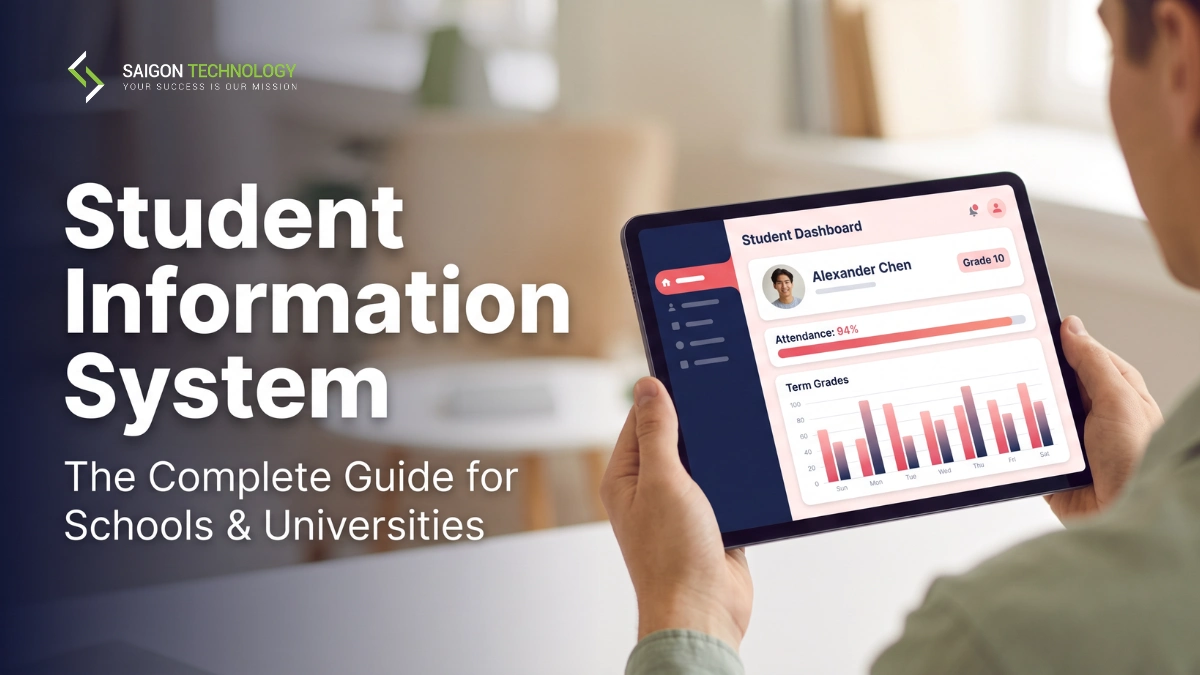
A student information system (SIS) is the software a school or university uses as its official record of every student: demographics, enrollment, schedules, attendance, grades and transcripts, from admission through graduation. It’s the system of record that registrars, teachers, families and education authorities all read from, so every other platform depends on its accuracy.
This guide is for school leaders, IT directors and procurement teams comparing platforms, and for EdTech vendors and multi-campus operators deciding whether to build their own. Saigon Technology’s engineers designed and built Scholar OS, an integrated education management platform that unifies student, academic and financial data. The build-versus-buy advice below draws on that architecture work, not only on vendor brochures.
Key Takeaways
- An SIS holds the official student record. An LMS delivers teaching, an ERP runs finance and HR, and an SMS bundles day-to-day school administration.
- Local rules shape requirements: FERPA and federal reporting in the US, the school census in England, the PDPA for Singapore’s private sector, and state or federal privacy law in Australia.
- Most schools should buy a commercial platform. Custom builds fit EdTech vendors, multi-tenant operators and institutions whose workflows no product supports.
- Whichever route you take, migrate historical records with validation and keep the legacy system running until the new record has proven itself.
- Judge vendors on multi-year cost, a pilot with anonymized data, and reference calls you arrange yourself.
SIS vs. LMS vs. ERP vs. SMS: Understanding the Difference
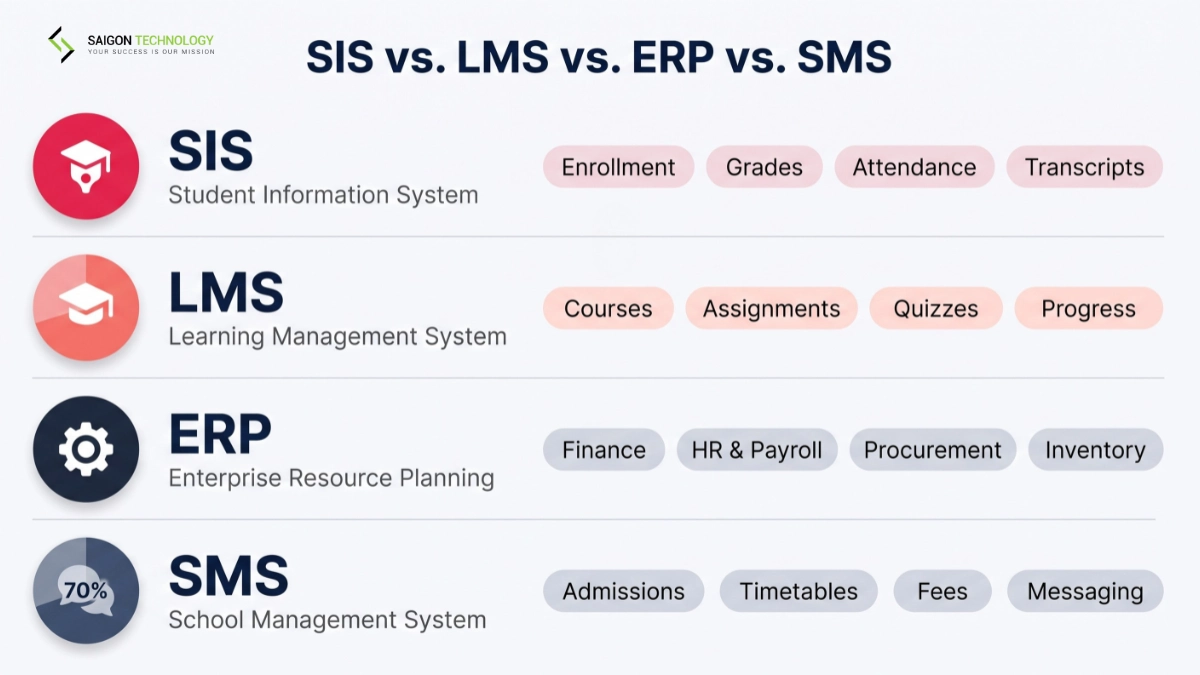
The four acronyms overlap, which is why buyers often ask for an SIS when they actually need an LMS. In short, the SIS owns the official student record, the LMS runs teaching and coursework, the ERP manages finance, HR and procurement, and an SMS packages everyday administration for schools that want a single tool.
SIS, LMS, ERP and SMS compared
| System | Core focus | Typical functions | Main users |
| Student information system (SIS) | Official student records | Enrollment, profiles, grades, attendance, transcripts, reports | Registrars, administrators, teachers |
| Learning management system (LMS) | Teaching and learning | Courses, assignments, quizzes, content, progress tracking | Teachers and students |
| School ERP | Institution-wide business operations | Finance, HR, payroll, procurement, inventory, often with SIS functions bundled in | Leadership, finance, HR, administration |
| School management system (SMS) | Running the school day to day | Admissions, attendance, timetables, fees, parent messaging | Admin staff, teachers, parents |
One naming trap: “SMS” also stands for student management system, a label many vendors use as a plain synonym for SIS. Check which meaning a vendor intends before you compare quotes.
If teaching delivery is the real gap, an LMS or a broader e-learning platform may matter more than a new records system. The two usually work as a pair: the SIS sends class rosters to the LMS, and grades flow back.
What Drives SIS Requirements in the US, UK, Singapore and Australia
Governments shape what an SIS must do far more through reporting rules and privacy law than through funding. The table summarizes the main driver in each market. It matters for selection, because a platform that produces a clean US state report may still need work before it can generate an English school census return.
Main SIS requirement drivers by market
| Market | Main driver | What the SIS must handle | Source |
| United States | State and federal reporting; program-level accountability for colleges | State and federal data submissions (EDFacts for K-12, IPEDS for postsecondary) and, from 2026, earnings reporting for Title IV programs under the STATS rule | Federal Register, STATS final rule (2026) |
| United Kingdom (England) | Department for Education statutory data collections | The school census, a statutory return that schools submit to the DfE | DfE: school census |
| Singapore | MOE runs central systems for government schools | Government schools use MOE’s School Cockpit; independent and international schools and private higher education choose their own SIS | MOE: Student Learning Space admin guide |
| Australia | State and territory school systems plus federal privacy law | Government schools follow state systems and state privacy law; non-government schools and private universities answer to the federal Privacy Act | OAIC: state and territory privacy legislation |
Singapore is the odd one out. MOE supplies School Cockpit to government schools, so the realistic SIS buyers are independent and international schools and private higher-education providers.
Across all four markets the selection test is the same. The platform has to fit current workflows, connect to the other systems a school runs, protect sensitive records, and produce the returns its education authority expects.
8 Core Features of a Student Information System
Most SIS platforms cover the same eight areas, from the core student record through to integration. Depth varies by segment: K-12 products lean toward attendance, scheduling and family communication, while higher-education products add degree audits, financial aid and registration rules.
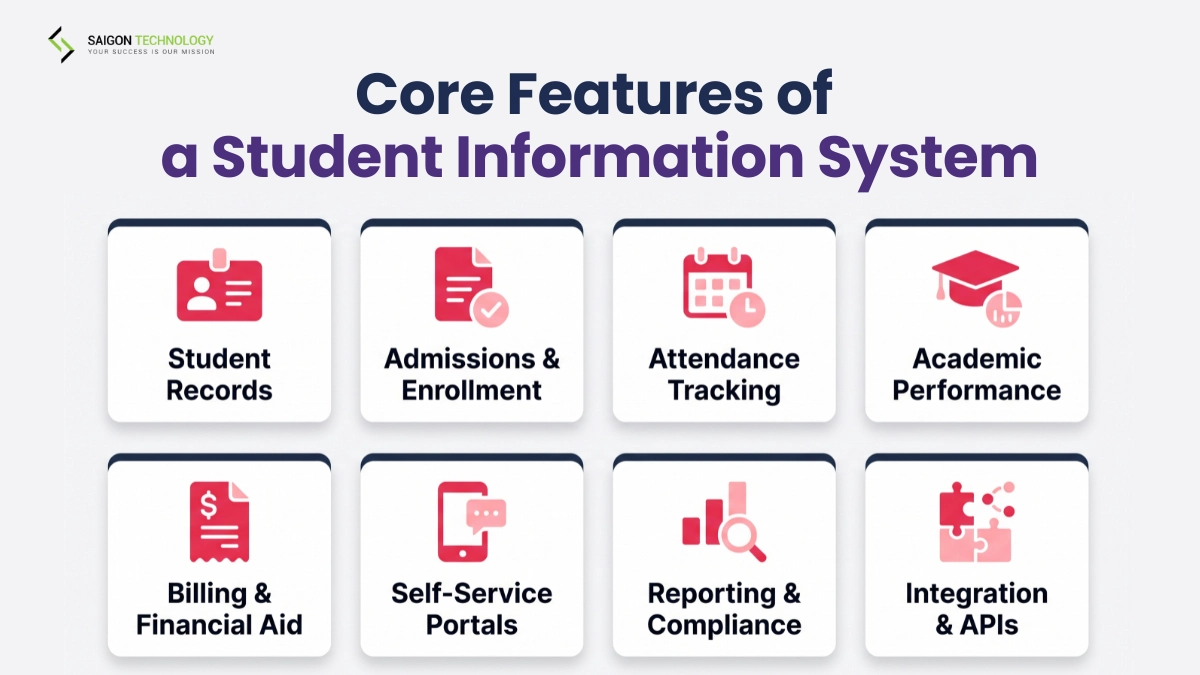
1. Student Records and Demographics
Personal details, contacts, guardians, student IDs, enrollment status and academic history live in one profile. Staff work from the same current record instead of reconciling spreadsheets. Everything else builds on it.
2. Admissions, Enrollment, and Registration
Application tracking, course scheduling, waitlists, prerequisite checks and status changes carry a student from applicant to registered learner.
3. Attendance and Student Tracking
Daily or period-level attendance, absences and tardies are recorded once. Thresholds can trigger alerts and feed reports for teachers, families and authorities.
4. Academic and Performance Management
Grades, GPA and transcripts sit alongside performance tracking that flags students who need support. Universities typically add program tracking and graduation-requirement checks on top.
5. Billing and Financial Management
Tuition, invoices, payment plans, scholarships and aid tracking usually connect to accounting or ERP software, so student and financial data stay in step and the finance office isn’t reconciling two versions of what each family owes at the end of every term.
6. Self-Service Portals and Communication
Students and parents check grades, timetables, attendance, fees and documents without calling the office, and receive notifications on their phones.
7. Reporting, Analytics, and Compliance
Dashboards and scheduled reports turn raw records into enrollment, attendance and performance views, and into the returns regulators require. Generating them from live data removes manual re-keying, and vendors ship updates when reporting rules change.
8. Integration and Interoperability
APIs, single sign-on and education data standards such as OneRoster and LTI connect the SIS to the LMS, ERP, assessment, library, payment and identity systems. Each record is entered once and reused everywhere.
How Does an SIS Work Day to Day?
An SIS works by keeping one authoritative record per student and letting every role read or update only its own part. When a teacher enters a grade or marks an absence, the change reaches the parent portal, the attendance report and the admin dashboard without anyone typing it twice.
Enrollment creates the record: personal details, program, status and contacts. From then on, role-based access decides who sees what. A teacher sees a class roster, a parent sees one child, and a registrar sees the full history. Nobody sees more.
Integration carries the record outward. Rosters sync to the LMS, billing data goes to the finance system, and identity checks run through single sign-on. When a report is due, whether for a principal, a state agency or a university board, it’s pulled from live data rather than assembled by hand.
The same record follows the learner through grade changes, transfers and graduation. That continuity is why the student information system is the hardest school platform to replace, and why a failed migration can damage years of academic history that families, universities and regulators will later ask to see. Treat it accordingly.
Types of Student Information Systems
Student information systems are usually grouped three ways: by who they serve (K-12 or higher education), by how they’re deployed (cloud, on-premise or hybrid), and by how open they are (commercial, open-source or custom). AI features now sit on top of all of them rather than forming a separate category.
SIS for K-12 Schools
K-12 platforms focus on attendance, scheduling, gradebooks and parent communication. In the US they also handle state reporting, health records and special-education compliance.
SIS for Higher Education
University platforms manage admissions, course registration, financial aid, billing, degree requirements and graduation, and they usually connect to a CRM, an LMS and an ERP.
Cloud, On-Premise, and Hybrid SIS
Cloud deployments run on vendor-managed infrastructure, which simplifies updates and remote access. On-premise gives the IT team full control, along with the maintenance burden. Hybrid setups help when a legacy platform has to keep running during a gradual move.
Open-Source Student Information Systems
Open-source platforms expose the code and allow deep customization. That freedom has a price. They suit institutions with in-house engineers, because hosting, security patches and support become the school’s job.
AI-Enabled Features
AI extends the core record rather than replacing it. Common uses include:
- Early-warning alerts that flag at-risk students from attendance or grade patterns
- Natural-language questions about student data, asked in plain English
- Scheduling help that detects conflicts and balances class sections
- Advising insights that surface trends early
- Report drafting from live data
The right type depends on institution size, education level, technical staff and budget. Some schools need a ready-made platform; others need custom education software for workflows no product covers.
Benefits for School Leaders, Teachers, and Families
The benefits differ by role. Leaders get one trustworthy dataset and faster reporting, teachers get one place for rosters, grades and attendance, and families get real-time visibility. The common thread is that data entered once can be used everywhere, which removes most of the reconciliation work schools do today.
For School Leaders and Administrators
A single source of truth replaces spreadsheet sprawl. State and federal returns, including the K-12 data US states submit to EDFacts, come straight from live records, and dashboards support quicker board-level decisions. Board reports stop being a scramble.
For Teachers
Teachers work from one gradebook, one attendance tool and one roster. Nothing gets typed twice. Early-warning signals surface students who are slipping before the end of term, and progress updates go to families from inside the platform.
For Parents and Students
Families see grades, attendance, assignments and announcements through self-service portals and mobile apps, with direct channels to teachers and the registrar. At university level, students manage their own registration, degree progress and transcript requests.
Student Data Privacy and Security by Country
A student information system concentrates personal, academic, health and sometimes financial data about minors, so privacy has to be designed in rather than added later. The laws differ by country, and in two of the four markets they also differ between public and private institutions, which changes what a vendor must support.
Student data privacy laws by market
| Market | Key laws | What the SIS must support | Regulator |
| United States | FERPA, COPPA, state student-privacy laws | Access controls, the right to inspect and request correction of records, consent before disclosure | U.S. Department of Education: FERPA |
| United Kingdom | UK GDPR, Data Protection Act 2018 | Lawful basis, data minimization, breach reporting | ICO: UK GDPR guidance |
| Singapore | PDPA for private and international schools and private higher education (public agencies are excluded) | Consent, purpose limitation, breach management | DPPC: Personal Data Protection Act |
| Australia | State and territory privacy laws for government schools and most universities; the Privacy Act 1988 and its APPs for non-government schools and private universities | Data handling, access rights, breach notification | OAIC |
FERPA is a privacy law, not a reporting rule. It sets who may inspect education records and when consent is needed before they’re disclosed, and its rights pass from parents to the student at 18 or on entry to postsecondary education, at which point the learner becomes an eligible student.
What to Check When Evaluating an SIS
Beyond the law, test how a platform protects data in practice. Ask each vendor for evidence on these points:
| Check | What to ask the vendor |
| Encryption | Is data encrypted at rest and in transit? |
| Access control | Are roles granular, and do logs record who viewed, edited or exported a record? |
| Retention and deletion | Can records be kept or deleted on your schedule? |
| Breach response | How are incidents detected, and how quickly are you told? |
| Third parties | Which sub-processors can see student data, and where is it stored? |
| Certifications | Which independent certifications, such as ISO 27001 or SOC 2, does the vendor hold? |
| Data rights | How are access, correction, export and deletion requests handled? |
For a custom-built system, these controls belong in the architecture from the first sprint, with audit logs designed alongside the data model rather than bolted on after launch. Confirm which laws apply based on your location, your users and the kinds of student data you hold.
Build vs. Buy: Should You Develop Custom SIS Software?
For most schools, buying is the right call. Established student information systems such as PowerSchool, Infinite Campus and Ellucian already encode years of regulatory logic and workflow patterns that a new build can’t reproduce quickly. Building custom is the exception. It fits a specific group of organizations.
The rule is simple: buy when configuration closes the gap. If a leading platform covers your workflows and reporting through configuration alone, buy it. Build when the gap is structural, for example because you sell the software to schools or run many institutions on one platform. Few schools ever reach that line.
Build vs. buy decision guide
| Build custom if… | Buy off-the-shelf if… |
| You’re an EdTech vendor building a product to sell to schools | You’re a single school or district with standard workflows |
| You run many institutions or regions on one multi-tenant platform | Most of your workflow maps to a leading platform through configuration |
| Your jurisdiction’s reporting isn’t served by existing products | Your FERPA and state reporting are already covered by established vendors |
| You need LMS or assessment integration deeper than standard APIs | Standard SIS-to-LMS integration (OneRoster, LTI) covers your needs |
| You can fund a long, multi-phase program with a dedicated team | You need to go live quickly on a limited budget |
Where custom development makes sense, the engineering bar is high. A production student information system must stay available through enrollment peaks, handle heavy grade entry at exam time, isolate each tenant’s data, encode reporting logic for several jurisdictions, and integrate securely with every other system the school runs.
What Building Looks Like in Practice: Scholar OS
Scholar OS shows the pattern on one institution’s problem. Student profiles, transcripts, enrollment and financial records sat in disconnected systems, while a long-running legacy platform called STARS still handled essential operations and couldn’t be switched off.
We designed and built Scholar OS as an integrated education management system in three connected layers: an IEMS core as the authoritative record for student, academic and financial data, an LMS, and a CRM, synchronized through REST APIs on a Node.js and MySQL back end.
The core came first, and learning and admissions were added around it, so a prospect becomes an enrolled student without anyone re-keying data, while STARS stayed online and connected through APIs instead of being ripped out and replaced in one high-risk cutover. The full write-up is in the Scholar OS case study.
Plan the Data Migration Before the Go-Live Date
Migration is where SIS projects slip. On Scholar OS, historical records moved from MS SQL to MySQL through field mapping and transformation, then were validated and reconciled against the source, with the work sequenced around live operations to keep disruption low. The same discipline applies when you buy:
- Map every field from the old system to the new one, including codes and status values.
- Run trial migrations, then reconcile record counts and samples against the source.
- Keep the old system available until the new record has proven itself in daily use.
- Schedule the cutover outside enrollment and exam windows.
Skipping step 3 is the most expensive shortcut.
How to Choose Student Information System Software: A 7-Step Framework
Choosing student information system software is a decision a school lives with for years, so it pays to follow a fixed sequence. This is the sequence we follow on SIS evaluations, most of which run under client NDAs: scope, compliance, integrations, deployment, multi-year cost, a hands-on pilot and independent references.
- Define the audience. K-12, higher education or both? That decides which platforms belong on the shortlist.
- List compliance requirements. Check the privacy and reporting rules where you operate, such as FERPA and state reporting in the US, UK GDPR in the UK, the PDPA for private institutions in Singapore, or state and federal privacy law in Australia, plus your own data-governance policy.
- Map must-have integrations. List every system the SIS has to talk to: LMS, finance or ERP, assessment tools, library, cafeteria, SSO and parent apps.
- Decide on deployment. Choose cloud, on-premise or hybrid based on data-residency rules, your IT team’s capacity and total cost.
- Estimate multi-year total cost. Add license fees, implementation, data migration, training and support. The sticker price is rarely the full picture.
- Pilot it. Use anonymized student data, real users and real scenarios. A demo won’t show the problems a pilot will.
- Call references yourself. Speak with several comparable institutions about implementation, data complexity and the relationship after signing, rather than relying on references the vendor picks.
Larger institutions need longer to work through these steps than small ones, mostly because of integration count and data volume. Don’t rush it. Time spent here is cheaper than a second migration.
How Saigon Technology Builds Custom Student Information Systems
Saigon Technology builds custom student information systems for EdTech vendors and for institutions whose workflows don’t fit a commercial product. Each engagement starts with the student record and its integrations, then adds modules, with senior-led rates of $22–$46 per hour and ISO 9001 and ISO 27001 certified processes behind every project.
After 14+ years of custom software development, the pattern we apply is the one Scholar OS followed: the record first, then admissions, attendance, academic management, fees, parent communication and reporting as modules shaped around how the institution already works. The record always comes first.
For multi-campus operators, we design centralized data with role-based access per location, so leadership gets one view instead of campus-by-campus records. Accounting, payment, LMS and identity systems connect through documented APIs, so the SIS doesn’t become another silo. Need an SIS built around your own workflows? Tell us how your institution runs today, and we’ll scope it from there.
FAQs
Who uses a student information system?
Registrars, administrators, teachers, students, parents and other authorized staff. Each group gets permissions that match its role and the information it needs, so a parent, a class teacher and a registrar can look at the same student and see three different, appropriately limited views of one record.
Can an SIS be used across multiple campuses?
Yes. A multi-campus setup centralizes student records while letting each campus manage its own students, programs, classes and staff. Shared data with role-based permissions keeps records consistent across locations.
Can an SIS integrate with other education software?
Yes. It typically connects to LMS platforms, ERP or accounting software, assessment tools, payment services, identity providers and student portals, through APIs and standards such as OneRoster and LTI.
How long does it take to implement an SIS?
Implementing student information system software depends on institution size, data volume, integrations, customization and migration. A single school on a standard configuration moves much faster than a multi-campus group replacing a legacy platform, where migration and parallel running set the pace.
Can AI be added to a student information system?
Yes. AI development can add early-warning alerts, natural-language data queries, report drafting, scheduling support and advising insights. Build each feature around a specific use case, and keep the core student information system secure and reliable.
Conclusion
A student information system is the operational record of a school or university, and the platform you choose shapes its workflows for a decade. Three points carry the decision: an SIS is distinct from an LMS, ERP or SMS; K-12 and higher education need different depth; and buying beats building for most institutions, except EdTech vendors and multi-tenant operators.
If you’re weighing a custom build, send your RFP and see it built in 48 hours.


Related articles

Custom Application Development: What Decision-Makers Need to Know Before They Build
 Thanh (Bruce) Pham - CEO of Saigon Technology
  17 Dec 2024
Native App Development: Everything You Need to Know
31 Dec 2024 
Outcome-Based Pricing: How It Works and What It Takes to Bill It
07 Aug 2026 
Legacy Application Migration: How to Move Legacy Apps to the Cloud
21 Aug 2026