




iOS App Development Cost in 2026: $25K–$400K+ Real Pricing Guide

 Updated on Sep 21, 2026
iOS app development cost is the total investment required to design, build, test and launch an application on Apple’s App Store, typically $25,000 to $400,000+ in 2026, depending on complexity, team location and feature depth.
However, that range is wide because the answer to “how much does it cost” is not one number. In fact, it is shaped by three decisions you make before any code gets written: how complex the product is, where your team sits, and how ambitious your feature set gets on AI, AR and Apple Vision Pro.
To help you plan, this guide gives you the real numbers you can take into a vendor conversation. Specifically, you will get a working estimation formula, phase-by-phase cost allocation, regional hourly rates including Vietnam, and cost by industry. At Saigon Technology, we have delivered 160+ mobile apps over 14 years for clients in the US, EU, Australia and Singapore. In short, what follows is what we actually charge, what our peers charge, and where the numbers move.
Key Takeaways
- Simple iOS apps cost $25,000–$50,000 (1.5–3 months). Medium apps run $50,000–$120,000 (3–6 months). Complex or regulated apps run $120,000–$400,000+ (6–15 months).
- Hourly rates for app development range from $22–$46 in Vietnam to $150–$250 in the United States. Team location alone can shift total cost by 3–5x.
- AI features (Core ML, LLM integration, ARKit) add $8,000–$80,000 per feature.
- Regulated apps (HIPAA, PCI-DSS, GDPR) carry a 15–30% compliance premium.
- iOS-specific costs Android does not have, App Review rejection cycles, the $99/year Apple Developer Program, and up to 30% App Store commission, are budget lines, not footnotes.
- iOS users generate roughly 2–3x higher in-app purchase conversion than Android users, which changes the ROI math on any consumer app.
How Much Does It Cost to Develop an iOS App in 2026?
Generally, an iOS app development cost in 2026 typically falls between $25,000 for a simple MVP and $400,000+ for an enterprise-grade regulated app. Ultimately, where your project lands depends on levels of complexity, feature set, team location and industry compliance requirements. For clarity, the table below shows the four tiers most commercial iOS projects fall into.
| Complexity | Example apps | Timeline | Cost range (USD) |
| Simple / MVP | Utility app, single-purpose tool, informational app | 1.5–3 months | $25,000 – $50,000 |
| Medium | Social features, custom backend development, third-party APIs, custom UI elements | 3–6 months | $50,000 – $120,000 |
| Complex | Real-time analytics, AI/ML, custom animations, multi-platform sync | 6–9 months | $120,000 – $250,000 |
| Enterprise / Regulated | Healthcare EHR, fintech trading, large marketplaces | 9–15 months | $250,000 – $400,000+ |
For example, our own Personal Loan Platform sits in the complex-to-enterprise bracket: a microservices lending system built on Java Spring Boot, ReactJS, AWS, Kafka and DynamoDB, spanning funnel building, A/B experimentation, fraud detection, loan modification, payoff verification, a member portal and e-signing. Notably, that sub-product count, not the screen count, is what pushes a build into the top two tiers.
Furthermore, if you receive a vendor quote below these ranges for iPhone app development, ask what they cut. Typically, under-scoped project scoping and thin QA are the two most common shortcuts. As a result, both compound cost 2–3x post-launch.
iOS App Development Cost Estimation Formula
In practice, every credible quote follows the same formula. Essentially, it turns feature scope into a dollar figure you can sanity-check before you sign.
iOS App Development Cost = (Total Development Hours × Hourly Rate) + Design Budget + Third-Party Services + Post-Launch Cost
Where:
- Total Development Hours = sum of hours across discovery, design, development, QA, and app store submission and review
- Hourly Rate = based on team location and seniority ($22–$250/hour)
- Design Budget = $8,000–$60,000 depending on UI/UX design depth and custom UI elements
- Third-Party Services = payment gateway integration, third-party APIs, SDKs, cloud services ($2,000–$15,000)
- Post-Launch Cost = 15–20% of build cost annually for the ongoing maintenance plan
Importantly, the discovery phase is where you scope the project properly. Specifically, it covers product brief writing, user research, technical architecture, MoSCoW feature prioritization, risk assessment, and a timeline with dependencies. Therefore, if a vendor allocates less than 5% of budget here, expect scope creep and change-order costs later. In other words, do not skip it to save money.
Worked example: mid-complexity fintech iOS MVP
For instance, consider a typical fintech MVP built for the US market. The example below assumes the following project scope and delivery setup:
- Core features: Sign in with Apple, Face ID, account dashboard, Stripe payment integration, push notifications, 1:1 in-app messaging, and an admin panel
- Team: 1 iOS engineer, 1 backend engineer, 0.5 QA, 0.5 UI/UX designer, and 0.25 project manager
- Timeline: 5 months
- Blended engineering rate: $42/hour (Saigon Technology senior offshore team)
| Line item | Hours | Rate | Cost |
| Discovery and project scoping | 80 | $40 | $3,200 |
| UI/UX design (wireframing to hi-fi) | 240 | $38 | $9,120 |
| iOS development (Swift/SwiftUI, Combine) | 640 | $42 | $26,880 |
| Backend development | 480 | $42 | $20,160 |
| QA, device compatibility testing, user acceptance testing (UAT) | 200 | $32 | $6,400 |
| App Store submission and review | 40 | $42 | $1,680 |
| Subtotal | 1,680 hrs | $67,440 | |
| Third-party services (Stripe, Twilio, Firebase, year 1) | $3,000 | ||
| Apple Developer Program (year 1) | $99 | ||
| Total build cost | ≈ $70,500 | ||
| Post-launch maintenance (year 1) | $10,600 | ||
| Year-1 total (build + maintenance) | ≈ $81,100 |
By comparison, the same scope built by a US onshore agency at $175/hour costs roughly $294,000 for the build alone. In other words, that is nearly 4x for the same shipped product. Notably, the gap is geography and business model, not developer skill.
What Drives the Cost of an iOS App? 6 Real Factors
Overall, six variables account for more than 90% of your total cost. Therefore, if you can pin down where you sit on each of these, you can predict your budget to within ±20% before writing any code.
1. App complexity and feature set
Above all, app complexity is the biggest single cost driver, accounting for 40–60% of the total. For example, a utility app with 3–5 screens and no backend can ship for $25K. In contrast, a social platform with real-time messaging, user-generated content and moderation can exceed $150K.
2. UI/UX design depth
Typically, your design budget ranges from $8,000 for template-based work to $60,000+ for custom UI elements, motion design and a full design system. Notably, apps built to Apple’s Human Interface Guidelines consistently outperform on retention and in-app purchase conversion, so this is one of the least useful places to cut. For this reason, our mobile app design practice runs design-system-first by default.
3. Backend infrastructure requirements
Typically, custom backend development runs $15,000–$90,000. Alternatively, backend-as-a-service (BaaS) options like Firebase can cut initial cost by 40–60% but limit long-term scalability. However, for regulated industries, custom backends are usually non-negotiable because BaaS providers rarely cover full HIPAA or PCI-DSS scope on standard tiers.
4. Native Swift/SwiftUI vs cross-platform
On the one hand, native iOS gives you day-one access to ARKit, Core ML, HealthKit integrations and Apple Vision Pro APIs. On the other hand, cross-platform frameworks like React Native or Flutter can save 30–40% when you ship to iOS and Android simultaneously. Ultimately, choose based on what your product needs to do, not what looks cheaper on paper.
5. Development team size, seniority and location
In practice, development team location is the multiplier. For example, a senior iOS engineer in the US costs 3–5x a senior in Vietnam or Eastern Europe. Additionally, team structure matters too: staff augmentation with one senior lead runs 30–40% cheaper than an in-house team producing the same output.
6. Third-party integrations
In addition, third-party API integration for payments, messaging, analytics and identity typically adds $2,000–$15,000 in one-time work plus $150–$1,500/month in usage-based pricing for cloud services. Unfortunately, first-draft quotes often leave these off. Therefore, ask.
What Makes iPhone App Development Cost Different from Android
Unfortunately, most cost guides treat “mobile” as one budget. However, it is not. In reality, seven line items exist on an iOS build that have no Android equivalent, or a materially different one. Consequently, if your quote does not name them, they are being absorbed somewhere you cannot see. For platform-agnostic and Android numbers, see our broader mobile app development cost guide.
Apple Developer Program ($99/year)
First, it is mandatory to ship anything to the App Store. By contrast, Android’s Play Console is a $25 one-time fee. Trivial in isolation, but it is a recurring line and it gates your release: for instance, let it lapse and your app is pulled. Details at the Apple Developer Program.
App Store Commission (Up to 30%)
Next, Apple takes up to 30% of eligible digital purchases, with reduced rates for qualifying small developers and for subscriptions after year one. Admittedly, this is not a development cost, but it belongs in the same spreadsheet: for example, on a subscription app it is the largest single number on the page, and it changes your break-even date more than your build budget does.
App Review Rejection Cycles
Notably, this is the iOS cost line almost every quote omits. Generally, first submissions clear in 3–7 business days, but apps involving subscription billing, user-generated content, account deletion flows or health claims are rejected at meaningfully higher rates. Moreover, each cycle costs engineering time plus calendar time. Therefore, budget one to two remediation cycles on any app touching those categories, roughly $2,000–$6,000 of engineering, and one to three weeks of schedule. By comparison, Android has no equivalent gate at this severity.
TestFlight and Beta Distribution
Although free, it imposes structure: for example, external testing requires its own Apple review pass, so your beta programme has a lead time Android’s track-based rollout does not.
Xcode, Provisioning, and Code Signing
In fact, certificates, provisioning profiles and entitlements are a recurring maintenance surface, not a one-time setup. For instance, expiry and team-membership changes break builds. Consequently, on a CI/CD pipeline this is real, ongoing configuration work.
Supporting Multiple Apple Devices
Supporting the Apple ecosystem extends beyond the iPhone.
- iPad: typically adds 10–20% for adaptive layouts, Split View, and Stage Manager.
- Apple Watch: may increase development effort by 15–25%.
- Apple Vision Pro: should be treated as a separate development phase rather than a simple port.
Each additional device increases development, testing, and maintenance costs.
Swift and SwiftUI Talent Availability
Finally, the senior Swift pool is smaller than the Kotlin/Java pool, and SwiftUI experience deep enough for production animation and state management is scarcer still. As a result, that shows up as a rate premium and, more expensively, as longer time-to-hire on a team you need to scale.
iOS vs Android Development Cost: Which Is Actually More Expensive?
In fact, search this question and you will find confident, contradictory answers. On the one hand, one widely-cited guide says iOS runs 10–15% more than Android. On the other hand, another says iOS runs 10–15% less. Notably, neither sources the claim.
However, both are describing something real and neither is wrong, they are measuring different halves of the same build.
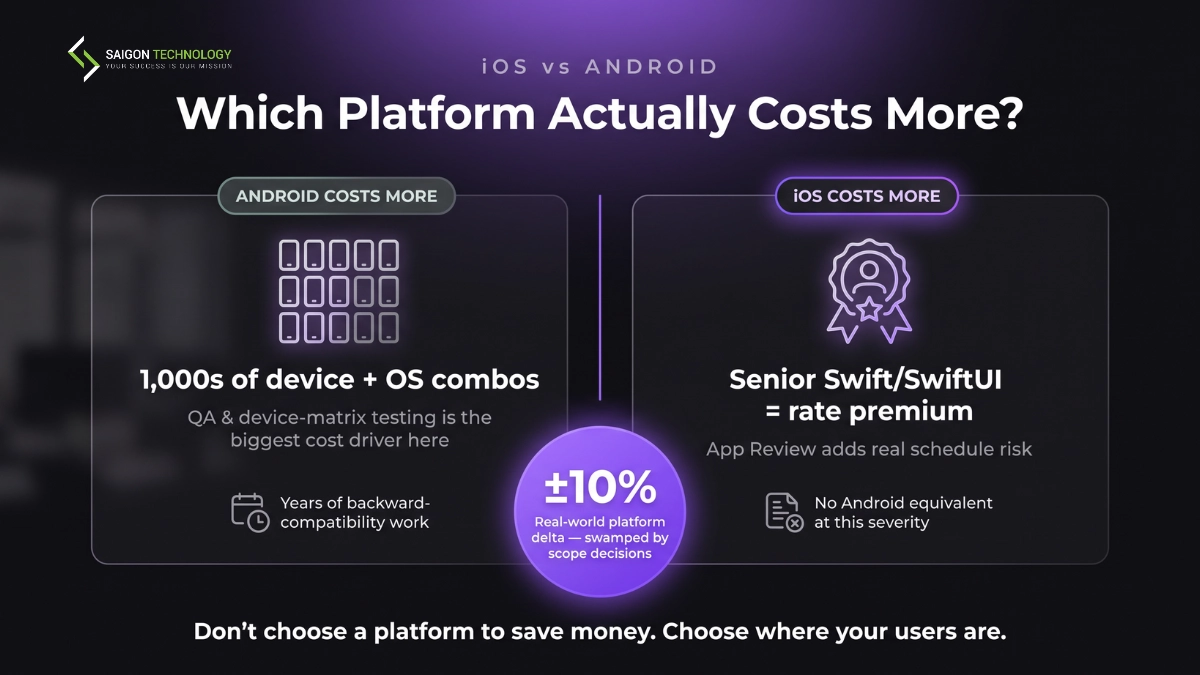
Where Android costs more: QA scope. First, Android spans thousands of active device and OS-version combinations. By contrast, Apple’s is roughly 20–30. As a result, that gap lands squarely on the testing budget, and device-matrix QA is the single largest platform-driven cost difference in a typical build. Additionally, Android users upgrade OS versions far more slowly, so backwards-compatibility work persists for years rather than months.
Where iOS costs more: rates and review risk. Second, senior Swift/SwiftUI engineers command a premium over equivalent Kotlin engineers. Moreover, App Review is a real schedule risk with no Android analogue at the same severity, see the rejection-cycle line above.
What that nets out to. Overall, across our mobile delivery history, for a like-for-like business app built by the same team to the same quality bar, the platform delta is small, usually inside ±10%, and it is swamped by scope decisions. Specifically, the apps where the delta gets large are the ones at the extremes: heavy device-fragmentation exposure pushes Android up, while heavy compliance or review-sensitive functionality pushes iOS up.
In short, the practical conclusion: do not choose a platform to save money. Ultimately, the saving is inside the noise. Instead, choose on where your paying users are, then control cost through scope, team seniority and location, the three levers that actually move the number.
iPhone App Development Cost by Feature
Generally, feature-level pricing varies more by implementation depth than by category. Below, the tables show typical native iOS costs. However, add 25–35% if you need cross-platform parity through a shared React Native or Flutter codebase.
User Authentication Features
| Feature | Cost (USD) | Timeline |
| Email/password login | $1,000 – $2,500 | 2–4 days |
| Sign in with Apple / Google / Facebook | $1,500 – $3,500 | 3–5 days |
| Biometric (Face ID / Touch ID) | $1,000 – $2,000 | 1–3 days |
| Multi-factor authentication (MFA) | $2,000 – $5,000 | 5–8 days |
| SSO / SAML enterprise auth | $5,000 – $12,000 | 2–4 weeks |
Communication and Real-time Features
| Feature | Cost (USD) | Timeline |
| Push notifications (APNs) | $1,500 – $4,000 | 3–5 days |
| In-app chat (1:1 messaging) | $8,000 – $20,000 | 3–4 weeks |
| Group chat / channels | $15,000 – $35,000 | 4–7 weeks |
| Video calling (WebRTC / Agora) | $12,000 – $40,000 | 4–7 weeks |
| Voice calling / VoIP | $8,000 – $25,000 | 3–5 weeks |
Payment and Commerce Features
| Feature | Cost (USD) | Timeline |
| Apple Pay integration | $2,000 – $5,000 | 3–5 days |
| Stripe / third-party payment gateway integration | $3,500 – $8,000 | 1–2 weeks |
| In-app purchase + subscriptions (StoreKit 2) | $3,000 – $7,500 | 1–2 weeks |
| Shopping cart + checkout flow | $6,000 – $18,000 | 2–3 weeks |
| Multi-currency + tax logic | $5,000 – $12,000 | 2–4 weeks |
Location, Media and Sensor Features
| Feature | Cost (USD) | Timeline |
| GPS + maps (MapKit / Google Maps) | $3,000 – $10,000 | 1–3 weeks |
| Geofencing | $4,000 – $12,000 | 2–3 weeks |
| Camera + photo/video capture | $2,500 – $8,000 | 1–2 weeks |
| Barcode / QR scanning | $2,000 – $5,000 | 3–5 days |
| BLE / Bluetooth device pairing | $5,000 – $15,000 | 3–5 weeks |
| HealthKit integrations | $4,000 – $12,000 | 2–4 weeks |
Data and Sync Features
| Feature | Cost (USD) | Timeline |
| Offline mode + local storage | $6,000 – $18,000 | 2–5 weeks |
| Advanced database integration + real-time sync (Firebase / CloudKit) | $5,000 – $15,000 | 2–4 weeks |
| Advanced search + filtering | $4,000 – $12,000 | 2–3 weeks |
| Real-time analytics dashboard (in-app) | $6,000 – $18,000 | 3–5 weeks |
| Admin panel development / CMS | $10,000 – $30,000 | 4–8 weeks |
Where the Money Goes: Cost by Development Phase
In practice, a typical iOS build distributes cost across five development stages. Therefore, use this to spot proposals that under-invest in the phases that protect your delivery.
| Phase | % of budget | Cost on $75K project | Cost on $150K project |
| 1. Discovery & scoping | 5–8% | $3,750 – $6,000 | $7,500 – $12,000 |
| 2. UI/UX design | 15–20% | $11,250 – $15,000 | $22,500 – $30,000 |
| 3. Development (iOS + backend) | 50–60% | $37,500 – $45,000 | $75,000 – $90,000 |
| 4. QA & testing stage | 12–18% | $9,000 – $13,500 | $18,000 – $27,000 |
| 5. Deployment & launch | 3–7% | $2,250 – $5,250 | $4,500 – $10,500 |
Notably, Phase 4 is where budgets get cut and where the cut is most expensive. For this reason, our mobile app testing practice treats device-matrix coverage as scope, not as a percentage to squeeze.
How Long Does iOS App Development Take?
A simple iOS app takes 1.5–3 months. A medium-complexity app takes 3–6 months. A complex or enterprise-grade app takes 6–15 months. Budget and timeline are the same conversation: the phase percentages above map onto calendar weeks roughly as follows.
| Phase | Simple / MVP | Medium | Complex / Enterprise |
| Discovery & scoping | 1–2 weeks | 2–3 weeks | 3–6 weeks |
| UI/UX design | 2–4 weeks | 4–8 weeks | 8–14 weeks |
| Development (iOS + backend) | 4–8 weeks | 10–18 weeks | 20–40 weeks |
| QA & testing | 1–3 weeks | 3–6 weeks | 6–12 weeks |
| App Store submission & review | 3–7 business days | 1–2 weeks | 2–4 weeks |
| Total | 1.5–3 months | 3–6 months | 6–15 months |
Notably, three things stretch these numbers, and none of them are coding speed.
First, regulated apps run 25–40% longer than equivalent unregulated ones because compliance work lands in design, development and testing simultaneously, not in a phase of its own.
Second, backend is consistently underestimated, authentication, databases, APIs and admin panels routinely take as long as the user-facing app.
Finally, App Review belongs in your launch date, not your development timeline; therefore, build in a remediation cycle if your app touches subscriptions, user-generated content or health claims.
How Much Does an iOS Developer Cost by Region?
Above all, team location is the single biggest lever on the cost of iOS app development. In fact, the same feature scope, built to the same quality bar, can cost 5x more in one region than another. For a broader cross-market view, see our global software outsourcing rates report.
| Region | Junior hourly | Senior hourly | Simple app cost |
| United States | $80 – $120 | $150 – $250 | $70,000+ |
| Western Europe (UK, DE, NL) | $70 – $110 | $120 – $180 | $55,000+ |
| Australia | $80 – $120 | $130 – $200 | $60,000+ |
| Eastern Europe (Poland, Ukraine) | $30 – $50 | $60 – $90 | $30,000+ |
| India | $20 – $40 | $40 – $60 | $20,000+ |
| Vietnam | $22 – $32 | $32 – $46 | $25,000+ |
Importantly, read the bottom two rows carefully. Typically, a floor materially below $25,000 means junior-only delivery with no architectural oversight, which is where rework costs are born. Therefore, match seniority before you compare headline rates.
Rate is only half the picture. Your total delivery cost also depends on the outsourcing model you choose. Staff augmentation puts you in charge of the process. A dedicated development team puts a full unit with a delivery lead on your project. An Offshore Development Center (ODC) sets up a long-term dedicated bench, often with a build-operate-transfer (BOT) path if you want to eventually own the team.
Compliance and Security Cost Overhead (HIPAA, PCI-DSS, GDPR)
Generally, regulated iOS apps carry a 15–30% compliance premium on top of base build cost. However, this is not paperwork. Instead, it is engineering time for encrypted data storage, audit logging and standards implementation.
| Framework | Applies to | Cost premium | Key engineering work |
| HIPAA + HITECH | US healthcare | +20–30% | AES-256 encrypted data storage, audit logging, PHI handling, Business Associate Agreements, HL7/FHIR interop |
| PCI-DSS | Payment processing | +15–25% | Tokenization, network segmentation, penetration testing, cardholder data isolation |
| GDPR | EU user data | +10–20% | Consent management, right-to-erasure workflows, data residency, breach notification |
| KYC / AML | Fintech onboarding | +15–25% | Identity verification, sanctions screening, transaction monitoring, third-party integrations |
| HL7 / FHIR | Healthcare interop | +10–15% | Standards-based data exchange, EHR integration |
For example, HealthCare Connect, our WebRTC-based teleconsultation platform, handles 50,000+ patient interactions per month with HIPAA and PDPA compliance built into every layer. Admittedly, certification work adds engineering time, but priced upfront it stays predictable, not a surprise line item halfway through the build.
What Does an iPhone App Cost in Your Industry?
In addition, category-specific cost ranges shift by industry, driven by compliance, integration complexity and depth of specialization.
| Industry | Cost range (USD) | Key drivers |
| Healthcare | $60,000 – $300,000+ | HIPAA, HL7/FHIR, HealthKit integrations, BLE for RPM, Voice AI |
| Fintech | $80,000 – $400,000+ | PCI-DSS, KYC/AML, Open Banking, real-time analytics |
| Wealth & Trading | $150,000 – $400,000+ | Real-time market data, GDPR, portfolio + custodian integration |
| E-commerce & Retail | $40,000 – $180,000 | Catalog scale, payment gateway integration, recommendation engines |
| Logistics & Fleet | $50,000 – $200,000 | Real-time GPS, offline mode, ERP/SAP integration, IoT |
| Preventive Health & Fitness | $50,000 – $250,000 | HealthKit, BLE pairing, wearables, Apple Watch |
AI Feature Costs, The New Line Item in 2026
Today, AI is no longer an exotic add-on in iPhone app development cost planning. Instead, it is a standard line item you should budget for upfront. Notably, AI/ML specialists carry a premium over baseline iOS engineering rates because of the specialization.
| AI feature | Cost add-on (USD) | Timeline add-on |
| On-device ML (Core ML, Vision) | $15,000 – $40,000 | 3–6 weeks |
| LLM integration (ChatGPT, Claude via API) | $5,000 – $20,000 | 2–4 weeks |
| Voice AI (Whisper, custom STT/TTS) | $10,000 – $35,000 | 3–6 weeks |
| Computer Vision (OCR, face recognition) | $12,000 – $45,000 | 4–8 weeks |
| AR features (ARKit, Reality Composer) | $20,000 – $80,000 | 6–12 weeks |
| Generative UI (dynamic layouts) | $8,000 – $30,000 | 2–5 weeks |
| Predictive analytics (Core ML + backend) | $12,000 – $35,000 | 4–8 weeks |
Unfortunately, retrofitting on-device AI into an app not designed for it can double the integration cost. Therefore, if AI is on your roadmap, scope it into architecture from day one. At Saigon Technology, we ship AI as part of our engineering workflow, not as a bolt-on service.
Native iOS vs Cross-Platform: Cost and Trade-Off Comparison
Importantly, the native vs cross-platform choice affects both your initial cost and long-term maintenance costs.
| Dimension | Native iOS (Swift/SwiftUI) | Cross-platform (React Native / Flutter) |
| Base cost | $25,000–$250,000 (iOS only) | $35,000–$170,000 (iOS + Android) |
| Time to market | Platform-specific development | Typically 20–30% faster for shared iOS and Android development |
| Performance | Excellent for graphics, AR, Core ML and hardware-intensive apps | Excellent for most business applications |
| Access to new iOS APIs | Available immediately after Apple releases them | Typically available after framework support is added |
| Best for | Healthcare, fintech, gaming, AR/VR, AI, enterprise apps | MVPs, marketplaces, eCommerce, SaaS, internal tools, dual-platform business apps |
For example, three of our own shipped mobile products show where the cross-platform route holds up: EVNT Mobile, a nightlife and events discovery app on iOS and Android; Genesis Sun Mobile, a UK education app built in Flutter; and the TECO app, a React Native build with offline data capability. Notably, all three are content-and-sync products rather than hardware-intensive ones, which is exactly the profile where a shared codebase pays for itself.
In short, go native when you need deep Apple API use, regulated compliance, or iOS-only scope. Conversely, go cross-platform when you ship iOS and Android together and native APIs are not on your critical path. For more, our native app development guide covers the technical trade-offs in more depth.
Business Value: Why iOS Development Delivers Higher ROI
However, cost is only half the equation. Equally important, the other half is what your app returns. Notably, iOS as a platform consistently outperforms alternatives on a few business dimensions worth knowing before you scope.
Revenue generation per user
In general, iOS users spend meaningfully more inside apps than Android users. As a result, higher in-app purchase conversion and higher subscription retention shift the payback math on consumer apps, especially fintech, health and premium SaaS.
Premium brand association
Additionally, iOS-only or iOS-first strategies signal quality, especially in North America, Western Europe and Australia. For B2B apps or wealth-management products, that association drives higher trial-to-paid conversion.
Security certifications and platform trust
Furthermore, iOS ships with strong security defaults: Secure Enclave, App Transport Security, sandboxing. Consequently, that reduces the engineering cost of meeting HIPAA, PCI-DSS and GDPR requirements compared to building the same guarantees on other platforms.
Access to premium hardware
Notably, ARKit, Core ML on the Neural Engine, and HealthKit integrations with Apple Watch and Apple Vision Pro all live inside the iOS ecosystem. Therefore, if your product roadmap includes spatial computing, on-device AI or health sensor integration, iOS is the shortest path to production.
Faster user adoption of updates
Typically, iOS users upgrade to new OS versions within months. In other words, when you ship a feature that depends on iOS 18 or iOS 19 APIs, most of your user base can use it almost immediately. As a result, long-term maintenance costs are lower.
Ultimately, if your goal is user growth at any cost, Android will always look better on install volume. Conversely, if your goal is revenue, retention and premium positioning, iOS remains the higher-ROI platform in 2026.
Hidden Costs of iOS App Development Most Quotes Miss
Unfortunately, experienced buyers have all been hit by “hidden” cost items after signing. In reality, they are only hidden because vendors leave them off first-draft proposals. Therefore, add these to any base estimate you receive.
- Apple Developer Program: $99/year for Individual or Organization accounts. Required to publish apps on the App Store.
- App Store commission: Apple charges up to 30% on eligible digital purchases, with reduced rates available for qualifying developers and subscriptions.
- App Review remediation: budget one to two rejection cycles on apps involving subscriptions, user-generated content or health claims, roughly $2,000–$6,000 plus one to three weeks of schedule.
- Third-party services: Firebase, Stripe, Twilio, SendGrid, Google Maps, analytics and authentication platforms typically cost $150–$1,500+ per month.
- Cloud hosting & infrastructure: servers, databases, storage, CDN, monitoring and backups can add $200–$5,000+ per month, depending on usage.
- Development tools: design, collaboration and monitoring tools such as Figma, Jira, GitHub and Sentry typically cost $200–$800 per month.
- Annual iOS updates: SDK upgrades, compatibility testing and App Store compliance generally cost $5,000–$20,000+ per year.
- Ongoing maintenance: bug fixes, security patches, API updates and performance improvements typically require 15–25% of the initial development cost annually.
- Marketing & ASO: user acquisition and App Store Optimization are separate from development, with launch budgets often starting at $10,000+.
- Legal & compliance: privacy policies, contracts and regulatory compliance (such as GDPR, HIPAA or PCI DSS) may add $2,000–$15,000 per market.
How to Reduce iOS App Development Cost Without Cutting Quality
Fortunately, you have more room to reduce cost than most vendors will tell you. In fact, six strategies consistently deliver 30–60% savings without sacrificing product quality.
- Ship an MVP first. Cut 40–60% of initial scope. Real MVPs launch in 3–4 months at $25K–$50K. See our MVP Development approach for the scope-slicing method we use.
- Choose the right outsourcing model. A dedicated development team saves 30–40% versus staff augmentation on 6+ month builds because coordination overhead lives inside the team, not on your calendar.
- Work with senior offshore teams. Vietnam and Eastern Europe both offer senior iOS talent at a fraction of onshore rates. Match seniority when comparing offshore vendors, not just headline hourly rate. Our Vietnam ODC Services run on a senior-first model by default.
- Lean on Apple’s native services. CloudKit for sync, Sign in with Apple for auth, StoreKit 2 for subscriptions. These reduce third-party licensing fees and integration hours.
- Design system first, screens second. Building a component library up front prevents mid-sprint design rework. Typical saving: 15–20% of the design budget.
- Automate testing from day one. CI/CD plus automated iOS testing cuts QA cost 25–30% and catches regressions before they reach production.
In addition, for enterprises that want to own the team long-term, a Build-Operate-Transfer engagement is often the lowest total cost of ownership over 3–5 years. To date, we have transferred 40+ developers to client entities via the BOT model.
Why Saigon Technology Delivers iOS Apps at Lower Cost
Three differentiators, not company history:
- Senior-first hiring. Every offshore team is anchored by senior leads with 8+ years of shipped iOS work, drawn from the top 1% of shortlisted software engineers, screened for English proficiency, soft skills, logical thinking and engineering depth, with client interviews before onboarding.
- AI-driven delivery. AI is operationalized inside our workflow, from code review to test generation, cutting engineering overhead on every build.
- Transparent $22–$46/hour pricing. Same rate at any scale. No layered rate cards, no volume markups. NDA and a 2-week risk-free trial, backed by Microsoft Gold Partner status and ISO 9001 and ISO 27001 certification issued by BSI (UK).
See our full iOS development capability for scope, stack and engagement models.
Frequently Asked Questions
1. How much does an iOS developer cost per hour?
An iOS developer costs $22–$46/hour in Vietnam, $40–$60/hour in India, $60–$90/hour in Eastern Europe, $120–$180/hour in Western Europe, and $150–$250/hour in the United States for senior-level Swift/Objective-C specialist rates. AI/ML specialists carry a premium over baseline offshore iOS rates because of the specialization. Rates scale with seniority: mid-level engineers typically sit 40–50% below senior rates in the same region.
2. Is it cheaper to build iOS first, or iOS and Android together?
iOS-first is cheaper upfront and more expensive in total if you know you need both. A single native iOS build costs 30–40% less than two native builds, but a shared React Native or Flutter codebase covering both platforms usually lands below the cost of two sequential native builds. Build iOS-first when you are validating demand or your paying users are concentrated on iOS; build cross-platform from day one when dual-platform is a committed requirement and native APIs are not on your critical path.
3. Do iPad, Apple Watch or Apple Vision Pro versions add cost?
Yes. An estimate based on iPhone app development cost only does not include additional Apple platforms. An iPad version typically adds 10–20% and 2–4 weeks, an Apple Watch app adds 15–25% and 3–6 weeks, while Apple Vision Pro (visionOS) can increase costs by 30–60% and 8–12 weeks. If you are planning a multi-device ecosystem, treat Vision Pro as a separate development phase rather than part of the initial iPhone app.
4. What is the average cost of iOS app development in 2026?
The average cost to develop an iPhone app in 2026 sits around $80,000–$120,000 for a medium-complexity app built by a mid-market offshore or nearshore agency. Simple utility apps run $25K–$50K. Enterprise or regulated apps regularly exceed $250K. Use the estimation formula earlier in this guide to sanity-check any vendor quote against your own feature scope.
Conclusion
Ultimately, the cost of iOS app development in 2026 comes down to three levers you control: complexity, region and feature depth. For example, a well-scoped MVP starts at $25K in Vietnam. In contrast, a regulated enterprise app can exceed $400K in the US. Overall, everything in between is a scope conversation, not a mystery.
Therefore, use the estimation formula, phase allocation and regional rates in this guide to sanity-check any vendor proposal you receive. Then, when you are ready to move from estimate to delivery, the next step is a scoped brief and 2–3 vendor conversations against that same brief.
Alternatively, if you would rather skip the guesswork, our team can turn your product brief into a fixed-scope iOS app development quote in 48 hours.
Get a fixed-scope iOS app development estimate in 48 hours → Contact Saigon Technology.


Related articles
50+ Startup App Ideas for 2026: Validate Before You Build
 Tam Nguyenthe - UI/UX Designer
  07 Feb 2023
Popular Cross-platform App Development Frameworks in 2026
31 Dec 2024 
Mobile App Development Process: A Ultimate Guide for Success
13 Jan 2025 
17 Mobile App Development Trends for 2026
21 Jan 2025 
App Design in 2026: Best Practices, Trends & Top Tools for Modern Apps
21 Nov 2025 
Hybrid App Development: A Practical Decision Guide for Businesses
27 Jan 2026