




ERP for Real Estate: Modules, Platforms & Custom Options

 Updated on Jul 15, 2026
Most real estate companies do not fail on strategy. They fail on data. Property records live in one system, leases in another, financial reports in spreadsheets, and tenant conversations in email. As the portfolio grows, the reconciliation work grows faster than the portfolio itself. An ERP for real estate solves that structural problem by turning fragmented tools into a single operating system for the business. If you’d rather skip straight to a delivery view, see our real estate software development services.
This guide is written for developers, REITs, commercial landlords, and property management firms evaluating whether the investment makes sense, which platforms to shortlist, and when a custom build outperforms an off-the-shelf product. It covers modules, top vendors, cost ranges, implementation risks, and the growing role of AI in modern platforms.
Key Takeaways
- A real estate ERP unifies property, lease, financial, project, and CRM data in a single platform.
- The system starts to beat point tools once a portfolio passes roughly 250 units or spans multiple entities (a common rule of thumb, not a hard threshold).
- Mid-market implementations typically run $50K–$400K over 3–6 months; custom builds range from $150K to $1.2M+.
- Most enterprise operators land on a hybrid: a packaged core with custom integrations and AI extensions built on top.
What Is ERP for Real Estate?
An ERP for real estate is an integrated software system that unifies property, lease, financial, project, and CRM data into a single source of truth. It replaces disconnected point tools with one platform that manages the full asset lifecycle, from acquisition and development through leasing, operations, and disposition.
The category is often confused with property management software (PMS) and customer relationship management (CRM) tools. The three systems overlap but serve different scopes.
| System | Primary scope | Best for |
| Real estate ERP | Full business operations: finance, property, lease, projects, CRM, compliance | Developers, REITs, multi-entity operators; portfolios above roughly 250 units |
| Property management software (PMS) | Day-to-day operations of a portfolio: rent collection, maintenance, tenant portal | Small to mid-size landlords and property managers |
| Real estate CRM | Deal pipeline, contacts, communications | Brokers, sales-focused teams |
ERP is the widest system of the three. It absorbs financial management, project accounting, document management, and portfolio-level reporting that a standalone PMS or CRM can’t handle at scale.
Why Do Real Estate Companies Need ERP Software?
Real estate operations run on data that lives in too many places at once. Once a portfolio grows past a handful of properties, the operational cost of fragmented tools shows up in every finance close, every lease renewal, and every board report. The table below maps recurring business challenges to what the system solves in each case.
| Business challenge | ERP solution |
| Multiple disconnected systems | Unified platform with a centralized database |
| Manual lease administration | Automated workflows and rental management |
| Delayed financial reporting | Real-time dashboards and one-view reporting |
| Poor maintenance coordination | Integrated asset management |
| Portfolio growth | Multi-entity management |
| Compliance complexity | Automated audit trails and regulatory compliance |
Data silos are the most common trigger for the investment. When accounting, leasing, and property teams each maintain their own spreadsheets, financial oversight becomes a monthly reconciliation exercise instead of a live view of the business. A unified platform closes those reporting gaps and gives leadership one number for portfolio performance, not three.
Manual lease administration is the second recurring pain point. Rent escalations, CAM reconciliations, and lease renewals are highly repeatable workflows that eat senior time when handled by hand. Automating them reduces revenue leakage and frees the team for higher-value work.
Portfolio growth is what finally forces the decision. A portfolio with multiple entities, jurisdictions, and asset classes can’t run on point tools without introducing reporting risk. Multi-entity management, standardized business processes, and role-based access control are the capabilities that make growth safe.
What Are the Core Modules of a Real Estate ERP?
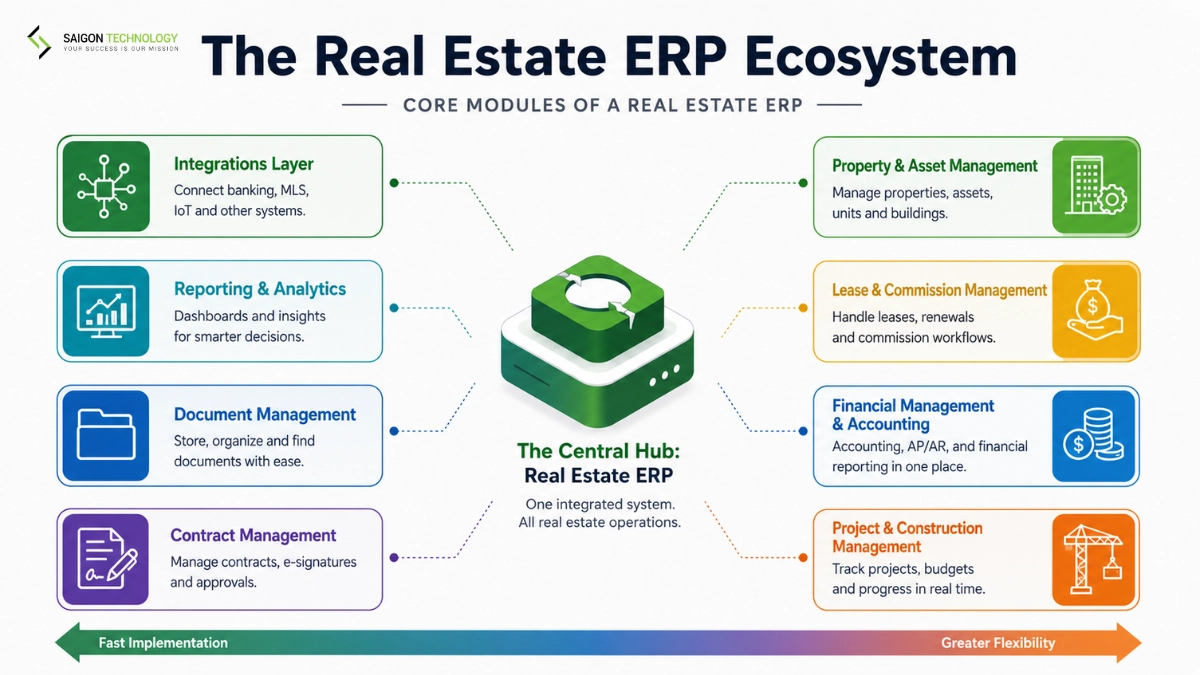
Think of the system as a set of modules: each one a self-contained capability, each one talking to the others through a shared data layer. The eight below cover the standard enterprise scope.
1. Property and Asset Management
The master registry for every property in the portfolio, covering units, floors, buildings, and parcels with occupancy, physical attributes, valuation history, and lifecycle status. Every other module links back to this record. Without a clean asset master, the rest of the system produces unreliable reporting.
2. Lease and Commission Management
The lease module handles the full lifecycle: creation, renewals, escalations, CAM reconciliation, broker commissions, and tenant communications. Modern platforms build IFRS 16 and ASC 842 lease accounting in, with automated straight-line rent and right-of-use asset calculations. This is where the operational and accounting sides of the business meet.
3. Financial Management and Accounting
General ledger, AP/AR, budgeting, procurement workflows, and multi-entity, multi-book accounting live here, alongside property-level P&L, cost allocation, and revenue recognition for lease income, service charges, and sales.
For the CFO, strong financial consolidation across entities is the single most valuable output of the whole system, with Gartner predicting a 30% faster financial close by 2028 for organizations adopting cloud ERP with embedded AI.
4. Project and Construction Management
Development accounting, contractor and subcontractor management, draw schedules, RFI and change orders, forecasting, and progress billing. Development spend ties directly into the asset ledger, so job costing and capex visibility are available in real time rather than at quarter-end.
5. CRM, Lead, and Sales Management
The CRM module manages prospect tenants, buyers, and brokers, tracking the full deal pipeline from lead capture through contract signing. On close, deals hand off automatically to the lease or sales module. That handoff removes the double entry that plagues most real estate operations.
6. Document and Contract Management
A central repository for leases, contracts, permits, insurance certificates, and correspondence. It offers version control, e-signature integration (typically DocuSign), and the audit trail required for SOX, GDPR, and local regulatory compliance. Role-based access control and tenants’ personal data protection sit inside this module too.
7. Reporting, BI, and Analytics
Standard real estate reports (rent roll, aged receivables, occupancy, NOI, cap rate) plus configurable dashboards, usually surfaced through Power BI or Tableau connectors. Natural-language querying increasingly lets non-technical users ask questions of portfolio data directly.
8. Integrations Layer
Buyers underestimate this module more than any other, and it decides whether the project succeeds in production. The platform needs to plug into MLS, DocuSign, QuickBooks, Salesforce, banking APIs, building management systems (BMS), BIM tools, HRMS, and BI and analytics tools. In our delivery experience, weak integration coverage is the most common reason enterprise ERP projects fall short of expected ROI.
The eight-module scope at a glance:
| Module | What it does | Typical integrations |
| Property and asset management | Master registry of every asset | GIS, valuation tools, BMS |
| Lease and commission management | Lifecycle, IFRS 16, CAM, commissions | DocuSign, tenant portals |
| Financial management and accounting | GL, AP/AR, multi-entity, procurement | QuickBooks, banks, tax |
| Project and construction management | Cost, contractors, draws, job costing | Procore, banking, BIM |
| CRM, lead, and sales management | Deal pipeline | Salesforce, HubSpot |
| Document and contract management | Contracts, audit trails | DocuSign, cloud storage |
| Reporting, BI, and analytics | Rent roll, NOI, dashboards | Power BI, Tableau |
| Integrations layer | Everything else | MLS, IoT/BMS, HRMS, APIs |
For a deeper look at how the property-operations side is scoped separately from ERP, see our companion guide on property management software development.
Which ERP Is Best for Real Estate? Top Platforms Compared
There is no universally best platform. The right choice depends on portfolio size, asset mix, deployment preference, and the existing tech stack. The table below compares the seven platforms most enterprise buyers evaluate in 2026.
| Platform | Best For | Deployment | Key Strengths | Trade-offs | Estimated First-Year Cost (USD)* |
| NetSuite | Mid-market to enterprise developers and property operators (250–5,000+ units) | Cloud (SaaS) | Strong financial management, flexible SuiteApps ecosystem, scalable cloud platform | Requires SuiteApps or partner customization for advanced property management workflows | $50,000–$200,000 |
| SAP S/4HANA Real Estate Management | Large enterprises with global, multi-country portfolios (1,000+ units) | Cloud or on-premise | Comprehensive financials, multi-entity consolidation, global compliance | Long implementation timeline and high total cost of ownership | $500,000–$5,000,000+ |
| Oracle ERP Cloud | Large enterprises with complex financial operations (1,000+ units) | Cloud | Advanced financial management, project accounting, enterprise scalability | Real estate functionality often relies on partner extensions | $250,000–$2,000,000+ |
| Microsoft Dynamics 365 | Mid-market organizations in the Microsoft ecosystem (100–2,000+ units) | Cloud | Familiar UX, Power BI integration, extensive ISV marketplace | Real estate capabilities depend on third-party ISVs | $50,000–$300,000 |
| Yardi Voyager | Property owners and operators of any portfolio size | Cloud | Purpose-built for property management with comprehensive leasing and operations | Less flexible for non-real-estate business processes | $30,000–$250,000 |
| MRI Software | Commercial, mixed-use, and investment portfolios (250–5,000+ units) | Cloud or on-premise | Mature lease management, investment accounting, and property operations | Some modules have an older user interface | $50,000–$300,000 |
| JD Edwards EnterpriseOne | Construction-focused developers and existing Oracle customers (500–5,000+ units) | Cloud or on-premise | Strong project accounting, construction management, and real estate capabilities | Legacy user experience; modern integrations may take extra effort | $200,000–$1,000,000+ |
* Estimated ranges based on vendor list pricing, implementation-partner quotes, and Saigon Technology project delivery experience as of 2026. Actual costs vary with scope, user count, and customization depth.
Two takeaways emerge from the comparison.
- Flexible ERP platforms (NetSuite, SAP, Oracle, Dynamics 365) offer breadth and multi-entity consolidation but need configuration or SuiteApps to handle real estate specifics.
- Real-estate-specific systems (Yardi, MRI) deliver property operations out of the box but are less flexible for businesses that also run non-real-estate activity, such as facility asset management or supplier management for a broader operation.
Whichever way you lean, score at least six criteria in the evaluation: functional fit, integration flexibility, vendor industry expertise, scalability requirements, customization ceiling, and total cost of ownership.
Off-the-Shelf vs. Custom Real Estate ERP: Which Is Right for Your Business?
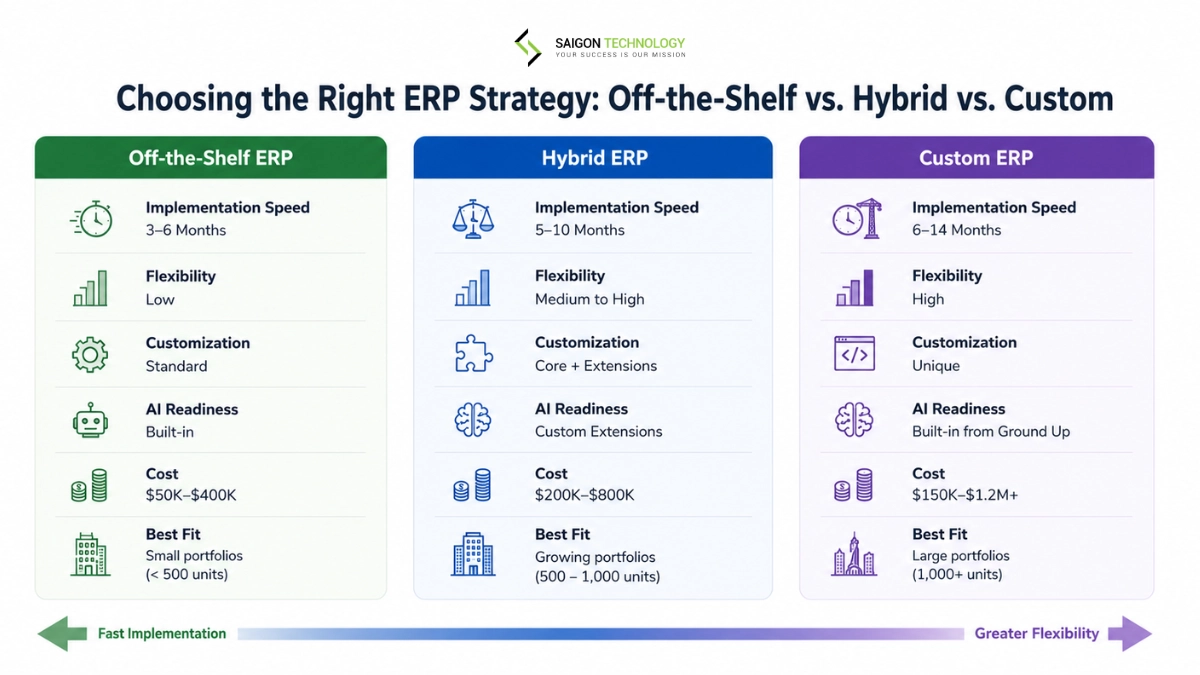
For most real estate companies, the decision isn’t simply whether to buy or build an ERP. The more practical question is whether an off-the-shelf platform, a custom-built solution, or a hybrid architecture best fits the organization’s portfolio, operational complexity, and long-term growth plans.
| Situation | Choose off-the-shelf | Choose custom ERP | Choose hybrid |
| Standard leasing, accounting, and property management workflows for portfolios under 500 units | ✓ | ||
| Need to launch in <90 days | ✓ | ||
| Budget under $100,000 for implementation | ✓ | ||
| Mixed-use portfolios or specialized asset classes with unique workflows | ✓ | ✓ | |
| Portfolio with 1,000+ units, multiple legal entities, or operations across multiple regions | ✓ | ✓ | |
| Proprietary investment, leasing, or asset management workflows create a competitive advantage | ✓ | ||
| AI-powered forecasting, predictive maintenance, or intelligent workflow automation is a strategic priority | ✓ | ✓ | |
| Existing SAP, Oracle, NetSuite, or Microsoft Dynamics environment must be retained | ✓ | ||
| Commercial ERP satisfies most requirements, but critical workflows require custom extensions | ✓ |
Off-the-shelf works when workflows are standard and time-to-value matters more than differentiation. So when does custom win? When the platform is central to the business model, when the portfolio outgrows what packaged software supports, or when AI and automation need to be built in from the ground up. Hybrid, the pattern most enterprise operators end up with, means buying the core and building a custom integration layer, dashboards, and AI extensions on top.
For teams weighing the trade-off at the portfolio level, our build vs buy software guide walks through the same decision framework in more depth.
Where AI Actually Moves the Needle in ERP
AI is becoming a core capability in modern platforms. McKinsey’s research suggests AI agents have the potential to reduce ERP implementation effort by at least 50% and cut program duration by half. Six use cases show measurable ROI in 2026 real estate operations:
- Lease abstraction and document intelligence. LLM-based extraction pulls clauses, dates, escalations, and options out of PDF leases in minutes, turning onboarding from hours of manual abstraction per lease into a quick review pass.
- Predictive maintenance. BMS and IoT sensor data feeds an ML model that forecasts equipment failure and generates work orders before assets break, which lowers maintenance costs while tenant satisfaction climbs.
- Deal pipeline scoring. For developers and brokers, ML models score inbound deals against historical closure rates so senior time flows to the highest-probability opportunities.
- Automated financial reconciliation. AI matches bank transactions to ledger entries and flags the exceptions. Weeks of manual matching each close cycle shrink to a review queue.
- Natural-language reporting. Executives ask the system directly (“Which properties dropped occupancy last month?”) and get an answer in seconds, instead of waiting on a new dashboard for every question.
- Tenant CRM copilots. AI classifies service requests, predicts churn risk, and drafts responses. Property managers cover more units at the same headcount.
For teams building these capabilities as extensions on top of NetSuite, Dynamics 365, Yardi, or a custom platform, AI development services is where the work sits.
How Much Does a Real Estate ERP Cost, and How Long Does It Take?
Cost breaks into three components: licensing (or build cost), implementation, and ongoing support. Here’s what enterprise buyers in the US market are paying in 2026.
| Approach | Typical Initial Investment (USD) | Typical Timeline | Ongoing Cost |
| Off-the-shelf SaaS ERP license | $80–$300 per user/month | Contract-based | Included or subscription renewal |
| Off-the-shelf ERP implementation | $50K–$400K | 3–6 months | 15–22% of annual license cost |
| Custom-built ERP | $150K–$1.2M+ | 6–14 months | 15–20% of development cost per year |
| Hybrid (commercial ERP + custom extensions) | $200K–$800K | 5–10 months | Software subscription + support and maintenance |
Beyond the upfront numbers, budget-versus-actual tracking, capex visibility, and financial controls are the three levers that most often determine whether ROI shows up on schedule. Total cost of ownership should also include customization scope, integration development, training, and change management.
Common Implementation Challenges (and How to Mitigate Them)
ERP implementations have a well-documented tendency to run over budget or schedule. McKinsey analysis finds that 65 to 80 percent of large tech programs exceed their planned budget or timeline, and Panorama Consulting’s annual ERP report tracks the same overrun pattern across hundreds of implementations every year. The good news? The failure modes are predictable, and every one of them can be mitigated with disciplined planning. Six appear most often in real estate engagements.
| Challenge | Business impact | Mitigation |
| Legacy data migration (spreadsheets, dirty lease records) | Delayed go-live, integrity issues at cutover | 8–12 week data cleansing phase before configuration |
| Integration complexity (MLS, banking, IoT, PMS) | Cost overruns, missing workflows post-launch | Map every integration upfront; treat integrations as a first-class module |
| User adoption resistance (property managers, brokers) | Low usage, ROI never materializes | Involve end users in configuration; phased rollout by property or region |
| Over-customization | Locked out of upgrades; ballooning support cost | Configure before customize; document every deviation |
| Multi-jurisdiction compliance (IFRS 16, ASC 842, GDPR, local tax) | Audit failures, reporting errors | Pick a platform with native support for target markets; validate with tax and legal counsel early |
| Vendor lock-in | Painful and expensive migration if the platform stops fitting | Contract clear data-export rights; abstract integrations via APIs |
Legacy data migration is the most common reason projects miss their go-live date. Inconsistent lease records, duplicate tenant information, and spreadsheet-based workflows often require significant cleansing before migration. A dedicated data assessment and cleansing phase before system configuration greatly reduces implementation risk, and for teams carrying an older on-prem ERP, our 7 R’s of legacy modernization guide covers the migration path options.
Integration complexity and user adoption are the next two major challenges. These platforms connect with banking systems, document management tools, CRM platforms, building management systems, and other business applications. Planning integrations from the start and involving end users early in configuration helps avoid delays while improving long-term adoption.
Successful implementations depend as much on preparation as technology. Based on Saigon Technology’s experience delivering 850+ engineering projects, allocating 8–12 weeks for discovery, business process analysis, data preparation, and integration planning reduces risk before development or configuration begins.
How to Plan Your Implementation (5-Step Framework)
This five-step framework works for both off-the-shelf and custom builds. Follow the steps in order.
- Audit current workflows and pain points. Interview finance, leasing, operations, and IT. Document the systems, spreadsheets, and workarounds each team uses. Quantify the cost of the current state in hours per month and reporting delays.
- Map required modules and must-have integrations. Score each module against portfolio needs. List every system the platform must connect to, with data volumes and update frequency for each.
- Make the buy-vs-build decision. Apply the framework in the earlier section. Get sign-off from finance and IT before moving to vendor selection.
- Choose a vendor or development partner. Complete a 2–4 week discovery phase or proof of concept (PoC) to validate requirements, architecture, timeline, and budget before implementation.
- Phase the rollout. Start with one module (typically financials or lease management) on one entity. Prove ROI in 90 days. Expand quarterly.
Skipping the discovery or PoC phase is a common cause of delays. Validating requirements and technical architecture upfront reduces project risk and avoids costly rework later.
Frequently Asked Questions
1. What Is ERP in Real Estate?
ERP in real estate means running the whole property business (accounting, leasing, projects, and tenant relationships) on one integrated platform instead of separate point tools. The payoff is a single source of truth: one rent roll, one ledger, and one view of portfolio performance across every entity and region.
2. What Are the Top 5 ERPs for Real Estate?
Enterprise buyers in 2026 most commonly shortlist NetSuite, SAP S/4HANA Real Estate Management, Oracle ERP Cloud, Microsoft Dynamics 365, and Yardi Voyager. MRI Software and JD Edwards EnterpriseOne complete the enterprise-tier list. The right choice depends on portfolio size, asset mix, and existing tech stack.
3. How Is It Different from Property Management Software?
An ERP covers the full business (finance, projects, CRM, compliance, and property operations), while property management software focuses on day-to-day portfolio operations such as rent collection, maintenance, and tenant portals. ERP is the wider system, and typically the right choice for developers, multi-entity operators, and portfolios above roughly 250 units.
4. How Much Does Implementation Cost?
Off-the-shelf implementations for the mid-market range from $50K to $400K, with licensing between $80 and $300 per user per month. Custom-built platforms range from $150K to $1.2M+ depending on scope. Ongoing support typically runs 15 to 22 percent of upfront cost per year.
5. How Long Does Implementation Take?
Off-the-shelf implementations take 3 to 6 months for mid-market portfolios. Custom builds take 6 to 14 months from discovery through phased rollout. Hybrid engagements sit in the middle at 5 to 10 months.
6. Is a Custom Build Worth It?
A custom real estate ERP is worth it when the platform is a competitive differentiator, when portfolio scale or unique workflows outgrow packaged software, or when AI and automation are first-class business requirements. For standard workflows on portfolios below 500 units, off-the-shelf is usually the better economic choice. Hybrid builds (an off-the-shelf core with custom extensions) are the most common pattern among enterprise operators in 2026.
Conclusion
The platform decision matters less than the plan around it: the implementation strategy, the integration map, and a system that can scale with the portfolio as it grows. That’s also why hybrid keeps winning in practice; a packaged core delivers the accounting backbone quickly, while custom extensions carry the workflows that actually differentiate the business.
Whether you’re building a custom ERP for real estate, extending an existing platform, or integrating AI into your current ecosystem, Saigon Technology delivers end-to-end real estate software development services backed by 850+ completed projects, ISO 9001 and ISO 27001 certifications, and senior engineering teams at published rates of $28–$46/hour. Share your RFP and we’ll deliver a clickable prototype of your core workflow, an end-to-end solution architecture, and implementation recommendations to help you move forward with confidence.


Related articles

Real Estate App Development in 2026: Cost, Features, Process & Technology Guide
 Thanh (Bruce) Pham - CEO of Saigon Technology
  06 Feb 2025
Custom Software vs Off-the-Shelf Solutions: A Side-by-Side Evaluation Framework
26 Mar 2026 
Staff Augmentation vs Dedicated Team: How to Choose the Right Model (2026)
08 Jun 2026 
Staff Augmentation vs Outsourcing: A CTO’s Decision Framework
09 Jun 2026 
Property Management Software Development: The Complete Custom Build Guide (2026)
15 Jun 2026 
Real Estate CRM Software Development: Architecture, Cost & Build Guide (2026)
17 Jun 2026 
Real Estate MLS Software Development: A 2026 Guide
30 Jun 2026