




Custom Software vs Off-the-Shelf Solutions: A Side-by-Side Evaluation Framework

 Updated on Mar 26, 2026
The real question is not which option is “better.” It is the one that fits your business requirements, timeline, budget constraints, and growth trajectory.
This guide gives you a structured framework to evaluate both paths across seven criteria that actually drive the decision, plus a scorecard you can bring to your next planning meeting.
What Off-the-Shelf Software Actually Includes
Off-the-shelf software, sometimes called commercial off-the-shelf software (COTS) or packaged software, refers to pre-built applications designed for a broad market. Think Salesforce for CRM, SAP for ERP, Shopify for e-commerce, or HubSpot for marketing automation. These products ship with a standard feature set, and you configure them to fit your operations.
“Out of the box” sounds simple, but in practice, most packaged tools require meaningful setup. Configuration options like custom fields, workflow rules, user profiles, and modules can take weeks to dial in for enterprise use. Many vendors offer marketplace plugins, add-ons, and a subscription tier structure that unlocks additional features and functionality over time.
What these tools typically cannot do:
- Replicate unique business processes that fall outside their design assumptions
- Build deep integrations with proprietary or legacy systems
- Satisfy highly specific compliance requirements without workarounds
When the gap between what the software offers and what your team needs grows wide enough, those workarounds become a permanent tax on productivity.
If you are already leaning toward a purpose-built approach and want to understand how tailored software solutions are developed from scratch, this guide covers the full lifecycle from discovery through post-launch maintenance. This article focuses on helping you decide whether that path is the right one.
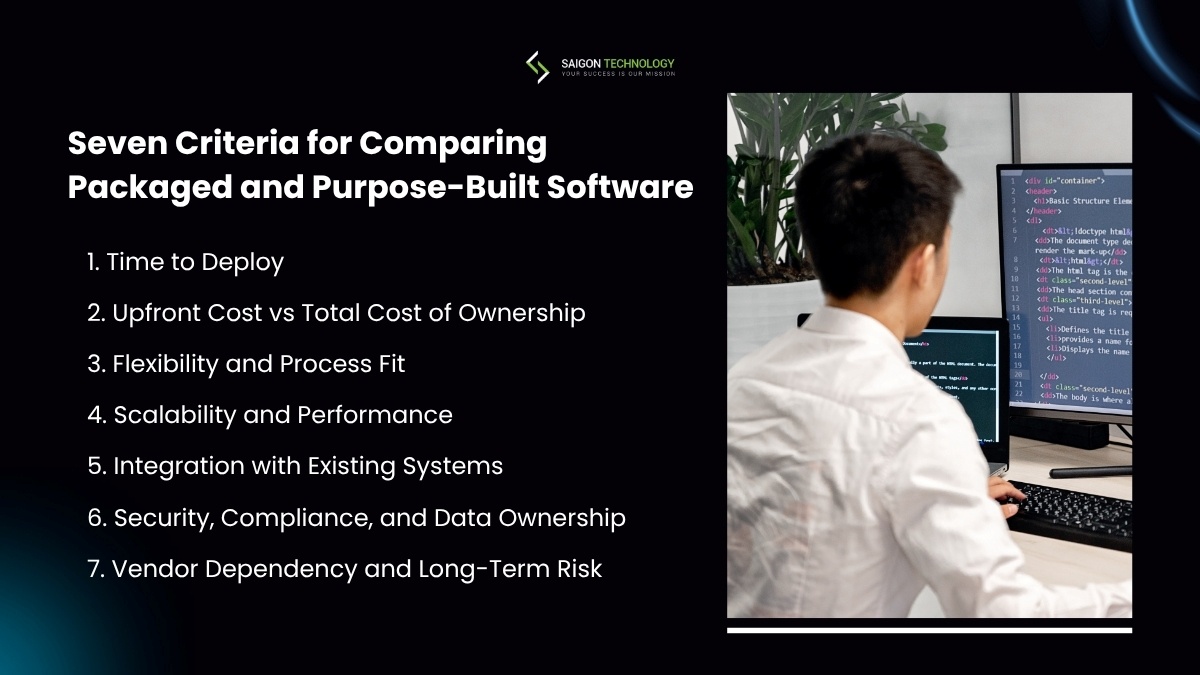
Seven Criteria for Comparing Packaged and Purpose-Built Software
Rather than listing generic advantages and disadvantages, here is a framework you can apply to your specific situation. Each criterion addresses a different dimension of the off-the-shelf vs custom software decision, and they are ordered by how often they determine the outcome in practice.
1. Time to Deploy
Development time is often the first factor teams raise, and for good reason.
Off-the-shelf software can be operational in days to weeks for basic implementations. Enterprise-grade configuration — integrating with your tech stack, migrating data, training teams — typically takes two to six months.
Purpose-built software takes longer. A minimal viable product (MVP) might take three to four months with an experienced development partner. A full-featured platform with custom integrations can take six to twelve months or more, depending on scope.
The trade-off is straightforward: speed versus fit. When you need a working solution by next quarter and the packaged tool covers 80% of your requirements, off-the-shelf wins on this criterion. When a rushed deployment means six months of manual exports and workarounds, the time saved on paper evaporates in practice.
Two patterns worth noting:
- Teams that skip a proper discovery phase to save time on a custom build almost always lose more time later to rework.
- Teams that rush an off-the-shelf deployment without mapping their integration requirements often spend months closing gaps they did not anticipate.
2. Upfront Cost vs Total Cost of Ownership
The initial investment comparison seems obvious: packaged software costs less to start.
Licensing fees or subscription charges for an off-the-shelf tool might run $50 to $500 per user per month. A bespoke project might start at $50,000 for a focused application and reach $500,000 or more for complex enterprise systems.
But the total cost of ownership over three to five years tells a different story. Off-the-shelf costs compound:
- Per-seat subscription fees grow as your team scales
- Premium subscription tiers become necessary for features you assumed were included
- Customization costs for integrations or workflow adjustments add up
A Gartner study on enterprise software found that implementation and ongoing costs often reach two to three times the licensing fees over five years.
Bespoke software has its own cost structure. Beyond the build, you need to budget for ongoing maintenance (typically 15-20% of the original development cost annually), hosting infrastructure, and occasional feature additions. The difference is that you own the asset. There are no subscription fees that increase at renewal, no vendor-imposed user limits, and no third-party licenses you do not control.
The hidden costs most comparisons miss:
On the off-the-shelf side, the highest hidden cost is what experienced teams call the “workaround tax“: the accumulated hours your staff spends on manual effort, data exports between systems, and process adjustments to fit the software’s assumptions rather than your actual workflow. This cost rarely appears in any budget line item, but it is real and ongoing.
On the custom side, the hidden cost is team dependency. You need either an internal engineering team or a reliable development partner to maintain and evolve the software. If that relationship breaks down, you are managing a codebase that requires specialized knowledge.
3. Flexibility and Process Fit
This criterion often becomes the deciding factor for companies with unique business processes or workflow automation needs that packaged tools do not support natively.
Off-the-shelf software is designed for the most common version of a given process. If your sales process, order management, or compliance workflow follows standard patterns, that is a fine fit. Configuration options: custom fields, automations, and user roles – provide reasonable flexibility within the vendor’s framework.
Purpose-built software adapts to your process rather than forcing your process to adapt. The difference matters most when:
- Your workflow is a source of competitive advantage
- You operate in a regulated industry with specific documentation requirements
- Your team has already tried an off-the-shelf tool and found the workarounds unsustainable
A practical test: list the ten most important workflows your team runs daily. For each one, ask whether the packaged tool handles it natively, handles it with configuration, handles it with a workaround, or does not handle it at all. If more than two or three critical workflows fall into the “workaround” or “not possible” category, process fit should weigh heavily in your evaluation.
4. Scalability and Performance
Scalability means different things in different contexts, and this is where generic comparisons fall apart.
Off-the-shelf software scales easily within the vendor’s design parameters. Adding users, increasing storage, or expanding to new regions is usually a matter of upgrading your plan. But there are ceilings; you cannot redesign the data model to handle a transaction volume the vendor did not architect for, and you cannot add a custom analytical engine that processes your specific KPI reports in real time.
Bespoke development scales exactly the way you need it to, but that scalability does not happen by accident. It requires deliberate IT architecture decisions during the discovery phase and ongoing investment in infrastructure.
The question to ask: Will your scale requirements stay within what a packaged tool supports for the next three to five years? If the answer is “probably yes,” off-the-shelf is the safer bet on this criterion. If you are already hitting the limits of your current tooling, custom becomes a more practical path.
5. Integration with Existing Systems
Integration capabilities have become a critical evaluation criterion as companies operate increasingly complex tech stacks. The average mid-market company uses 100-plus SaaS applications (Productiv, 2023). Getting them to share data reliably is a different challenge than getting any single tool to work.
Off-the-shelf software varies widely here. Major platforms like Salesforce or HubSpot offer extensive API access and marketplace integrations. Smaller or more specialized tools may offer limited connectivity, and you are dependent on the vendor’s integration roadmap. If they decide a particular integration is not a priority, you are stuck building a custom bridge anyway or living with data silos and manual exports.
Purpose-built software can integrate with anything you have access to. If the system has an API, you can build a connection. If it does not, you can build a data flow that works around the limitation. This is particularly relevant for companies with legacy systems that packaged tools do not support or proprietary databases with non-standard schemas.
A practical first step before deciding: map your current tech stack and identify every system the new software needs to communicate with. Check the off-the-shelf tool’s integration directory. If three or more critical integrations are missing or require third-party integration middleware, factor that complexity and cost into your evaluation.
6. Security, Compliance, and Data Ownership
For companies in regulated industries, security implications and compliance requirements can narrow the decision quickly.
Off-the-shelf software runs on shared infrastructure managed by the vendor. Your data lives alongside other customers’ data, separated by logical (not physical) boundaries. Reputable vendors maintain SOC 2 compliance, offer encryption at rest and in transit, and publish security protocols. But you have limited control over data access policies, data residency, and how the vendor responds to a breach.
Custom software gives you full ownership and control:
- Data residency – choose where your data lives
- Encryption standards – define your own protocols
- Access controls – design role-based permissions for your organization
- Audit logging – build the compliance trail your regulators require
- Incident response – control the process end-to-end
For healthcare organizations bound by HIPAA, financial services firms under PCI DSS, or government agencies with FedRAMP requirements, this level of control is often not optional; it is a regulatory necessity.
The ownership dimension matters beyond compliance, too. With off-the-shelf software, data export options may be limited and contract terms may restrict how you use your own data. With bespoke development, you own the code, the data, and the infrastructure, full data portability, and no restrictions.
7. Vendor Dependency and Long-Term Risk
Every software decision carries long-term risk. The question is what kind of risk exposure you are more comfortable managing.
With off-the-shelf software, vendor risk is the primary concern:
- The vendor can increase pricing at renewal. Enterprise SaaS price increases of 5-10% annually are standard
- They can sunset features your team depends on
- They can be acquired, change strategic direction, or shut down entirely
- Your migration options are constrained by data portability and the availability of alternatives
With bespoke software, operational risk sits with you:
- You need ongoing maintenance and post-launch support, either from an internal team or a development partner
- If your primary developer leaves or your partner relationship deteriorates, you are managing a codebase that requires context to maintain
- Mitigation requires good documentation, clean code standards, and avoiding single points of failure
Neither risk profile is inherently worse. The right question is which risk your organization is better equipped to manage, and which one would cause more damage if it materialized.
The Hybrid Approach Most Comparisons Overlook
In practice, many companies do not choose strictly between custom vs off-the-shelf software. They use both.
The pattern looks like this: deploy packaged software for standardized needs – email, project management, basic CRM, accounting – and build custom where you differentiate or where integration gaps create operational friction. This “build and buy“ model treats off-the-shelf tools as the foundation and custom development as the layer that connects everything and fills the gaps.
Two real-world examples of the hybrid model:
- E-commerce: A company uses Shopify for its storefront and checkout, but builds custom order management software to handle a complex fulfillment workflow that no off-the-shelf tool supports.
- Fintech: A company uses Stripe for payment processing but builds a custom compliance and reporting engine that meets regulatory requirements; no packaged tool fully addresses this.
This approach works well when the boundaries between packaged and custom are clearly defined. It becomes problematic when the integration layer grows so complex that maintaining it costs more than building a unified system would have. The key is defining those boundaries during your project plan, not discovering them mid-implementation.
A Decision Scorecard You Can Use Today
Here is a simple framework to bring structure to your evaluation. Rate each criterion on a 1-5 scale based on your specific situation, not in the abstract, but for the actual problem you are solving.
For each of the seven criteria above, ask: “Does off-the-shelf or custom score higher for our specific goals and constraints?“
How to read your scores:
- Off-the-shelf scores 4-5 on most criteria – start there. You are likely dealing with standardized needs that packaged software handles well. The cost-effective option is to configure, not build.
- Custom scores significantly higher on 3+ business-critical criteria, invest in purpose-built software. The upfront cost is higher, but the long-term ROI from process fit, scalability, and ownership typically justifies the investment.
- Scores are mixed; explore the hybrid model. Use packaged tools where they score high, and build custom functionality for the areas where off-the-shelf falls short.
Two important caveats. First, weigh the criteria. Security and compliance in a healthcare company are not the same priority as deployment speed for an internal productivity tool. Not every criterion matters equally for every project. Second, this is a starting framework for problem definition and stakeholder input alignment, not a formula. The tradeoffs are real, and context matters more than any scoring model.
If your evaluation points toward a custom solution, our guide for decision-makers covers what to know before building, from the discovery phase through partner selection and post-launch optimization.
FAQs
1. What is the main difference between commercial off-the-shelf software and purpose-built solutions?
Off-the-shelf software is pre-built for a broad market and configured to your needs. Purpose-built software is designed and developed specifically for your organization’s business requirements. The core trade-off is speed of deployment and lower upfront cost versus depth of process fit and long-term ownership.
2. Can off-the-shelf software be customized to match specific business processes?
To a degree. Most packaged tools offer configuration options, plugins, and API access. But there are hard limits. If your workflow requires logic the vendor did not design for, or your data model does not match the platform’s schema, you reach a ceiling that no amount of configuration can overcome. At that point, you are either living with workarounds or building custom integrations on top of the packaged tool.
3. How do I calculate the total cost of ownership for both options?
For off-the-shelf, add up licensing fees, per-seat costs, implementation consulting, user training, integration development, and workaround labor over three to five years. For custom, include discovery, development, testing, deployment, hosting, ongoing maintenance (budget 15-20% of build cost annually), and incremental development. Compare the five-year totals, not just year one. The long-term cost savings often shift the math more than teams expect.
4. Is a hybrid approach, using packaged software with custom integrations, a practical middle ground?
Often, yes. Many companies deploy off-the-shelf tools for standard functions and build custom components where they need custom functionality, complex workflow logic, or deep integration with legacy systems. The risk is integration complexity and scope creep, so define the architecture and boundaries during planning, not after you have started building.
5. What industries most often need purpose-built software over packaged alternatives?
Healthcare, financial services, logistics, and government frequently require industry-specific solutions due to compliance requirements, proprietary workflows, or integration capabilities that packaged tools cannot address. But the decision depends on specific use cases and business suitability, not industry labels alone. A healthcare startup with simple scheduling needs might be fine with an off-the-shelf tool. A retail company with a unique supply chain workflow might need bespoke software.


Related articles
Build vs Buy Software: How to Make the Right Decision for Your Business
 Khoa Nguyen - Offshore Development Consultant
  25 Mar 2026
When a Dedicated Team Beats In-House Hiring
25 Mar 2026 
Choosing Between Models: A Decision Framework for Tech Leaders
19 Mar 2026 
Dedicated Team Pricing in 2026: What Buyers in the US, EU, Australia, and Singapore Actually Budget
13 Mar 2026 
No-Code vs Purpose-Built Software: A Decision Framework for Startup Founders
12 Mar 2026 ![Software RFP Template: Free Guide + Download [2026]](https://saigontechnology.com/wp-content/uploads/software-rfp-template.png "Software RFP Template: Free Guide + Download [2026]")
Software RFP Template: Free Guide + Download [2026]
10 Mar 2026 
Cross Functional Team Roles and Responsibilities: A Practical Guide
09 Mar 2026 
Software Pricing Models: A Complete Guide (2026)
29 Jan 2026 
Software Development Contracts: Controlling Cost, Change, and Risk (2026)
14 Jan 2026