




Custom Application Development: What Decision-Makers Need to Know Before They Build

 Updated on Jun 08, 2026
Thanh Pham has led custom application delivery for 19+ years, overseeing hundreds of projects across healthcare, fintech, logistics, and enterprise SaaS. He writes from direct experience managing the technical and business decisions covered in this guide.
Key Takeaways
-
Custom application development means building software around your specific workflows, not adapting your business to generic tools.
-
The global custom development market is projected to reach $146.18 billion by 2030, growing at a 22.3% CAGR.
-
A custom build makes sense when off-the-shelf licensing costs exceed build costs within 3-5 years, your industry demands built-in compliance, or the software is a competitive differentiator.
-
Expect to invest $30K-$750K+ upfront, plus 15-25% annually for hosting and maintenance.
-
The single biggest cause of budget overruns is unclear requirements, not technical complexity. Never skip the discovery phase.
-
Always calculate the 5-year total cost of ownership before deciding between custom and SaaS.
Custom application development is the process of designing, building, and maintaining software tailored to a specific organization’s workflows, data, and business goals. Unlike off-the-shelf products that force companies to adapt their processes to the tool, a custom application is built around how your business actually operates.
The market reflects growing demand. The global custom software development market was valued at $43.16 billion in 2024 and is projected to reach $146.18 billion by 2030, growing at a 22.6% CAGR (Grand View Research, 2025). That growth signals something important: more organizations are concluding that generic tools can’t keep up with the way they need to work.
This guide walks you through the decisions that matter before you commit budget, timeline, and team resources to building a custom application. Whether you’re a CEO weighing the business case, a CTO evaluating the technical path, or a Head of Product defining what to build first, the goal here is to help you make a more informed call.
What Is Custom Application Development?
Custom application development is the practice of creating software specifically for one organization’s needs, rather than licensing a product built for the broadest possible market. The result is an application that fits your processes, integrates with your existing systems, and evolves on your schedule.
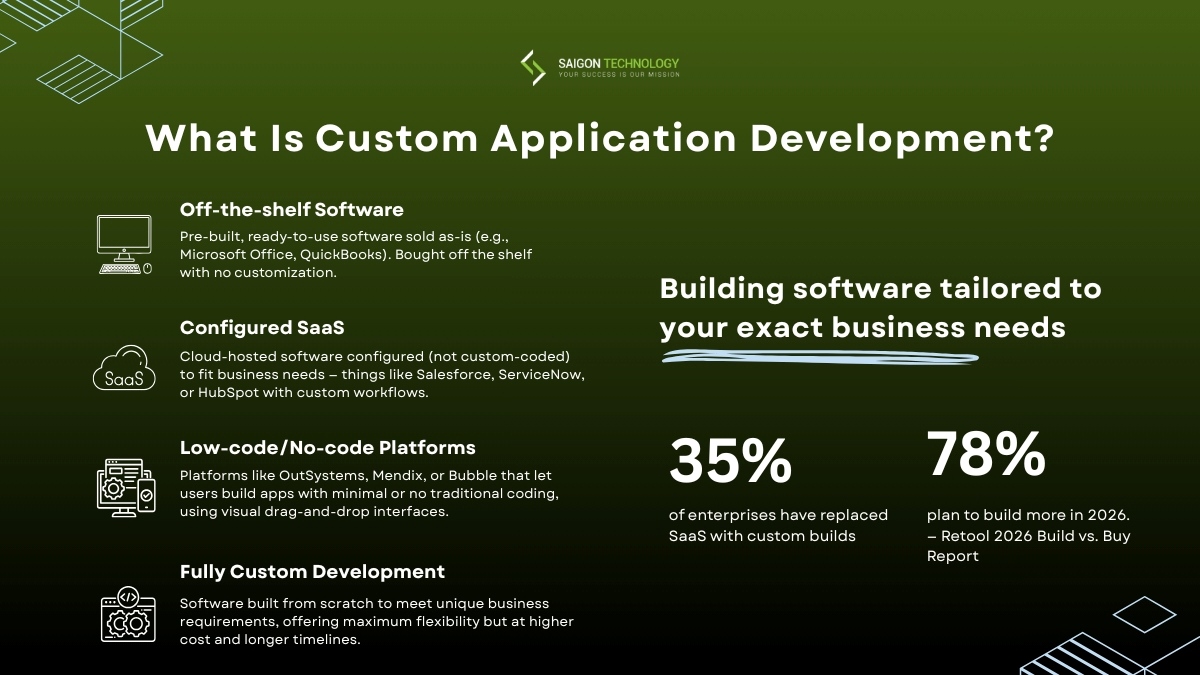
Source: Retool’s 2026 Build vs. Buy Report
“Custom” vs. “Customized” – The Difference Matters
There’s a meaningful difference between the two that trips up many decision-makers.
Configuring Salesforce with custom fields and workflows is customization; you’re working within the boundaries of an existing product. Building a purpose-built platform that handles your specific underwriting logic, connects to your proprietary data sources, and enforces your regulatory requirements – that’s custom app development. You own the architecture, not just the configuration.
The Build Spectrum
It helps to think of software options as a spectrum rather than a binary choice:
- Off-the-shelf products – Ready-made, broadly applicable, limited flexibility.
- Configured SaaS – You adapt a platform to your needs within its boundaries.
- Low-code and no-code platforms – Business users or citizen developers build applications using visual development environments without writing traditional code.
- Fully custom application development – Purpose-built, no constraints beyond your architecture decisions.
Who Typically Goes the Custom Route?
Three patterns show up consistently.
– Enterprises with complex workflows. No off-the-shelf product can handle their operations without painful workarounds, manual data exports, duplicate entry across systems, and elaborate automation chains to bridge tool gaps.
– Companies in regulated industries. Healthcare, financial services, and defense organizations need compliance requirements like GDPR or HIPAA built into the architecture rather than bolted on after the fact.
– Organizations that have outgrown their SaaS tools. When your team spends more time fighting tool limitations than getting work done, and workaround costs keep climbing, it’s often a signal that you’ve hit the ceiling of what configured software can do.
Understanding where your situation falls on this spectrum is the first real decision. Not every problem needs a custom solution, and not every organization is ready to maintain one.
When Custom App Development Makes Sense (and When It Doesn’t)
This is where most guides fall short. They list the benefits of a custom app without acknowledging that it’s not always the right answer. Here’s a more honest framework.
When Custom Application Development Is the Right Call
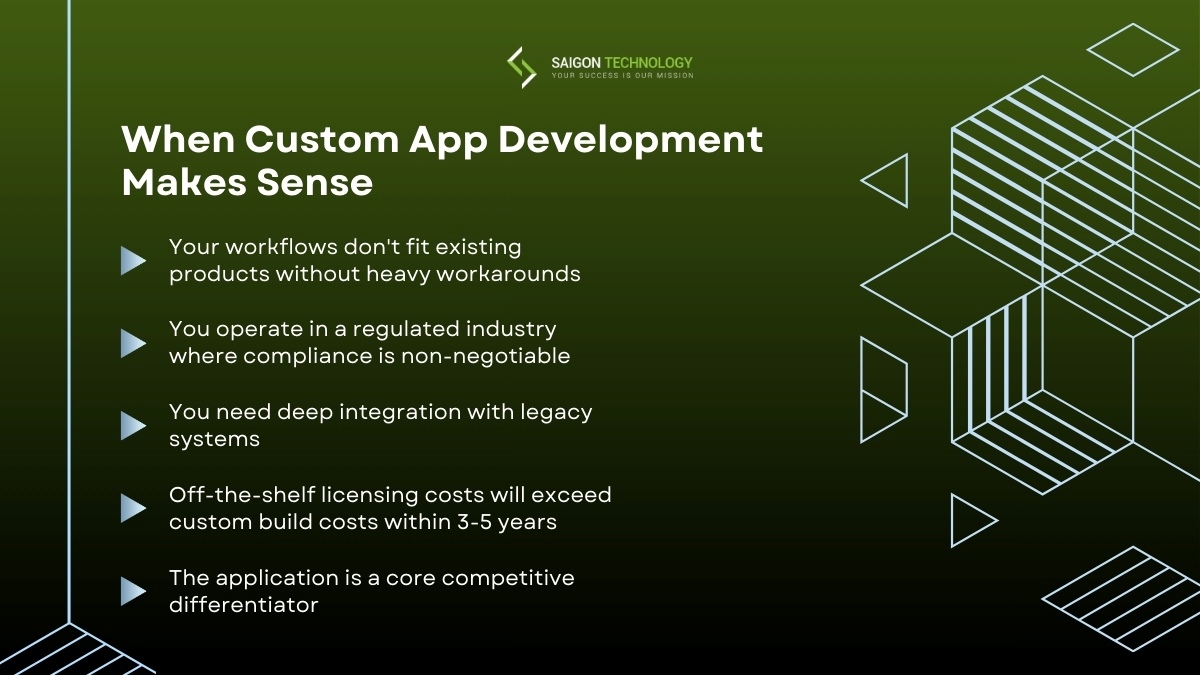
1. Your workflows don’t fit existing products without heavy workarounds
If your team spends significant time on manual processes because your software can’t handle the way you actually work, exporting data to spreadsheets, re-entering information across systems, building elaborate automation chains, that’s a signal. The cost of those workarounds compounds every month.
2. You operate in a regulated industry where compliance is non-negotiable
Healthcare organizations dealing with HIPAA, financial institutions navigating SOC 2 and PCI-DSS, or companies subject to GDPR can’t afford to hope their SaaS vendor handles compliance correctly. Custom business application development lets you build security and compliance into the system architecture from day one rather than layering it on top.
3. You need deep integration with legacy systems
Many enterprises run on ERP platforms, proprietary databases, or supply chain management software that predates modern API standards. When your existing systems are business-critical but weren’t designed to connect with modern tools, a custom application can serve as the integration layer that ties everything together.
4. Off-the-shelf licensing costs will exceed custom build costs within 3-5 years
This one requires honest math. Add up per-seat licensing, add-on fees, and the cost of workarounds. Compare that to the total cost of ownership for a custom build. For organizations with hundreds of users, the crossover point often comes sooner than expected.
5. The application is a core competitive differentiator
If the software you need is central to what makes your business different, your pricing engine, your logistics optimization, your customer experience, building it on the same platform your competitors use means you’re competing on execution alone, not capability.

When Off-the-Shelf Software Is the Smarter Choice
You need standard business functions
HR management, basic CRM, project management, and accounting are well-solved problems. Unless your requirements are genuinely unusual, existing products will serve you well at a fraction of the cost and timeline.
Your team is small and has no dedicated IT resources
Custom applications require ongoing maintenance. If you don’t have the internal capacity to manage updates, security patches, and bug fixes, or the budget to outsource that work, a SaaS product with built-in support is a more realistic path.
The problem is already well-solved by existing products
Before committing to a custom build, do thorough market research. You might find that a product you haven’t evaluated yet does 90% of what you need.
You need something running in weeks, not months
Custom app development takes time. Even an MVP typically requires 3-6 months. If you need a solution operational next month, start with an existing product and evaluate a custom application as a longer-term move.
Custom vs. Off-the-Shelf: Side-by-Side Comparison
| Factor | Custom Application | Off-the-Shelf Software |
| Time to launch | 3-12+ months | Days to weeks |
| Upfront cost | $30K-$750K+ | $0-$50K (licensing) |
| Ongoing cost | 15-25% of the build cost annually | Per-seat licensing (compounds) |
| Flexibility | Built to your exact needs | Limited to the vendor’s roadmap |
| Compliance control | Full control over architecture | Dependent on the vendor |
| Integration depth | Connects to any system | Limited to prebuilt connectors |
| Competitive advantage | Can be a differentiator | Same tool as competitors |
| Maintenance burden | Requires dedicated resources | Handled by the vendor |
Benefits of Custom Application Development for Enterprises
Most articles on this topic list the same vague benefits: “scalability,” “flexibility,” “efficiency.” Those words don’t help you make a business case. Here’s what the benefits actually look like in practice.
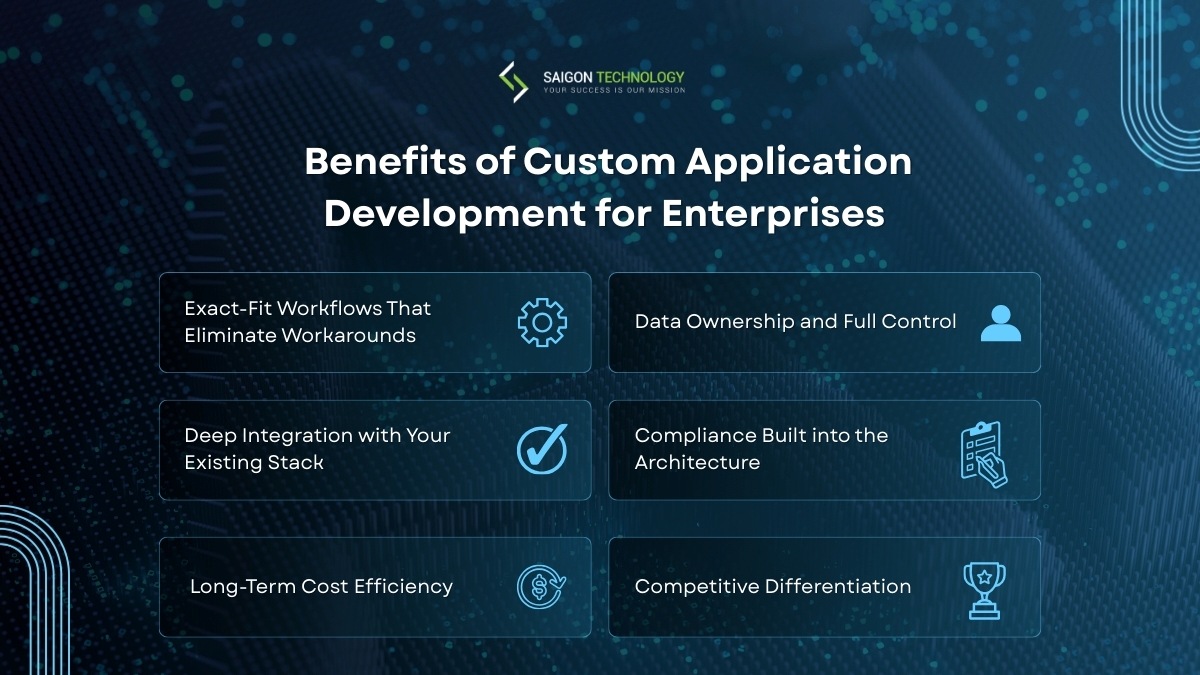
1. Exact-Fit Workflows That Eliminate Workarounds
When a logistics company builds a custom application to manage its dispatch operations, the system mirrors how dispatchers actually work, not how a generic project management tool assumes they work.
The difference shows up in minutes saved per task, fewer errors from manual data transfers, and processes that flow instead of stalling. Aligning technology with actual business processes means a team that works with the tool instead of around it.
2. Data Ownership and Full Control
With a custom application, you own the source code, the data, and the product roadmap. You’re not dependent on a vendor’s pricing decisions, feature prioritization, or sunset announcements.
When your SaaS provider decides to discontinue a feature you depend on or raises prices by 40%, you’re stuck. With your own application, you control the roadmap entirely.
3. Deep Integration with Your Existing Stack
Custom applications connect to your ERP, custom CRM, and legacy systems through a purpose-built integration strategy, not through middleware hacks or fragile third-party services that break when one system updates.
This means your data flows cleanly between systems, reducing the manual reconciliation work that bogs down operations teams.
4. Compliance Built into the Architecture
Building a healthcare platform? HIPAA requirements can be embedded in how data is stored, transmitted, and accessed, not retrofitted through configuration. The same applies to GDPR, SOC 2, or industry-specific regulations.
Security and compliance become architectural decisions rather than afterthoughts. This approach ensures user data protection is handled at the foundation level.
5. Long-Term Cost Efficiency
Consider a mid-size company with 500 employees using a SaaS tool at $50 per seat per month:
- SaaS cost: $300,000/year = $1.5 million over five years (with no ownership)
- Custom build: $150K-$250K to build + $30K-$50K/year in maintenance
- Custom 5-year total: ~$400K-$500K (with full ownership)
The math doesn’t always favor a custom app, but for larger teams, it often does. Understanding the total cost of ownership over a 3-5 year horizon is essential before deciding.
6. Competitive Differentiation
When your technology is the business advantage, not just a support tool, relying on the same platform your competitors use puts a ceiling on how far ahead you can get. Custom application development lets you encode your unique intellectual property, processes, and customer experience into software that competitors can’t replicate by signing up for the same subscription.
Custom Application Development in Practice: What Results Actually Look Like
The benefits above sound good in theory. Here’s what they look like when custom application development moves from concept to production, with real tech stacks, real timelines, and measurable outcomes from projects we’ve delivered.
Case Study 1: Fleet Management Platform
- Challenge: A vehicle leasing company serving Australia and New Zealand ran its operations on a prototype that still depended on manual processes and disconnected systems. Travel agencies, transport operators, and internal administrators each used separate tools for bookings, fleet tracking, and reporting. The result: delayed driver assignments, missed certification renewals, and hours lost to manual report preparation every week.
- What we built: A centralized B2B fleet management platform serving three distinct user roles through custom application development. The system unified real-time GPS tracking, crew management with automated certification expiry alerts, hotel and vehicle booking modules, geofence enforcement, encrypted payroll processing, and reporting with prebuilt templates supporting PDF and Excel export. Rather than bolting together off-the-shelf integrations, the architecture connected existing systems through an Enterprise Service Bus and RESTful APIs.
- Results: One platform replaced multiple disconnected tools across all three stakeholder groups. Managers gained real-time visibility into fleet locations and driver status. Automated alerts flagged speeding, geofence breaches, and expired certifications instantly, and prebuilt reporting templates cut report preparation time significantly.
Case Study 2: AxiaGram – HIPAA-Compliant Telemedicine Platform
- Challenge: A US-based healthcare organization coordinated remote consultations, clinical documentation, and chronic care management across disconnected systems. Care teams switched between separate tools for video calls, note-taking, and EHR (Electronic Health Record) updates, creating data silos and increasing HIPAA compliance risk across millions of patient records.
- What we built: A single HIPAA-compliant platform consolidating teleconsultation, AI-powered voice note-taking, secure internal messaging, Electronic Visit Verification (EVV) with geo-tagging and digital signatures, and full EHR integration. The application required purpose-built modules: voice AI that captures clinical notes hands-free during patient visits, real-time video streaming, and role-based access controls enforcing HIPAA requirements across every workflow.
- Results: Development time dropped by 40% through an offshore development center (ODC) model maintained since 2021. The platform now manages over 6 million medical records securely. AI-powered voice documentation eliminated manual note-taking during consultations, and EVV with geo-tagging created auditable records for every home visit, reducing compliance risk while improving care team efficiency.
What We’ve Learned Across 800+ Projects
After delivering custom applications for over 14 years, certain patterns keep showing up in our project data.
The #1 cause of budget overruns isn’t technical complexity – it’s unclear requirements. Projects that skipped the discovery phase consistently cost more than those with full discovery, including interviews and workshops, wireframes, and stakeholder alignment.
Most requested tech stack in 2025–2026: React + Node.js + PostgreSQL on AWS (40% of new projects), followed by .NET Core + Azure (25%). Spring Boot with Kafka and PostgreSQL lead for complex enterprise platforms.
Average kickoff-to-MVP: 4–5 months for internal tools, 6–8 months for customer-facing platforms with compliance requirements.
Client retention for post-launch support: 82% continue with ongoing maintenance contracts after year one.
These numbers come from our own delivery data across 300+ clients, not generic industry ranges.
The Real Cost of Custom Application Development
Cost is typically the first question decision-makers ask, and most answers are unhelpfully vague. A range of “$10K to $500K+” tells you almost nothing. Here’s a more specific breakdown.
Key Takeaway: The build cost is only the beginning. Always calculate the 5-year total cost of ownership, including hosting, maintenance, and feature updates, before comparing custom vs. SaaS.
What Drives Cost
Application complexity and scope. The number of user roles, data models, integrations, and business logic rules directly impacts development time and cost. A single-purpose internal tool with five screens is fundamentally different from a customer-facing platform with role-based access, real-time dashboards, and connections to a dozen external systems.
Platform requirements. Web-only is the simplest. Add a native mobile app (iOS and Android), and you’re roughly doubling the front-end work, though cross-platform tools like React Native or Flutter can reduce this. Responsive design for the web can cover many mobile use cases without a separate app.
Team size and location. A senior developer in the U.S. bills $100–$180/hour. A mid-level developer in Eastern Europe bills $31–$76/hour, and in Asia, $24–$41/hour (Accelerance, 2026 Global Software Development Rates & Trends Guide). The savings are real, but factor in communication overhead, timezone gaps, and the need for stronger quality control with distributed teams.
Security and compliance requirements. Applications handling sensitive data — healthcare records, financial transactions, personal information – need additional security layers, encryption, audit trails, and compliance documentation. These add 15-30% to development costs but aren’t optional in regulated industries.
Third-party integrations. Each integration with an external system (payment processors, CRMs, ERPs, analytics platforms) adds complexity. Some systems have well-documented APIs. Others require custom middleware. The difference between integrating with Stripe and integrating with a 15-year-old ERP system is significant.
Realistic Cost Ranges by Project Type
| Project Type | Typical Cost Range | Development Timeframe | Examples |
| Internal tool or workflow app | $30K – $80K | 2-4 months | Employee portal, approval workflows, reporting dashboards |
| Customer-facing portal | $75K – $200K | 4-8 months | Client dashboards, self-service platforms, and booking systems |
| Complex enterprise platform | $200K – $750K+ | 6-18 months | Multi-tenant SaaS products, supply chain management software, and trading platforms |
These ranges assume a mid-to-senior development team with relevant expertise. Offshore teams may cost 40-60% less, but factor in communication overhead and QA implications.
Total Cost of Ownership: What Most Guides Skip
The build cost is just the beginning. To make an honest comparison with SaaS alternatives, you need to account for what happens after launch:
- Hosting and infrastructure typically run 15-25% of the initial build cost annually, depending on the hosting environment and usage patterns. A $200K application might cost $30K-$50K per year to host and operate.
- Ongoing maintenance and bug fixes add another 15-20% annually. This covers security patches, performance monitoring, bug fixes, compatibility updates when browsers or operating systems change, and general upkeep.
- Feature updates and iterations are where most of the post-launch value is created. Budget for continuous improvement based on user feedback, the application gets better over time, which is one of the key advantages of owning your software.
- Security and compliance audits are annual costs for regulated industries. Data backups, disaster recovery plans, and data recovery processes need regular testing.
- The 3-year and 5-year view matters. A custom application that costs $200K to build might have a 5-year TCO of $500K-$600K, including all maintenance and infrastructure. A SaaS alternative at $100K per year totals $500K over the same period, but you own nothing at the end, and the vendor can change pricing or features at any time.
How Custom Applications Are Built: The Development Process
If you’re commissioning a custom application for the first time, the process can feel opaque. Here’s what to expect at each stage, from a client’s perspective rather than a developer’s.
Key Takeaway: A well-run custom development project follows six phases: discovery, architecture, development, testing, deployment, and post-launch optimization. The discovery phase is where projects either get set up for success or start accumulating problems.
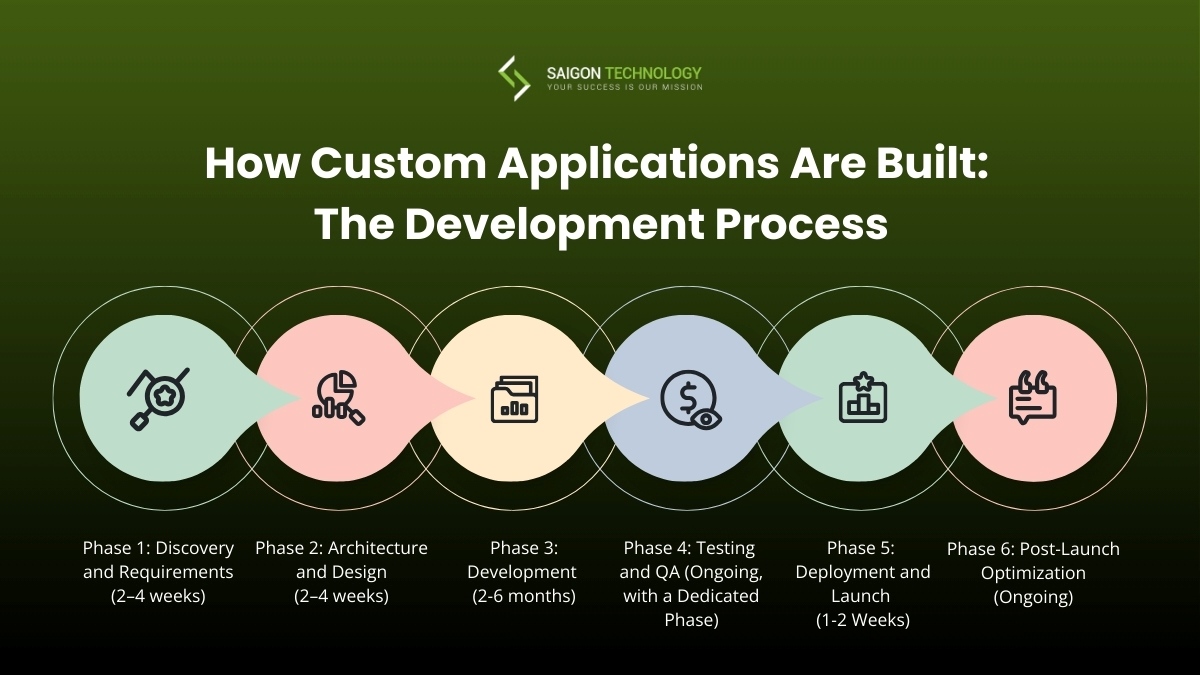
Phase 1: Discovery and Requirements
Timeline: 2–4 weeks
The discovery phase is where the project either gets set up for success or starts accumulating problems. A good development team will run interviews and workshops with your key stakeholders to understand:
- Your business processes
- User requirements and expectations
- The problems you’re trying to solve
Expect to invest meaningful time from your side; this isn’t something to delegate entirely.
What you should receive at the end of this phase:
- Documented project requirements
- User flow diagrams showing how different roles interact with the system
- A clear project plan with prioritized features
Thorough stakeholder alignment at this stage prevents expensive misunderstandings later.
Phase 2: Architecture and Design
Timeline: 2–4 weeks
This is where the technical foundation gets laid.
Technology decisions. The team selects the tech stack, programming languages, frameworks, databases, and cloud infrastructure based on your project’s specific needs, not their default preferences.
Key architecture decisions include:
- System architecture approach (monolith vs. microservices – monoliths are simpler and faster for most initial builds)
- Platform selection for hosting
- Integration strategy for connecting with existing systems
These are decisions you should understand, even if you don’t make them yourself.
Design work. Expect wireframes first (structural layouts without visual design), then interactive mockups that show how the application will actually look and feel. Good teams build a prototype or clickable mockup before writing production code so you can validate the concept with real users.
MVP scope. This phase also defines the minimum viable product, the smallest version of the application that delivers real business value. A well-defined MVP is your best defense against scope creep.
Phase 3: Development
Timeline: 2–6 months
Most teams today follow agile methodologies, delivering working software in two-week sprints. Each sprint produces something you can see, test, and give feedback on.
Your role as a stakeholder: Stay engaged without micromanaging. Review what’s delivered each sprint. Flag issues early. Trust the development methodology but verify progress against milestones.
What good looks like behind the scenes:
- Modular, reusable code through a component-based architecture
- Regular code reviews
- Engineering standards that keep the codebase maintainable
- Visual development tools for admin interfaces to accelerate delivery
“Done” at each milestone means working functionality that’s been tested, reviewed, and demonstrated, not just code that compiles.
Phase 4: Testing and Quality Assurance
Timeline: Ongoing throughout development, with a dedicated phase before launch
Quality assurance isn’t something you bolt on at the end. It should happen throughout development, with a dedicated testing phase before launch.
Types of testing that matter:
| Type | What it covers |
| Functional testing | Verifies the application does what it’s supposed to |
| Integration testing | Confirms that different components and third-party services work together |
| Unit testing | Validates individual components in isolation |
| Non-functional testing | Performance under load, security vulnerability scanning, and accessibility compliance |
| Platform testing | Cross-browser and cross-device compatibility |
User acceptance testing (UAT) is where your actual end users try the application in realistic scenarios. This is non-negotiable. Issues caught here cost a fraction of what they’d cost to fix after deployment.
A solid testing strategy, with automated testing processes, clear test cases, and bug tracking systems, makes the difference between a smooth launch and a painful one.
The cost of skipping thorough testing? Plan on 5-10x the expense to fix issues in production that could have been caught earlier (IBM Systems Sciences Institute).
Phase 5: Deployment and Launch
Timeline: 1–2 weeks
Deployment involves moving the application from the development environment to production. Two approaches:
- Phased rollout – Launch to a small group first, then expand. For enterprise applications, this is almost always smarter. It limits the blast radius if something goes wrong.
- Full launch – Everyone gets access at once.
This phase also includes:
- Data migration from existing systems
- User training and documentation
- Post-deployment monitoring setup
If you’re replacing an existing tool, plan for a transition period where both systems run in parallel.
Phase 6: Post-Launch Optimization
Timeline: Ongoing
This is where the real value gets created, and where too many organizations drop the ball. Post-launch support isn’t optional.
What to put in place:
- Performance monitoring to catch issues before users report them
- A feedback process for collecting and prioritizing user input
- Regular iteration cycles, monthly or quarterly feature updates based on real usage data
- Maintenance budget for ongoing security patches and infrastructure upkeep
An application without ongoing investment is a depreciating asset. One with continuous improvement becomes more valuable every quarter.
How to Choose the Right Development Partner
Selecting the right vendor or partner is one of the highest-leverage decisions in the entire process.
Key Takeaway: The best indicator of a reliable partner is long-term client satisfaction. Ask for references from clients who launched 12+ months ago. Anyone can deliver a project, but few maintain quality relationships and working software over time.
1. Portfolio relevance
Have they built something similar in your industry? A team that’s built healthcare platforms understands HIPAA. A team that’s built fintech products understands transaction processing at scale. Industry experience reduces the learning curve you’re paying for.
2. Technical expertise
Do they have deep knowledge of the technologies chosen for your project, or are they generalists who’ll figure it out as they go? Ask specific questions about their experience with your required tech stack and any AI-powered development platforms they use to accelerate delivery.
3. Communication and process
- How do they handle scope changes?
- What’s their escalation path when something goes wrong?
- How often will you receive updates?
The best technical team in the world is useless if you can’t communicate with them effectively.
4. Team structure
Will you have a dedicated team, or will your project share resources with other clients? Shared resources mean competing priorities. A dedicated team costs more but delivers faster and with fewer context-switching delays.
5. IP ownership
Who owns the code when the project ends? This should be unambiguous and in your contract. You’re paying for a custom app; you should own the result.
6. Post-launch support
- Do they offer maintenance contracts?
- How do they handle bug fixes and feature updates after the initial project closes?
- What are their SLAs for critical issues?
Here’s a practical tip that separates experienced buyers from first-timers: ask for references from clients who launched 12 or more months ago. Anyone can deliver a project. The question is whether the application still works well, the relationship is still functional, and the total cost stayed within reasonable bounds.
Common Mistakes That Derail Custom App Projects
These aren’t theoretical risks. They’re patterns that show up repeatedly in projects that go off track.
Key Takeaway: The five most damaging mistakes, skipping discovery, no MVP scope, misaligned stakeholders, choosing the lowest bid, and ignoring post-launch maintenance, are all preventable with upfront planning.
1. Starting Without a Clear MVP Scope
Trying to build everything at once is the single most common cause of budget overruns and failed projects. Define the minimum viable product that delivers real business value, launch it, learn from actual usage, then iterate.
Build your product roadmap in phases. Phase one is the MVP. Everything else goes on the backlog with clear prioritization.
2. Skipping Discovery to Save Money
When organizations cut the discovery phase to reduce upfront costs, they pay for it many times over during development. It costs 5-10x more to fix in code what could have been caught during requirements gathering.
The discovery phase typically costs 5-10% of the total project budget. Skipping it to save that 5-10% regularly results in 30-50% cost overruns.
3. No Stakeholder Alignment
When the CEO wants a customer-facing platform, the CTO wants a modern architecture showcase, and the end users need something that simplifies their daily work, the project fails politically even if the code is solid.
Stakeholder alignment on goals, priorities, and success metrics must happen before development begins.
4. Choosing a Partner Based on Lowest Bid
The lowest bid typically means one of three things:
- The team underestimated the scope – you’ll pay the difference in change orders.
- The team plans to use junior developers – you’ll pay the difference in rework.
- The team is cutting corners on testing – you’ll pay the difference in technical debt.
Evaluate value, not just price. A team that costs 30% more but delivers a maintainable, well-tested application is cheaper in the long run.
5. Ignoring Post-Launch Maintenance
An application without ongoing maintenance is a depreciating asset:
- Security vulnerabilities go unpatched
- Performance degrades as data volumes grow
- Users accumulate frustrations that never get addressed
- Browser and OS updates break functionality
Budget for ongoing maintenance from day one. It’s not an optional add-on; it’s part of the cost of owning software.
FAQs
What is custom application development?
Custom application development is the process of building software specifically for one organization’s unique needs, workflows, and goals. Unlike off-the-shelf products designed for broad markets, a custom application is designed and coded to fit how your business actually operates, integrating with your existing systems and scaling according to your requirements.
How much does custom app development cost?
Costs range from $30,000 for a straightforward internal tool to $750,000 or more for a complex enterprise platform. The primary cost drivers are application complexity, platform requirements (web, mobile, or both), team location and seniority, and security and compliance requirements. Budget an additional 15-25% of the build cost annually for hosting, maintenance, and ongoing improvements.
How long does it take to build a custom application?
A focused MVP typically takes 3-6 months from discovery through launch. More complex enterprise platforms can take 12-18 months. The development timeframe depends on scope, team size, integration requirements, and how quickly your organization can make decisions and provide feedback during the process.
When should a company invest in a custom application instead of buying a SaaS product?
Consider a custom app when:
- Your workflows are too specific for generic tools
- You’re in a regulated industry requiring built-in compliance
- Your SaaS licensing costs will exceed custom build costs within 3-5 years
- The application represents a competitive advantage
Stick with SaaS for standard business functions, small teams, or when you need a solution immediately.
What technologies are used in custom application development?
The tech stack depends on the project. Common choices include:
- Front-end: React or Angular
- Back-end: Node.js, Python, or Java
- Databases: PostgreSQL or MongoDB
- Cloud: AWS, Azure, or Google Cloud
- Mobile: React Native or Flutter (cross-platform), Swift/Kotlin (native)
The right choice depends on your specific requirements, not current trends.
How do you measure ROI on a custom application?
Track three categories:
- Cost savings – Reduced licensing fees, eliminated manual processes, and fewer errors
- Revenue impact – Faster time-to-market, improved customer experience, new capabilities
- Productivity gains – Time saved per user per day, multiplied across your team
Establish baseline metrics before launch, so you have a clear comparison point. Most organizations see positive ROI within 18-24 months for well-scoped projects.
What should I look for in a custom app development partner?
Prioritize relevant industry experience, technical expertise in your required stack, clear communication processes, transparent IP ownership terms, and strong post-launch support options.
Ask for references from clients who launched 12 or more months ago – long-term success matters more than initial delivery. For a deeper dive, see our guide on how to choose the right custom development company.
Your Next Step: A Decision Checklist Before You Build
Building a custom application is a significant investment, but when the conditions are right, it’s one of the highest-ROI decisions a company can make. The key is knowing whether your situation genuinely calls for a custom app and having the right information to manage the process effectively.
Before you commit to a custom build, walk through these five questions with your stakeholders:
-
Have you documented the specific workflows that existing tools can’t handle? Vague frustration isn’t enough. Write down the exact processes, the manual steps, and the time cost of each workaround. This becomes your requirements foundation.
-
Do you have a realistic budget range based on the project type? Use the cost tables in this guide as a starting point. If your budget is under $30K, you’re likely looking at a low-code solution or phased MVP, not a full custom build.
-
Can you commit a product owner or decision-maker to the project for 3-6 months? Custom applications require ongoing stakeholder input. If your leadership team can’t allocate time for weekly reviews, the project will stall.
-
Have you calculated the 5-year TCO comparison? Add up your current SaaS licensing, workaround labor costs, and integration maintenance. Compare that to the custom build cost plus 20% annual maintenance. If custom is cheaper over 5 years AND solves problems SaaS can’t, you have a business case.
-
Do you have internal capacity to maintain the application after launch, or budget to outsource it? A custom application without a maintenance plan is a liability, not an asset. Plan for 15-25% of the build cost annually.
If you answered “yes” to at least four of these, you’re in a strong position to move forward with a custom application. The next step is a structured discovery engagement with a qualified development partner to validate scope, timeline, and architecture.
Need a second opinion? Saigon Technology offers a no-commitment discovery consultation to help you evaluate whether building makes sense for your specific situation, scope, timeline, and trade-offs included.


Related articles
The Upsides of Custom App UX/UI Design in Business
 Thanh (Bruce) Pham - CEO of Saigon Technology
  13 Jun 2024
8 Tips to Choose the Right Custom Software Development Company
12 Jun 2024 
Top 6 Programming Languages for Custom Software Development
12 Jun 2024 
No-Code vs Purpose-Built Software: A Decision Framework for Startup Founders
12 Mar 2026 
Build vs Buy Software: How to Make the Right Decision for Your Business
25 Mar 2026 
Custom Software vs Off-the-Shelf Solutions: A Side-by-Side Evaluation Framework
26 Mar 2026 
When Should You Rebuild vs. Refactor? A Scoring Guide for Engineering Leaders
31 Mar 2026 
ERP Software Development: A 2026 Guide for Decision-Makers
19 May 2026